cancel
Showing results for 
Search instead for 
Did you mean: 

The Power BI Data Visualization World Championships is back! Get ahead of the game and start preparing now! Learn more

Reply
iGi
Advocate I
Advocate I

"Value" field defaulting to "Sum" instead of "Count"

Hello, 


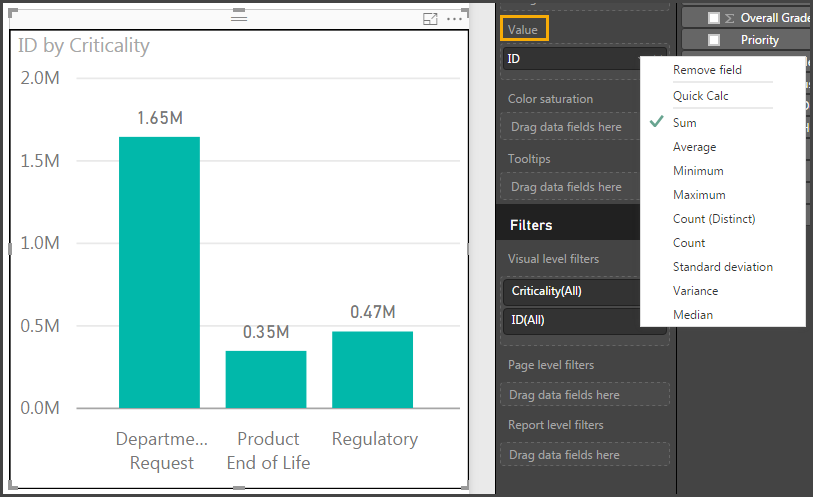
Ever since around the beginning of the year, what's been happening is that the Value field appears to be defaulting to Sum rather than Count, as it used to. 


The default looks like this and requires two extra clicks for each visual: 

PowerBI Value Field Default.png


I'm absolutely certain that I didn't need to change the Value field before. Can anyone else confirm? 

1 ACCEPTED SOLUTION
v-haibl-msft
Microsoft Employee
Microsoft Employee

@iGi


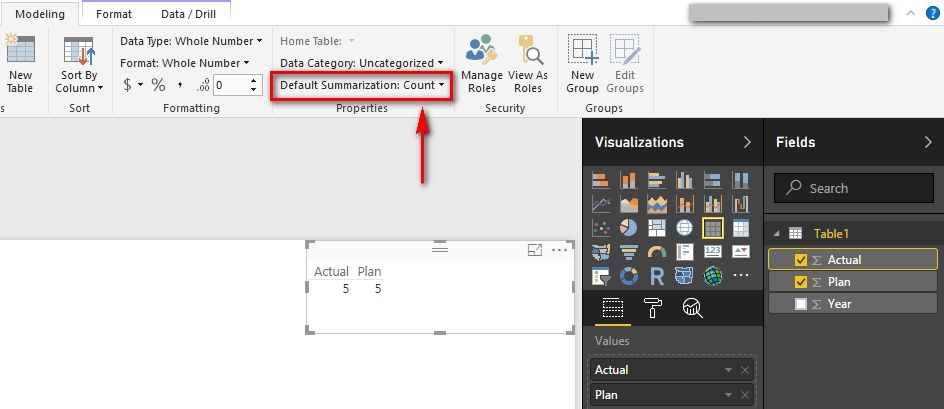
Please try to change the default summarization in the Modeling tab of Power BI Desktop.


Value field defaulting to Sum instead of Count_1.jpg 


Best Regards,

Herbert

View solution in original post

5 REPLIES 5
v-haibl-msft
Microsoft Employee
Microsoft Employee

@iGi


Please try to change the default summarization in the Modeling tab of Power BI Desktop.


Value field defaulting to Sum instead of Count_1.jpg 


Best Regards,

Herbert

That did the trick. Thank you very much. Is there any way to set is as the default globally so that it applies each time I open PowerBI?

Greg_Deckler
Community Champion
Community Champion

Edit your query and specifically set the column to Text in your query. Or, you can go into your data model and change the type to Text there. Or, are you doing this all in the service? One final way would be to put something that is obvioulsy text as a row in that table like "a" instead of a number and that will force it to text.


Follow on LinkedIn
@ me in replies or I'll lose your thread!!!
Instead of a Kudo, please vote for this idea
Become an expert!: Enterprise DNA
External Tools: MSHGQM
YouTube Channel!: Microsoft Hates Greg
Latest book!:
DAX For Humans

DAX is easy, CALCULATE makes DAX hard...
iGi
Advocate I
Advocate I

Thanks @Greg_Deckler. I'm importing from an Excel document in this scenario where the ID column is just set to "general" (each ID is a number). I've changed that to a simple "number" format in Excel, imported anew and still get Sum as the default. 


Any other ideas? Maybe I missed something. 

Greg_Deckler
Community Champion
Community Champion

In my experience, Text fields default to Count, numeric fields default to Sum.


Follow on LinkedIn
@ me in replies or I'll lose your thread!!!
Instead of a Kudo, please vote for this idea
Become an expert!: Enterprise DNA
External Tools: MSHGQM
YouTube Channel!: Microsoft Hates Greg
Latest book!:
DAX For Humans

DAX is easy, CALCULATE makes DAX hard...

Helpful resources

Announcements
Power BI DataViz World Championships

Power BI Dataviz World Championships

The Power BI Data Visualization World Championships is back! Get ahead of the game and start preparing now!

December 2025 Power BI Update Carousel

Power BI Monthly Update - December 2025

Check out the December 2025 Power BI Holiday Recap!

FabCon Atlanta 2026 carousel

FabCon Atlanta 2026

Join us at FabCon Atlanta, March 16-20, for the ultimate Fabric, Power BI, AI and SQL community-led event. Save $200 with code FABCOMM.