FabCon is coming to Atlanta
Join us at FabCon Atlanta from March 16 - 20, 2026, for the ultimate Fabric, Power BI, AI and SQL community-led event. Save $200 with code FABCOMM.
Register now!- Power BI forums
- Get Help with Power BI
- Desktop
- Service
- Report Server
- Power Query
- Mobile Apps
- Developer
- DAX Commands and Tips
- Custom Visuals Development Discussion
- Health and Life Sciences
- Power BI Spanish forums
- Translated Spanish Desktop
- Training and Consulting
- Instructor Led Training
- Dashboard in a Day for Women, by Women
- Galleries
- Data Stories Gallery
- Themes Gallery
- Contests Gallery
- QuickViz Gallery
- Quick Measures Gallery
- Visual Calculations Gallery
- Notebook Gallery
- Translytical Task Flow Gallery
- TMDL Gallery
- R Script Showcase
- Webinars and Video Gallery
- Ideas
- Custom Visuals Ideas (read-only)
- Issues
- Issues
- Events
- Upcoming Events
Get Fabric Certified for FREE during Fabric Data Days. Don't miss your chance! Request now
- Power BI forums
- Forums
- Get Help with Power BI
- Desktop
- Re: "Cumulative" count - only active contracts
- Subscribe to RSS Feed
- Mark Topic as New
- Mark Topic as Read
- Float this Topic for Current User
- Bookmark
- Subscribe
- Printer Friendly Page


- Mark as New
- Bookmark
- Subscribe
- Mute
- Subscribe to RSS Feed
- Permalink
- Report Inappropriate Content
"Cumulative" count - only active contracts
Hi!
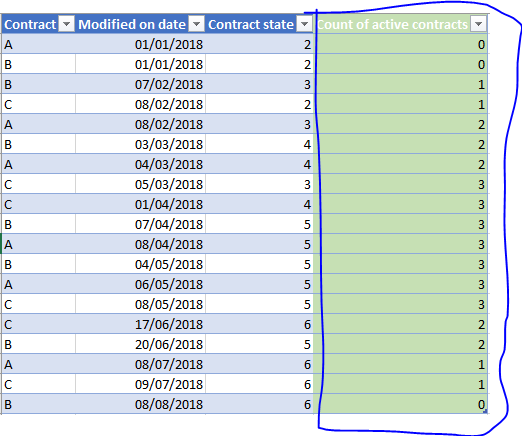
I'm trying to figure out how our active contracts have changed through time, however I can't get the dax correct. Basically I want to count all contracts that are in contract states 3, 4 or 5 at a specific date (modified on). I've achieved the cumulative count, but my measure keeps taking into account contracts that are also in state 6 at the given date, which is not what I want.
Here is an example in Excel of what I'm looking to achieve. (ERROR ALERT: both rows with the date 08/02/2018 should have active contracts as 2 since Contract A became active at that same date). A measure instead of a column would be preferable. Thanks!
Solved! Go to Solution.
- Mark as New
- Bookmark
- Subscribe
- Mute
- Subscribe to RSS Feed
- Permalink
- Report Inappropriate Content
For all those interested, I solved this on my own by the following three measures.
Contracts = CALCULATE(DISTINCTCOUNT(Contract[Contract.id]),
FILTER(Contract, Contract[Document.ContractState] <> "2")
Ended Contracts = CALCULATE(DISTINCTCOUNT(Contract[Contract.id]),
FILTER(Contract, Contract[Document.ContractState] = "6")
Fleet (running total) = CALCULATE([Contracts]-[Ended Contracts],
FILTER(ALLSELECTED(Contract), Contract[Modified On Date]<= MAX(Contract[Modified On Date])))


- Mark as New
- Bookmark
- Subscribe
- Mute
- Subscribe to RSS Feed
- Permalink
- Report Inappropriate Content
- Mark as New
- Bookmark
- Subscribe
- Mute
- Subscribe to RSS Feed
- Permalink
- Report Inappropriate Content
Sure!
Basically, if the contract is (up to that date) in contract state 3, 4 or 5, it is counted as active. However, if it is only in state 2 or has already gone to state 6 (up to that date), it should not be counted. Does this help?
- Mark as New
- Bookmark
- Subscribe
- Mute
- Subscribe to RSS Feed
- Permalink
- Report Inappropriate Content

- Mark as New
- Bookmark
- Subscribe
- Mute
- Subscribe to RSS Feed
- Permalink
- Report Inappropriate Content
Thanks for looking at the problem!
Contract A becomes active on 08/02/2018 and increases the count of active contracts to two.
Contract B is already active as of 07/02/2018 and a change to status 4 on 03/03/2018 does not change the count of active contracts.
Same applies on 04/03/2018 with A as did with B on 03/03/2018.
3, 4 and 5 are all in the state "active". Just a different kind of active.
These are only a few columns of the data, therefore there are multiple "duplicates" in the actual dataset (such as 17/06/2018 and 09/07/2018) because values of oher columns in the dataset change (but those are not relevant here), but I thought it might be good to know when solving the problem.
- Mark as New
- Bookmark
- Subscribe
- Mute
- Subscribe to RSS Feed
- Permalink
- Report Inappropriate Content
So you want the cumulative values per contract.
Try the following DAX formula. Create a new MEASURE
Cumulative_Actual =
CALCULATE (
        COUNT ( Table[Contract] ),
        FILTER (
            ALLEXCEPT( 'Table', Table[Contract]),
            Table[Modified on date] <= MAX ( Table[Modified on date] )
			&& (Table[Contract state] <> 2 || Table[Contract state] <> 6)
        )
    )
- Mark as New
- Bookmark
- Subscribe
- Mute
- Subscribe to RSS Feed
- Permalink
- Report Inappropriate Content
Thanks for trying, but still not the right outcome. I already had something very similar. Here's what I have done
Contracts = CALCULATE(DISTINCTCOUNT(Contract[Contract.id]), FILTER(Contract, Contract[Document.ContractState] = "3" || Contract[Document.ContractState] = "4" ||Contract[Document.ContractState] = "5"))
Fleet (running total) = CALCULATE(Contract[Contracts], FILTER(ALLSELECTED(Contract), Contract[Modified On Date]<= MAX(Contract[Modified On Date])))
The problem is that this kind of dax is also taking into account the already ended contracts (state 6), which should be excluded. I don't think "cumulative" is right word for what I'm looking for, as that means the count is always rising.. I want a time series count of contracts, meaning the total can also decrease in time, as the example did.
- Mark as New
- Bookmark
- Subscribe
- Mute
- Subscribe to RSS Feed
- Permalink
- Report Inappropriate Content
For all those interested, I solved this on my own by the following three measures.
Contracts = CALCULATE(DISTINCTCOUNT(Contract[Contract.id]),
FILTER(Contract, Contract[Document.ContractState] <> "2")
Ended Contracts = CALCULATE(DISTINCTCOUNT(Contract[Contract.id]),
FILTER(Contract, Contract[Document.ContractState] = "6")
Fleet (running total) = CALCULATE([Contracts]-[Ended Contracts],
FILTER(ALLSELECTED(Contract), Contract[Modified On Date]<= MAX(Contract[Modified On Date])))

- Mark as New
- Bookmark
- Subscribe
- Mute
- Subscribe to RSS Feed
- Permalink
- Report Inappropriate Content
Hello
I have a similar problem and that was really helpful, thanks! 😁
I still have an issue, because these measures don't take into account the contracts that have been activated again (example, going from stage 6 to stage 3 again) and I also have to deal with changes being made in the same day so I'll need to find a way to insert the contract version number or the time somewhere 😅 but this was already a great help 😁
- Mark as New
- Bookmark
- Subscribe
- Mute
- Subscribe to RSS Feed
- Permalink
- Report Inappropriate Content
BTW I just noticed a error in my example data. Both rows witht he date 08/02/2018 should have active contracts as 2 since A became active at that same date, sorry!

Helpful resources

Power BI Monthly Update - November 2025
Check out the November 2025 Power BI update to learn about new features.

Fabric Data Days
Advance your Data & AI career with 50 days of live learning, contests, hands-on challenges, study groups & certifications and more!

FabCon Atlanta 2026
Join us at FabCon Atlanta, March 16-20, for the ultimate Fabric, Power BI, AI and SQL community-led event. Save $200 with code FABCOMM.


