cancel
Showing results for 
Search instead for 
Did you mean: 

Get Fabric Certified for FREE during Fabric Data Days. Don't miss your chance! Request now

Reply
Anonymous
Not applicable

"Count if" based on another tables column value

Hi!


I'm quite newbie to PowerBI/PowerPivot/DAX syntax, so I'm sorry if I'm asking for help with a trivial task... that said, let me try to explain the problem I'm facing:
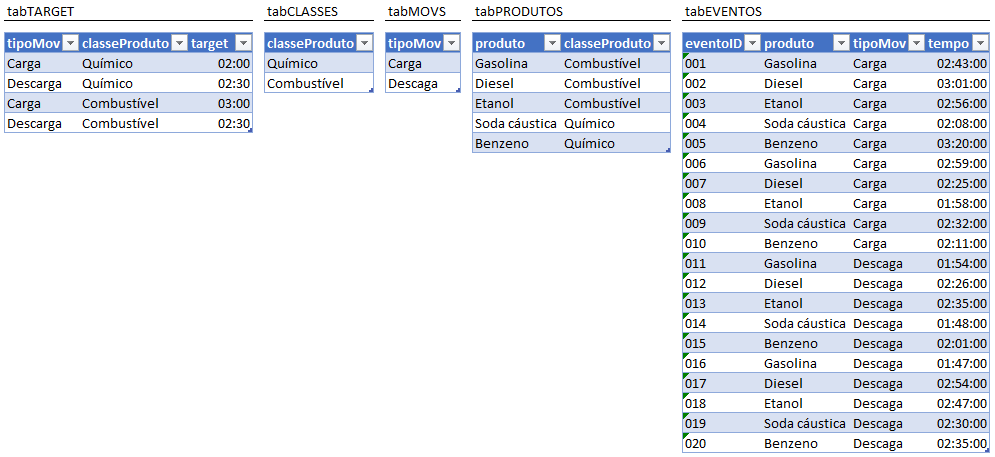
I have the following tables with the respective columns:

GabrielPires_1-1595265161543.png


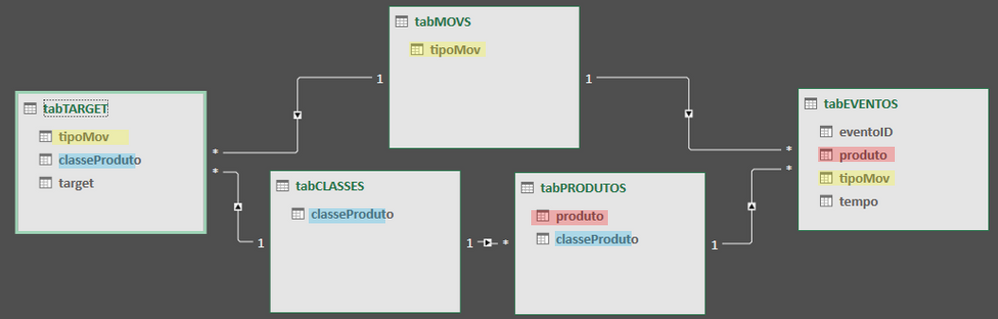
and I need to calculate how many occurrences in "tabEVENTOS" table have "tempo" equal to or less than the "target" (from "tabTARGET" table), based on "tipoMov" and "produto" columns. Here is a diagram of the relationship between the tables:

GabrielPires_2-1595266050797.png


I don't even know where to start solving. I "googled" for more than two hours but I didn't find anything that could clearly help me ... Of course, I found some complex solutions, but none that seemed to be best practices ... Please, can someone help me?


thanks in advance!

1 ACCEPTED SOLUTION
Anonymous
Not applicable

I've found a way to achieve it... But I don't know if its the best way to do It...


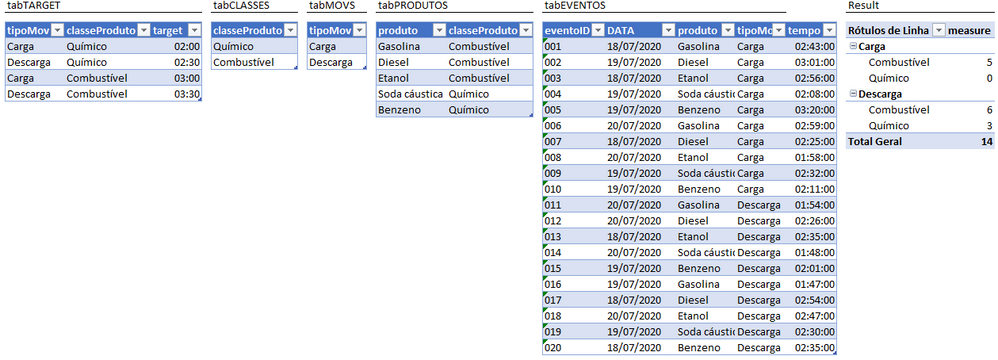
measure=SUMX(tabEVENTOS; (CALCULATE( MAX(tabTARGET[target]); FILTER(tabTARGET; tabEVENTOS[tipoMov]=tabTARGET[tipoMov]); FILTER(tabTARGET; RELATED(tabPRODUTOS[classeProduto])=tabTARGET[classeProduto]) )>=tabEVENTOS[tempo])*1)


image.png


By the way, I apologise about my problem explanation... I think it wasn't clear enough.

View solution in original post

4 REPLIES 4
amitchandak
Super User
Super User

@Anonymous ,

the best I can get

countx(filter(summarize(tabEVENTOS, tabMOVS[tabMOV], tabCLASSES[classProduto],"_1"sum(tabEVENTOS[tempo]),"_2",sum(table[target])),[_1]<[_2]),[tabMOV])

Share with Power BI Enthusiasts: Full Power BI Video (20 Hours) YouTube
Microsoft Fabric Series 60+ Videos YouTube
Microsoft Fabric Hindi End to End YouTube
Anonymous
Not applicable

I've found a way to achieve it... But I don't know if its the best way to do It...


measure=SUMX(tabEVENTOS; (CALCULATE( MAX(tabTARGET[target]); FILTER(tabTARGET; tabEVENTOS[tipoMov]=tabTARGET[tipoMov]); FILTER(tabTARGET; RELATED(tabPRODUTOS[classeProduto])=tabTARGET[classeProduto]) )>=tabEVENTOS[tempo])*1)


image.png


By the way, I apologise about my problem explanation... I think it wasn't clear enough.

Hi @Anonymous ,


So, have the issue been resolved? If Yes, you may accept the right reply as solution, that way, other community members would benefit from the solution.


Best Regards,

Amy

Anonymous
Not applicable

@amitchandak, thanks for responding!


So, that "string" should be used as a Measure. Right? And should it count how many events were less (or equal) than "target" depending on its "classeProduto" and "tipoMov" as result? And if I "slice" my data by "produto" (for example) that measure should show me the count o ocurrences only on thar category?

I'm asking this because it didn't work... so I'm trying to figure out how to make it work and that is the result I'm looking for.
Wouldn't be easier to calculate a column wich returns 1 or 0 wether my "tempo" clumn satisfy that "<='target' " condition and than sum it?


thanks in advance!

Helpful resources

Announcements
November Power BI Update Carousel

Power BI Monthly Update - November 2025

Check out the November 2025 Power BI update to learn about new features.

Fabric Data Days Carousel

Fabric Data Days

Advance your Data & AI career with 50 days of live learning, contests, hands-on challenges, study groups & certifications and more!

FabCon Atlanta 2026 carousel

FabCon Atlanta 2026

Join us at FabCon Atlanta, March 16-20, for the ultimate Fabric, Power BI, AI and SQL community-led event. Save $200 with code FABCOMM.

Top Solution Authors
Top Kudoed Authors