Join us in Barcelona for FabCon and SQLCon, September 28 - October 1, 2026.
This is best Fabric, Power BI, SQL and AI community event. How do we know? The last event sold out! Save €200 with code FABCMTY200.
Register now- Power BI forums
- Get Help with Power BI
- Desktop
- Service
- Report Server
- Power Query
- Mobile Apps
- Developer
- DAX Commands and Tips
- Custom Visuals Development Discussion
- Health and Life Sciences
- Power BI Spanish forums
- Translated Spanish Desktop
- Training and Consulting
- Instructor Led Training
- Dashboard in a Day for Women, by Women
- Galleries
- Data Stories Gallery
- Themes Gallery
- Contests Gallery
- QuickViz Gallery
- Quick Measures Gallery
- Visual Calculations Gallery
- Fabric Apps Gallery
- Notebook Gallery
- Translytical Task Flow Gallery
- TMDL Gallery
- R Script Showcase
- Webinars and Video Gallery
- Ideas
- Custom Visuals Ideas (read-only)
- Issues
- Issues
- Events
- Upcoming Events
The Fabric community is upgrading! Read all of the details including the timeline and what you can expect. Learn more
- Power BI forums
- Forums
- Get Help with Power BI
- Desktop
- Re: problem with computing pivot table
- Subscribe to RSS Feed
- Mark Topic as New
- Mark Topic as Read
- Float this Topic for Current User
- Bookmark
- Subscribe
- Printer Friendly Page


- Mark as New
- Bookmark
- Subscribe
- Mute
- Subscribe to RSS Feed
- Permalink
- Report Inappropriate Content
problem with computing pivot table
Hi there
I have a table like this
Product, date, ind1, ind2
Indicators ind1 and ind2 are integers
I have done a matrix like this
Rows : Date
Columns : nothing
Values : ind1 (aggregated by Sum), ind2 (aggregated by Sum)
It works fine, but I need to add à third indicator in the values field which will be Sum(ind2)/Sum(ind1) ir order to get the percentage
I did not find the way to do it
Do you have any idea ?
Thanks for your help
Regards
Marc
Solved! Go to Solution.

- Mark as New
- Bookmark
- Subscribe
- Mute
- Subscribe to RSS Feed
- Permalink
- Report Inappropriate Content
Percentage = Calculate(Divide(Sum(ind2), Sum(ind1)))
- Mark as New
- Bookmark
- Subscribe
- Mute
- Subscribe to RSS Feed
- Permalink
- Report Inappropriate Content
Percentage = Calculate(Divide(Sum(ind2), Sum(ind1)))
- Mark as New
- Bookmark
- Subscribe
- Mute
- Subscribe to RSS Feed
- Permalink
- Report Inappropriate Content
Thank you for your answer and sorry for this late follow-up
Unfortunately, it doesn't work
He is a sample to explain more clearly my need
Market
| Item | Date | On | Fault | |
| A1 | ItemA | 01/11/2017 | 1 | 0 |
| A1 | ItemA | 02/11/2017 | 0 | 0 |
| A1 | ItemA | 03/11/2017 | 1 | 1 |
| A1 | ItemB | 01/11/2017 | 1 | 1 |
| A1 | ItemB | 02/11/2017 | 0 | 0 |
| A1 | ItemB | 03/11/2017 | 1 | 1 |
If i make a pivot table group by market :
| A1 | ||
| Date | Sum of On | Sum of Fault |
| 01/11/2017 | 2 | 1 |
| 02/11/2017 | 0 | 0 |
| 03/11/2017 | 2 | 2 |
My need is to make the ratio :"sum of Fault"/"sum of On"
| A1 | |||
| Date | Sum of On | Sum of Fault | ratio |
| 01/11/2017 | 2 | 1 | 0,5 |
| 02/11/2017 | 0 | 0 | #DIV/0! |
| 03/11/2017 | 2 | 2 | 1 |
As you can see, the ratio is calculated after the sum aggregation
I don(t know how to do this in Power BI (and in Excel) is one pass
Thanks for your help
Regards
Marc
- Mark as New
- Bookmark
- Subscribe
- Mute
- Subscribe to RSS Feed
- Permalink
- Report Inappropriate Content
Hi Marc,
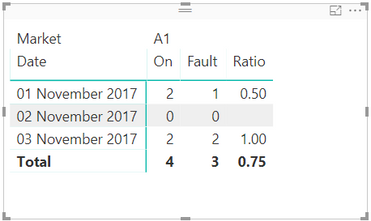
I think I may be getting confused here somewhere, is the third table in your example your expected outcome? If so the expression I gave you will work in power bi. I used the example data set you gave and got the following output:
- Mark as New
- Bookmark
- Subscribe
- Mute
- Subscribe to RSS Feed
- Permalink
- Report Inappropriate Content
Thanks for this so quick answer.
I'm confused too
Your formula works as a measure  :
:
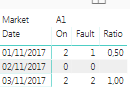
But for some reason, with my real datas, I can't make a measure, only a column. With a column, obviously, it doesn't work.
I have no idea why i can't make a measure, my real table has same data types than the sample one.
Would you have an idea ?
Regards
Marc
- Mark as New
- Bookmark
- Subscribe
- Mute
- Subscribe to RSS Feed
- Permalink
- Report Inappropriate Content
Hi again
I tried this :
Copy the formula working as a column
Paste the formula as a measure and it worked...
If I try to type the formula in a new measure, auto type of the fields does not show the fields I need. Very curious.
Whatsoever, your solution was the right one and I'm very grateful
Regards
Marc
- Mark as New
- Bookmark
- Subscribe
- Mute
- Subscribe to RSS Feed
- Permalink
- Report Inappropriate Content
What are you using as your data source?
- Mark as New
- Bookmark
- Subscribe
- Mute
- Subscribe to RSS Feed
- Permalink
- Report Inappropriate Content
an ODBC data source (pointing to SQlite) with transformations in power query
Helpful resources

FabCon & SQLCon – Barcelona 2026
Join us in Barcelona for FabCon and SQLCon, the Fabric, Power BI, SQL, and AI community event. Save €200 with code FABCMTY200.

Power BI DataViz World Championships - June 2026
A new Power BI DataViz World Championship is coming this June! Don't miss out on submitting your entry.

| User | Count |
|---|---|
| 24 | |
| 22 | |
| 20 | |
| 18 | |
| 14 |


| User | Count |
|---|---|
| 44 | |
| 36 | |
| 23 | |
| 20 | |
| 20 |


