cancel
Showing results for 
Search instead for 
Did you mean: 

The Power BI Data Visualization World Championships is back! Get ahead of the game and start preparing now! Learn more

Reply
mrumy
Regular Visitor

problem connecting to SQL Server instance Database via enterprise gateway

Good day,

We`ve made PoC set up to test with Power BI. Config following:

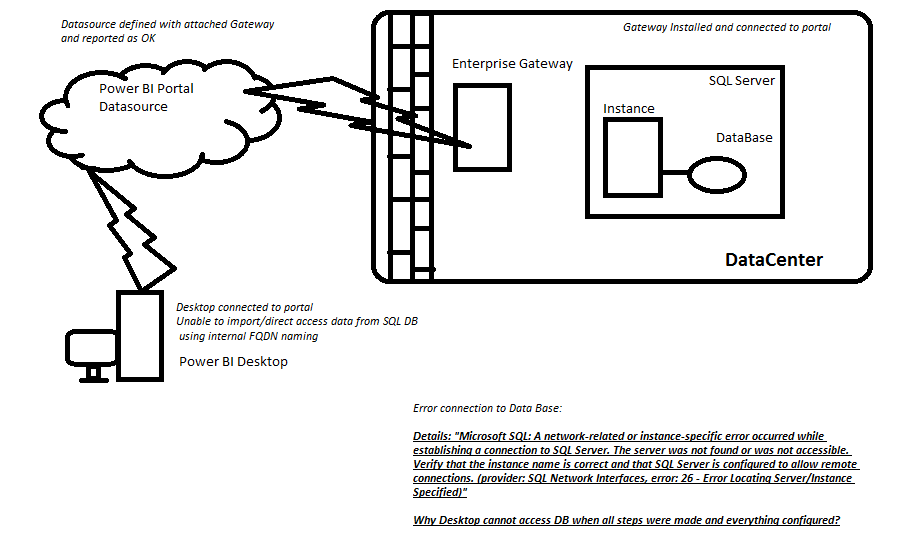
PBI Desktop<>Portal-PBIGW-DataSource<>SQL\instance->DB


Trying to connect Desktop App to SQL Database (on private netwoork).  Gateway and Data Source are configured on portal and reported available.

But as soon as I want to connect that DataBase (providing internal SQL Server name and instance) getting error UNABLE TO CONNECT:

Details: "Microsoft SQL: A network-related or instance-specific error occurred while establishing a connection to SQL Server. The server was not found or was not accessible. Verify that the instance name is correct and that SQL Server is configured to allow remote connections. (provider: SQL Network Interfaces, error: 26 - Error Locating Server/Instance Specified)"

Why Desktop cannot access DB when all steps were made and everything configured?

5 REPLIES 5
Anonymous
Not applicable

@mrumy,

Based on your description, you are able to connect to SQL database when adding the source within gateway, but you fails to connect to SQL Server in Power BI Desktop, right? If so, do you use same connection string in gateway and Power BI Desktop? Do you install gateway and Power BI Desktop in same machine?

Regarding the error 26, please follow the instructions in the blog below to troubleshoot it.
https://blogs.msdn.microsoft.com/sql_protocols/2007/05/13/sql-network-interfaces-error-26-error-loca...


Regards,
Lydia Zhang

Thank you for reply, I`ve seen that article prior to post here. below is an image of expected configuration and problem appeared. The question is mainly to concept of Gateway as such I believe.

PBI setup.png

Anonymous
Not applicable

@mrumy,

Please post a screenshot about connection string you use to connect to SQL Server database in Power BI Desktop.

Also we need to verify that if you can connect to the SQL Server from other applications such as SQL Server Management Studio(SSMS) or Excel. Ensure that other applications are installed in the same machine with Power BI Desktop.

Regards,
Lydia

I do not quite catch the connection string question. In Power BI Desktop I`m using GUI: Get Data->SQL Server and there enter the server internal FQDN\Instance and database name.

As for the other applications You`ve mentioned ansver is - no: unable to connect because server is on private network, no direct access to that server, shouldn`t BI Gateway takeover that fuctionality with powerBI Desktop?

SSMS not installed (requiered?)


Anonymous
Not applicable

@mrumy,

We need to verify the following things.

1. Are you able to ping the server that installing SQL Server from the machine that installing Power BI Desktop?
2. How about using "Machinename\instancename' or "IP address\instancename" as server name?
3. Do you add UDP port and TCP port in firewall if the firewall is on?

In addition, gateway and Power BI Desktop are two separate tools, they take different roles in Power BI.


Regards,
Lydia

Helpful resources

Announcements
Power BI DataViz World Championships

Power BI Dataviz World Championships

The Power BI Data Visualization World Championships is back! Get ahead of the game and start preparing now!

December 2025 Power BI Update Carousel

Power BI Monthly Update - December 2025

Check out the December 2025 Power BI Holiday Recap!

FabCon Atlanta 2026 carousel

FabCon Atlanta 2026

Join us at FabCon Atlanta, March 16-20, for the ultimate Fabric, Power BI, AI and SQL community-led event. Save $200 with code FABCOMM.