Don't miss your chance to take the Fabric Data Engineer (DP-600) exam for FREE! Find out how by watching the DP-600 session on-demand now through April 28th.
Learn moreJoin the FabCon + SQLCon recap series. Up next: Power BI, Real-Time Intelligence, IQ and AI, and Data Factory take center stage. All sessions are available on-demand after the live show. Register now
Hello everyone,
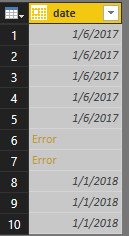
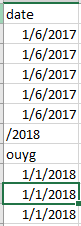
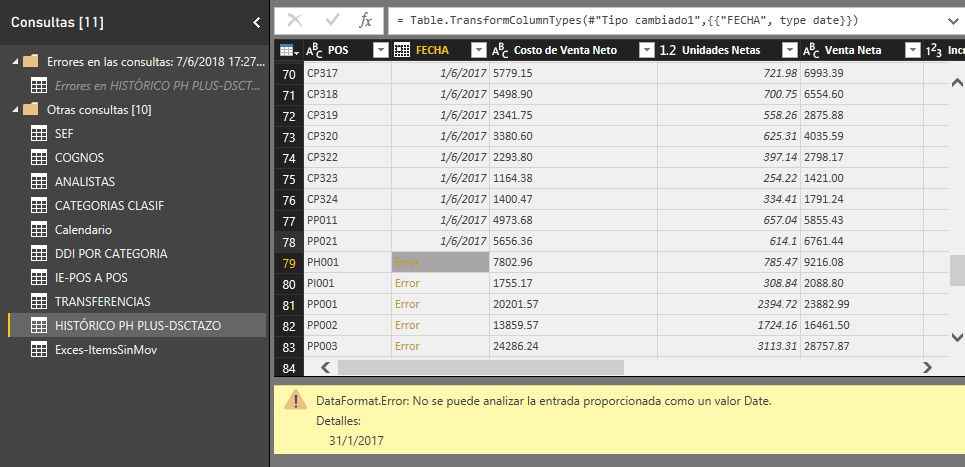
I have a problem: when updating some files, errors are generated in the date and only in certain cells (as seen in the image), I have tried everything from going to the Query Editor option and removing the corrections but the error is maintained, I have created a new power bi document and I have copied the Query edition, but it does not work; I have to mention that they changed my computer, I had windows 7 and now windows 10, will it be the date format? to say, before it was 01/01/2018 and now it is 1/1/2018 ?, apart from that I had another problem with the format of the decimals and I had to change the regional configuration to English (usa) but I have the configuration of the computer in Spanish because I'm from Ecuador; will it be that the file was damaged? power bi always gives problems? the ideal is to solve without adding another column because the column is linked to other files, please your help because it has me desperate and I do not want to repeat the whole report bi. Thank you very much.
Hi @nebiroswill
I’ not sure which cause the error of your file, however, I can reproduce a similar issue as you did.
When the format of values in “date” column are not all in date format, it will show error when importing to Power BI.
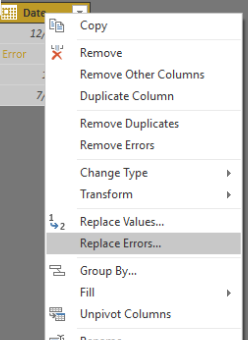
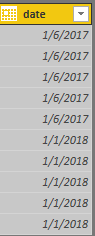
A workaround is that you can try to use replace error function to replace the error value to default value.
Best Regards
Maggie
Check out the April 2026 Power BI update to learn about new features.
If you have recently started exploring Fabric, we'd love to hear how it's going. Your feedback can help with product improvements.
A new Power BI DataViz World Championship is coming this June! Don't miss out on submitting your entry.
| User | Count |
|---|---|
| 45 | |
| 38 | |
| 34 | |
| 21 | |
| 17 |
| User | Count |
|---|---|
| 66 | |
| 64 | |
| 31 | |
| 26 | |
| 26 |