cancel
Showing results for 
Search instead for 
Did you mean: 

The Power BI Data Visualization World Championships is back! Get ahead of the game and start preparing now! Learn more

Reply
vjnvinod
Impactful Individual

power Bi CARD

hi,


How do we format Power BI card visuals to Millions or billions based on our requirment.

I don't find any option to do so.


Please suggest if there is a way to do it.Card power BI.PNG

3 REPLIES 3
mikez2605
Regular Visitor

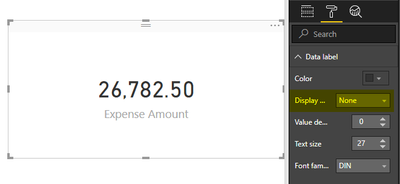
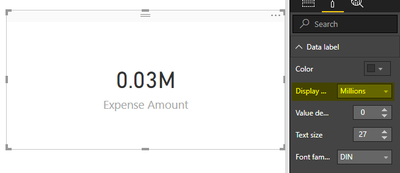
Under formatting for the card, try changing the Display Units field (under Data Label)?


Before:

1.png


After:

2.png

vjnvinod
Impactful Individual

@mikez2605


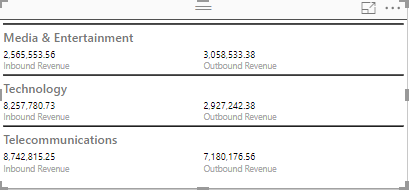
No Display option showing in power BI desktop. see my scrubbed file below, can you try?


https://www.dropbox.com/s/9j5asfq7xpdt0go/testchecknew.pbix?dl=0


displayoptionnot available.PNG


I see you're using a multi row card, whereas I was using a card, which explains the difference. Looks like that formatting option isn't available for multi row cards. I would recommend creating 6 different cards and set the format individually.


Otherwise, you could create a measure similar to the below:


"=CONCATENATE(TRUNC([value name])/1000000,2),"M")" (for millions)

You'd have to do this for each data point however, so it's not an ideal solution

Helpful resources

Announcements
Power BI DataViz World Championships

Power BI Dataviz World Championships

The Power BI Data Visualization World Championships is back! Get ahead of the game and start preparing now!

December 2025 Power BI Update Carousel

Power BI Monthly Update - December 2025

Check out the December 2025 Power BI Holiday Recap!

FabCon Atlanta 2026 carousel

FabCon Atlanta 2026

Join us at FabCon Atlanta, March 16-20, for the ultimate Fabric, Power BI, AI and SQL community-led event. Save $200 with code FABCOMM.