Don't miss your chance to take the Fabric Data Engineer (DP-600) exam for FREE! Find out how by watching the DP-600 session on-demand now through April 28th.
Learn moreJoin the FabCon + SQLCon recap series. Up next: Power BI, Real-Time Intelligence, IQ and AI, and Data Factory take center stage. All sessions are available on-demand after the live show. Register now
Hi everyone:
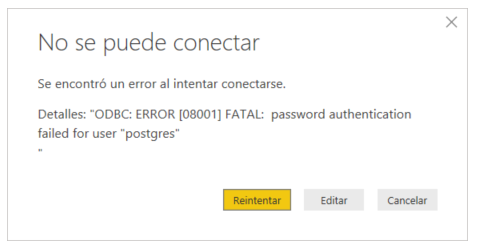
I've been having trouble connecting to PostgreSQL by ODBC. The aplication responds with an error: "password authentication failed for user 'postgres'". I try this credentials with other clients and work fine.
I have installed npgsql-4.0.10 and configure system DSC in windows.
The server don't use SSL Encryption.
Thank you!
Hi @Anonymous ,
You could try to delete the credential in Datasource Setting, then re-enter it to see whether it work or not. You could try to refer to Connecting Power BI To PostgreSQL for details.
Best Regards,
Zoe Zhi
If this post helps, then please consider Accept it as the solution to help the other members find it more quickly.
Hi:
I try to restart DSN and power bi connection (detele all permitions and restar de connection), but still not working.
Thank you!
Hi @Anonymous , do you have '%' in your password? If it's the case, you can try to replace '%' by '%25'
https://community.powerbi.com/t5/Issues/PostgreSQL-ODBC-to-PowerBI-Password/idi-p/874849
spent the past 4 ours trying to make this damnmed thing work and this is the solution.
the werid thing is that in the ODBC local instance it accepts the % normally however when authenticating trough PBI it does not.
Check out the April 2026 Power BI update to learn about new features.
If you have recently started exploring Fabric, we'd love to hear how it's going. Your feedback can help with product improvements.
A new Power BI DataViz World Championship is coming this June! Don't miss out on submitting your entry.
| User | Count |
|---|---|
| 45 | |
| 38 | |
| 34 | |
| 21 | |
| 17 |
| User | Count |
|---|---|
| 66 | |
| 65 | |
| 31 | |
| 26 | |
| 26 |