This is best Fabric, Power BI, SQL and AI community event. How do we know? The last event sold out! Save €200 with code FABCMTY200.
Register nowA new Data Days event is coming soon! This time we’re going bigger than ever. Fabric, Power BI, SQL, AI and more. Don't miss out.
Hi,
I have text data that might look like this:
A fruit that grow in bunches are banana
Red Delicious apples grow on trees
Carrots grow in the ground
A summer vegtable is corn
I've added data to a custom column that extract the food from the text using something like this:
Fruit=CONCATENATEX (
FILTER ( Categories, SEARCH ( Categories[Fruits], [Text Data],, 0 ) > 0 ),
Categories[Fruits],
""
)
Return
VAR
Vegetable=CONCATENATEX (
FILTER ( Categories, SEARCH ( Categories[Vegetables], [Text Data],, 0 ) > 0 ),
Categories[Vegetable],
""
)
ReturnFruit&Vegetable
This works nicely. However, I want to populate another column with the literal "Fruit" or "Vegetable" depending on my variables.
I know I could use the formula again on the other column, but that seems inefficient. I could also append the correct word (eg if trim(Fruit)<>"",Fruit&"Fruit") with a delimiter inbetween and then extract the data in the other column. However, I'm trying to figure out if I can populate the column I want directly.
I tried this with no luck:
if trim(Fruit)<>"","Fruit","Vegetable")
Any help is appreciated.
Hi @Gambrinus,
If I understand your requirement correctly that you want to reference the var fruit when you create another calculated column?
If it is, it seems that is not supported in Power BI currently.
If you don't want to create the var fruit for each time when you create the calculated column, you could create the fruit as a calculated column, then you could reference it when you create another calculated column.
Best Regards,
Cherry
Thanks for the reply Cherry.
What I want, is once I've detemined the type of food in ColumnJ, to populate another column (ColumnX) with a literal for the type of food.
In my two-food-type example, either Var Fruit or Var Vegetable will be populated. I'd like to accomplish this:
If(trim(Fruit)<>"",[ColumnX]="This is a Fruit",If(trim(Vegetable)<>"",[ColumnX]="This is a Vegetable","Unknown"))
So if the Var Fruit has a value, then ColumnX will contain the literal test, otherwise, if Var Vegetable has a value, ColumnX will have different literal text, otherwise ColumnX will have "Unknown"
Thank you.
Hi @Gambrinus,
Have you solved your problem?
If you have solved, please always accept the replies making sense as solution to your question so that people who may have the same question can get the solution directly.
If you still need help, please feel free to ask.
Best Regards,
Cherry
Hi @Gambrinus,
Try this formula below.
Column 2 =
VAR fruit =
LOOKUPVALUE ( 'table'[Fruits], 'table'[Text Data], 'table'[Text Data] )
VAR vege =
LOOKUPVALUE ( 'table'[Vegetables], 'table'[Text Data], 'table'[Text Data] )
RETURN
IF (
vege <> "",
"This is a vegetable",
IF ( fruit <> "", "this is a fruit", "Unknown" )
)
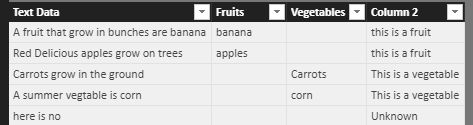
Here is the output.
For more details, you could have a reference of the attachment.
Best Regards,
Cherry
Sign up to receive a private message when registration opens and key events begin.
If you have recently started exploring Fabric, we'd love to hear how it's going. Your feedback can help with product improvements.
| User | Count |
|---|---|
| 32 | |
| 26 | |
| 21 | |
| 20 | |
| 15 |
| User | Count |
|---|---|
| 65 | |
| 43 | |
| 28 | |
| 22 | |
| 22 |