Join us at FabCon Atlanta from March 16 - 20, 2026, for the ultimate Fabric, Power BI, AI and SQL community-led event. Save $200 with code FABCOMM.
Register now!The Power BI Data Visualization World Championships is back! It's time to submit your entry. Live now!
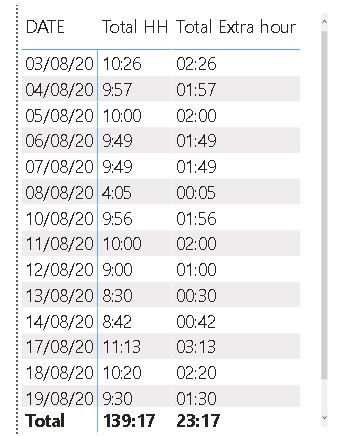
I've try plot a chart with this table but there is something wrong, I have to plot a chart with Extra Hour, and another with divide an Extra hour per Total HH and plot a chart.
_01Total HH =
CALCULATE(
SUMX('hh tsv','hh tsv'[Final Time]-'hh tsv'[Star Time]),
'hh tsv'[Action] in{"Production"},'hh tsv'[product] in {"13"}
)To get the right total of columns I use
Total HH = INT('hh tsv'[_01Total HH])*24+FORMAT('hh tsv'[_01Total HH],"hh")&":"&FORMAT('hh tsv'[_01Total HH],"nn")to get extra hour
_02 Horas extra = [_01Total HH] - IF( WEEKDAY(MAX('hh tsv'[DATE]),1) = 7 ,TIME(4,0,0), TIME(8,0,0))
Total Extra hour = SUMX(VALUES('hh tsv'[DATE]),[_02 Horas extra])
Solved! Go to Solution.
@Estyfodense
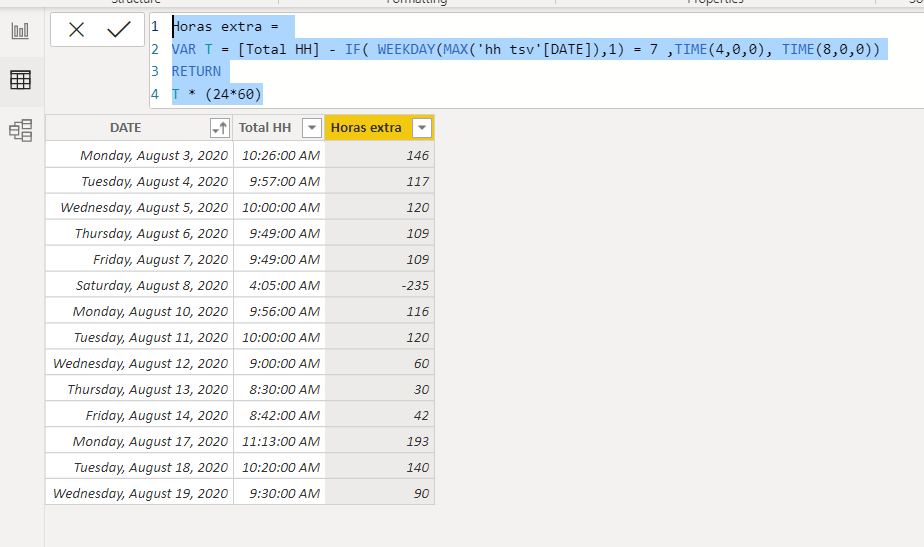
If you are trying to plot the extra hours on a graph, you need to have it in one measurement unit, so convert the extra time to minutes by adding the following column in your table.
Horas extra =
VAR T = [Total HH] - IF( WEEKDAY(MAX('hh tsv'[DATE]),1) = 7 ,TIME(4,0,0), TIME(8,0,0))
RETURN
T * (24*60)
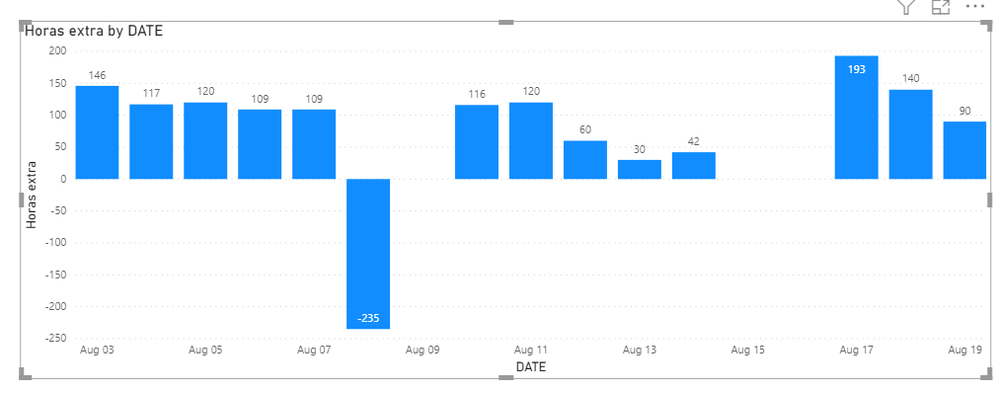
This is your chart with Extra Time in Minutes:
________________________
Did I answer your question? Mark this post as a solution, this will help others!.
Click on the Thumbs-Up icon if you like this reply 🙂
⭕ Subscribe and learn Power BI from these videos
⚪ Website ⚪ LinkedIn ⚪ PBI User Group
Hi @Estyfodense
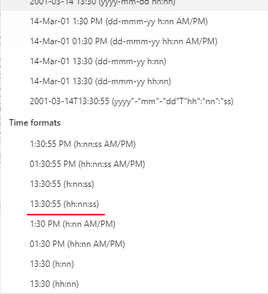
Format your [Total Extra Hour] as hh:nn:ss as below
Then, You should be able to get the sum of the [Total Extra Hour]
I've already done this, but my measurement is in the tooltip tab
@Estyfodense - Sorry, not following this. Not really enough information to go on, please first check if your issue is a common issue listed here: https://community.powerbi.com/t5/Community-Blog/Before-You-Post-Read-This/ba-p/1116882
Also, please see this post regarding How to Get Your Question Answered Quickly: https://community.powerbi.com/t5/Community-Blog/How-to-Get-Your-Question-Answered-Quickly/ba-p/38490
The most important parts are:
1. Sample data as text, use the table tool in the editing bar
2. Expected output from sample data
3. Explanation in words of how to get from 1. to 2.
I did a chart in excel that show me the total of extra hour and know I'm try do this at PBI.
I used measure to calculate the total of extra hour per day and now I'd like plot a char with the value .
@Estyfodense
If you are trying to plot the extra hours on a graph, you need to have it in one measurement unit, so convert the extra time to minutes by adding the following column in your table.
Horas extra =
VAR T = [Total HH] - IF( WEEKDAY(MAX('hh tsv'[DATE]),1) = 7 ,TIME(4,0,0), TIME(8,0,0))
RETURN
T * (24*60)
This is your chart with Extra Time in Minutes:
________________________
Did I answer your question? Mark this post as a solution, this will help others!.
Click on the Thumbs-Up icon if you like this reply 🙂
⭕ Subscribe and learn Power BI from these videos
⚪ Website ⚪ LinkedIn ⚪ PBI User Group
The Power BI Data Visualization World Championships is back! It's time to submit your entry.
Check out the January 2026 Power BI update to learn about new features.
| User | Count |
|---|---|
| 56 | |
| 42 | |
| 41 | |
| 21 | |
| 21 |
| User | Count |
|---|---|
| 150 | |
| 107 | |
| 64 | |
| 36 | |
| 36 |