cancel
Showing results for 
Search instead for 
Did you mean: 

We've captured the moments from FabCon & SQLCon that everyone is talking about, and we are bringing them to the community, live and on-demand. Starts on April 14th. Register now

Reply
bharka
Regular Visitor

pivot table

Hello,


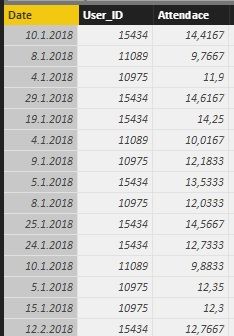
I've got a problem with one formula. This is the table I have:


pbi.jpg

One row is one day that the user was present (each user is there multiple times). What I need is a new table that will contain User_ID, month and sum of Attendance for each user in the particular month. I need the table for further calculations but I wasn't able to figure it out. 


Thanks for any help. 

1 ACCEPTED SOLUTION
Anonymous
Not applicable

@bharka,

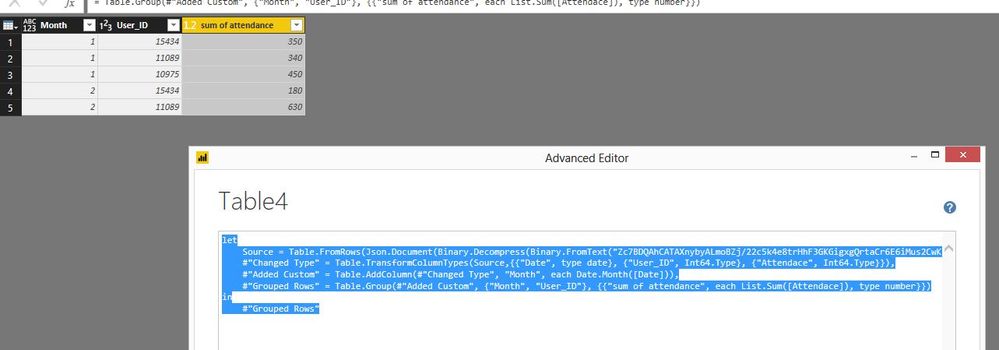
Add a blank query in Power BI Desktop, paste the following code  to the Advanced Editor of the blank query to test the process.

let
    Source = Table.FromRows(Json.Document(Binary.Decompress(Binary.FromText("Zc7BDQAhCATAXnybyALmoBZj/22c5k4e8trHhF3GKGigxgQrtaCr6E6iMus2CwKZr+QgDSJ/+koJYk+NfAzZJFf+a9BDfq+hf8QNnBrtmNyNgjhLa7KfnC8=", BinaryEncoding.Base64), Compression.Deflate)), let _t = ((type text) meta [Serialized.Text = true]) in type table [Date = _t, User_ID = _t, Attendace = _t]),
    #"Changed Type" = Table.TransformColumnTypes(Source,{{"Date", type date}, {"User_ID", Int64.Type}, {"Attendace", Int64.Type}}),
    #"Added Custom" = Table.AddColumn(#"Changed Type", "Month", each Date.Month([Date])),
    #"Grouped Rows" = Table.Group(#"Added Custom", {"Month", "User_ID"}, {{"sum of attendance", each List.Sum([Attendace]), type number}})
in
    #"Grouped Rows"

2.JPG1.JPG

Regards,
Lydia

View solution in original post

5 REPLIES 5
Anonymous
Not applicable

@bharka,

Add a blank query in Power BI Desktop, paste the following code  to the Advanced Editor of the blank query to test the process.

let
    Source = Table.FromRows(Json.Document(Binary.Decompress(Binary.FromText("Zc7BDQAhCATAXnybyALmoBZj/22c5k4e8trHhF3GKGigxgQrtaCr6E6iMus2CwKZr+QgDSJ/+koJYk+NfAzZJFf+a9BDfq+hf8QNnBrtmNyNgjhLa7KfnC8=", BinaryEncoding.Base64), Compression.Deflate)), let _t = ((type text) meta [Serialized.Text = true]) in type table [Date = _t, User_ID = _t, Attendace = _t]),
    #"Changed Type" = Table.TransformColumnTypes(Source,{{"Date", type date}, {"User_ID", Int64.Type}, {"Attendace", Int64.Type}}),
    #"Added Custom" = Table.AddColumn(#"Changed Type", "Month", each Date.Month([Date])),
    #"Grouped Rows" = Table.Group(#"Added Custom", {"Month", "User_ID"}, {{"sum of attendance", each List.Sum([Attendace]), type number}})
in
    #"Grouped Rows"

2.JPG1.JPG

Regards,
Lydia

Thank you 😊
ricardocamargos
Continued Contributor

Hi @bharka,


I think once u have the data imported, the Date column will be recognized as text.

If you take a look to the Applied Steps, the second step changes the data types, the date column now is decimal.


To use this column as date, you just need to delete this second step and click on Date column and convert it to Date type. Now you are able to do some calculations by date.


I hope it helps you,


Ricardo

Hi @ricardocamargos


the date format is right, the problem is that I have no idea how to create the table I described. I need to use the sum of Attendance for each user in each month as a numerator in another calculations. 


Thanks for the advice, though 🙂


The reason is that I don't have powerBI in English and the format just looks different but it's the same.

Helpful resources

Announcements
New to Fabric survey Carousel

New to Fabric Survey

If you have recently started exploring Fabric, we'd love to hear how it's going. Your feedback can help with product improvements.

Power BI DataViz World Championships carousel

Power BI DataViz World Championships - June 2026

A new Power BI DataViz World Championship is coming this June! Don't miss out on submitting your entry.

Join our Fabric User Panel

Join our Fabric User Panel

Share feedback directly with Fabric product managers, participate in targeted research studies and influence the Fabric roadmap.

March Power BI Update Carousel

Power BI Community Update - March 2026

Check out the March 2026 Power BI update to learn about new features.