Join us at FabCon Atlanta from March 16 - 20, 2026, for the ultimate Fabric, Power BI, AI and SQL community-led event. Save $200 with code FABCOMM.
Register now!Get Fabric Certified for FREE during Fabric Data Days. Don't miss your chance! Request now
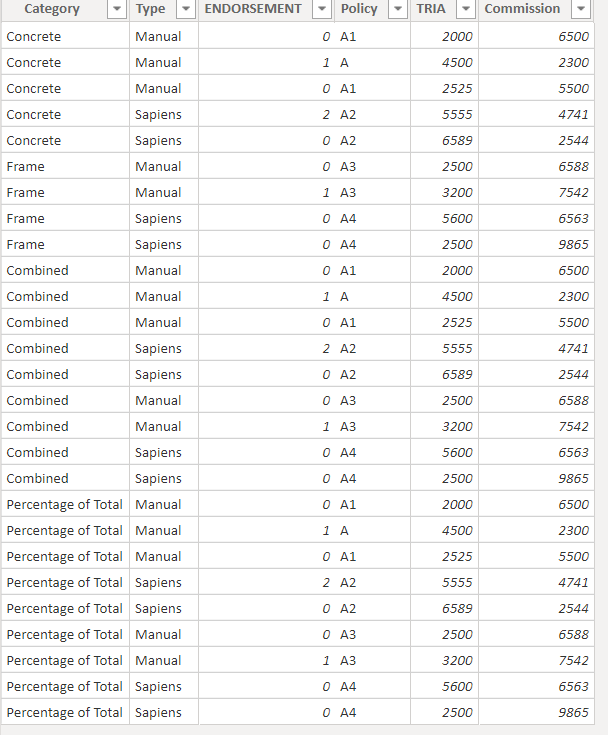
I have data like above for report creation.
Alraedy am calculating sum for tria and average for commission using some measures...like below
Solved! Go to Solution.
Hi @Anonymous,
Modify your measure as below:
TRIA sum = CALCULATE(SUM('Sheet1'[TRIA]),FILTER(ALL('Sheet1'),'Sheet1'[ENDORSEMENT]=0 &&'Sheet1'[Category]=MAX('Sheet1'[Category])&&'Sheet1'[Type]=MAX('Sheet1'[Type])))
AVg Commission = CALCULATE (AVERAGE('Sheet1'[Commission]),FILTER(ALL('Sheet1'), 'Sheet1'[ENDORSEMENT]=0&&'Sheet1'[Category]=MAX('Sheet1'[Category])&&'Sheet1'[Type]=MAX('Sheet1'[Type])))
Then create a new measure as below:
Percentage of Total=DIVIDE('Sheet1'[TRIA sum],'Sheet1'[AVg Commission])
Best Regards,
Kelly
Did I answer your question? Mark my post as a solution!
Hi @Anonymous,
Modify your measure as below:
TRIA sum = CALCULATE(SUM('Sheet1'[TRIA]),FILTER(ALL('Sheet1'),'Sheet1'[ENDORSEMENT]=0 &&'Sheet1'[Category]=MAX('Sheet1'[Category])&&'Sheet1'[Type]=MAX('Sheet1'[Type])))
AVg Commission = CALCULATE (AVERAGE('Sheet1'[Commission]),FILTER(ALL('Sheet1'), 'Sheet1'[ENDORSEMENT]=0&&'Sheet1'[Category]=MAX('Sheet1'[Category])&&'Sheet1'[Type]=MAX('Sheet1'[Type])))
Then create a new measure as below:
Percentage of Total=DIVIDE('Sheet1'[TRIA sum],'Sheet1'[AVg Commission])
Best Regards,
Kelly
Did I answer your question? Mark my post as a solution!
Check out the November 2025 Power BI update to learn about new features.
Advance your Data & AI career with 50 days of live learning, contests, hands-on challenges, study groups & certifications and more!