Join us at FabCon Atlanta from March 16 - 20, 2026, for the ultimate Fabric, Power BI, AI and SQL community-led event. Save $200 with code FABCOMM.
Register now!The Power BI Data Visualization World Championships is back! Get ahead of the game and start preparing now! Learn more
Hello the community,
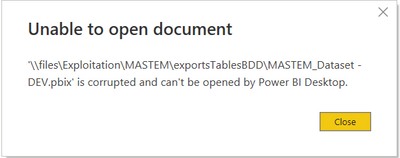
I had a sad suprise this monday morning. The pbix file I was working on 8 hours a day for the last 2 weeks refuse to open and returns this error :
The old version stored in the TempSaves folder is dated of the first day I created it so there is nothing to retrieve.
I also tried desinstalling the app and installing the last version.
It's unfrotunately still not working and I have no clue on what happend with this pbix file and how to solve the issue.
Of course I didn't make any copy of the file before the problem.
I'm praying right now with the hope that one of you know a miraculous solution to make it work again !
Thanks in advance.
Kind regards,
Cado
Solved! Go to Solution.
@Anonymous , if you have published this file, download the version from power bi service.
Or install an older version of power bi and try
https://docs.microsoft.com/en-us/power-bi/desktop-latest-update-archive
@Anonymous , if you have published this file, download the version from power bi service.
Or install an older version of power bi and try
https://docs.microsoft.com/en-us/power-bi/desktop-latest-update-archive
Hi,
I've had same error message when opening a pbix file. I've been going through forums since yesterday and trying all kinds of advice (clearing cache, restoring previous versions - there were none, opening from the app and not by double clicking on the pbix, sharing the file on OneDrive with myself, trying to open the copy from shared drive, OneDrive, C drive/desktop, downloading copy from PB services) and nothing worked. Even the copy downloaded from Services had the same error.
The file was published to Services in May 2024 and I haven't touched it since. There is a weekly refresh set up and in the Services everything works fine. But now I need to make changes to it and I can't. No idea what may have happened. My colleagues get the same error when they try to open this file but we all can open other pbix files no problem.
I've been trying to open it in version Version: 2.137.1102.0 64-bit (October 2024).
I will let it live in Services for now but will have to create a copy from scratch to make the changes needed.
I also copied all my other pbix files to a sharepoint location so that I have a version history if this ever happened again with some other pbixs.
But would love to know if there is anything else I can try to recover this file. Any other ideas?
Thanks a lot!
Thank you @amitchandak you're a genius !
I should have thought about exporting the pbix file from the Service but I was so frustrated about my loss that I was not able to think enough 😅
The Power BI Data Visualization World Championships is back! Get ahead of the game and start preparing now!
Check out the November 2025 Power BI update to learn about new features.
| User | Count |
|---|---|
| 59 | |
| 43 | |
| 42 | |
| 23 | |
| 17 |
| User | Count |
|---|---|
| 190 | |
| 122 | |
| 96 | |
| 66 | |
| 47 |