Join us at FabCon Atlanta from March 16 - 20, 2026, for the ultimate Fabric, Power BI, AI and SQL community-led event. Save $200 with code FABCOMM.
Register now!The Power BI Data Visualization World Championships is back! It's time to submit your entry. Live now!
Hello everyone,
I got one more problem
I got one data table like this :
No Archived Amount Amount Arch Measure
Ord1 NO 10€ 0€ 10€
Ord2 NO 10€ 0€ 10€
Ord2 YES 0€ 5€ 5€
Ord3 YES 0€ 12€ 12€
Total 20€ 17€ 32€
Don't tell me why there are several orders which are NO and Archived at the both time this is a fact. I don't know why.
So, I don't want the order2 archived on the total.
Today I made a table like this :
No Amount Amount Arch Measure
Ord1 10€ 0€ 10€
Ord2 10€ 5€ 10€
Ord3 0€ 12€ 12€
Total 20€ 17€ 20€
With measure = If amount=0 ; amount arch ; amount) but the total is false (it is not what I want).
Do you have an issue about that?
Thanks for all,
Solved! Go to Solution.
Hi bapt69,
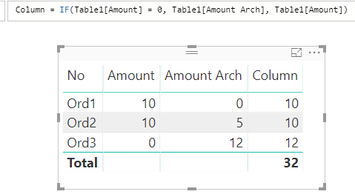
To achieve your requirememt, you can create a calculate column instead using DAX below:
Column = IF(Table1[Amount] = 0, Table1[Amount Arch], Table1[Amount])
Regards,
Jimmy Tao
Hi bapt69,
To achieve your requirememt, you can create a calculate column instead using DAX below:
Column = IF(Table1[Amount] = 0, Table1[Amount Arch], Table1[Amount])
Regards,
Jimmy Tao
The Power BI Data Visualization World Championships is back! It's time to submit your entry.
If you love stickers, then you will definitely want to check out our Community Sticker Challenge!
Check out the January 2026 Power BI update to learn about new features.
| User | Count |
|---|---|
| 70 | |
| 55 | |
| 38 | |
| 28 | |
| 22 |
| User | Count |
|---|---|
| 133 | |
| 119 | |
| 54 | |
| 37 | |
| 31 |