cancel
Showing results for 
Search instead for 
Did you mean: 

The Power BI Data Visualization World Championships is back! Get ahead of the game and start preparing now! Learn more

Reply
Anonymous
Not applicable

parameter in advanced editor query sql

hi


im working on making my tables partially depentent on a parameter


so the normal sql in advanced editor looks like this


let
Source = Sql.Database(SQLServerName, DatabaseName),
#"dbo_CRONUS JetCorp UK$Customer" = Source{[Schema="dbo",Item="CRONUS JetCorp UK$Customer"]}[Data]
in
#"dbo_CRONUS JetCorp UK$Customer"


and it work fine, then i would like to add a parameter for the "CRONUS JetCorp UK in the item part, because i also have a US version.


so for that i made a sql like this


let
Source = Sql.Database(SQLServerName, DatabaseName),
#"dbo_CRONUS JetCorp UK$Customer" = Source{[Schema="dbo",Item=(#"Company Name")&"Customer"]}[Data]
in
#"dbo_CRONUS JetCorp UK$Customer"


but it does not work 😕


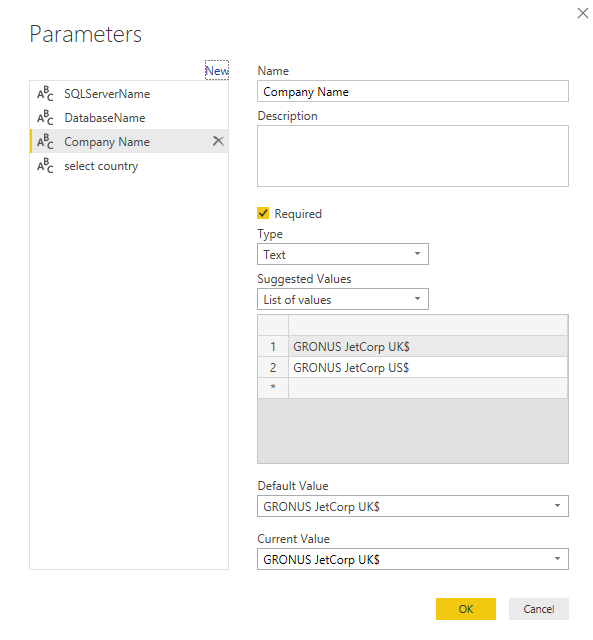
my parameter is setup like this

Capture.PNG


hope one of you can help, because i cant seem to find the answer.


1 ACCEPTED SOLUTION
PattemManohar
Community Champion
Community Champion

@Anonymous Not able to replicate the error. Tried the same and working fine. Please post any error that you are facing after changing the table name in the parameter (which is Company Name in your case).


Did I answer your question? Mark my post as a solution!

Proud to be a PBI Community Champion


View solution in original post

3 REPLIES 3
Anonymous
Not applicable

Hej


in my advanced editor i have this sql


let
Source = Sql.Database(SQLServerName, DatabaseName),
#"dbo_CRONUS JetCorp UK$Customer" = Source{[Schema="dbo",Item="CRONUS JetCorp UK$Customer"]}[Data]
in
#"dbo_CRONUS JetCorp UK$Customer"


so i have created a parameter, and my end result should look something like this


let
Source = Sql.Database(SQLServerName, DatabaseName),
#"dbo_CRONUS JetCorp UK$Customer" = Source{[Schema="dbo",Item=(#"Company Name")&"Customer"]}[Data]
in
#"dbo_CRONUS JetCorp UK$Customer"


so i dont need to tell power bi everytime what company the table comes from, but that this is a parameter, and then the tabels name??


i dont seem to find any answers when googleling this, hope you guys can help.

PattemManohar
Community Champion
Community Champion

@Anonymous Not able to replicate the error. Tried the same and working fine. Please post any error that you are facing after changing the table name in the parameter (which is Company Name in your case).


Did I answer your question? Mark my post as a solution!

Proud to be a PBI Community Champion


Anonymous
Not applicable

@PattemManohar


thank you for your answer, and you are correct i can actually see that i made a spelling mistake and my original solution actually did work, so i have you to thank for, that my method was right and therefore something else was wrong.

Helpful resources

Announcements
Power BI DataViz World Championships

Power BI Dataviz World Championships

The Power BI Data Visualization World Championships is back! Get ahead of the game and start preparing now!

December 2025 Power BI Update Carousel

Power BI Monthly Update - December 2025

Check out the December 2025 Power BI Holiday Recap!

FabCon Atlanta 2026 carousel

FabCon Atlanta 2026

Join us at FabCon Atlanta, March 16-20, for the ultimate Fabric, Power BI, AI and SQL community-led event. Save $200 with code FABCOMM.