cancel
Showing results for 
Search instead for 
Did you mean: 

The Power BI Data Visualization World Championships is back! Get ahead of the game and start preparing now! Learn more

Reply
Anonymous
Not applicable

one entity's totals per another (but still related/associated!) entity

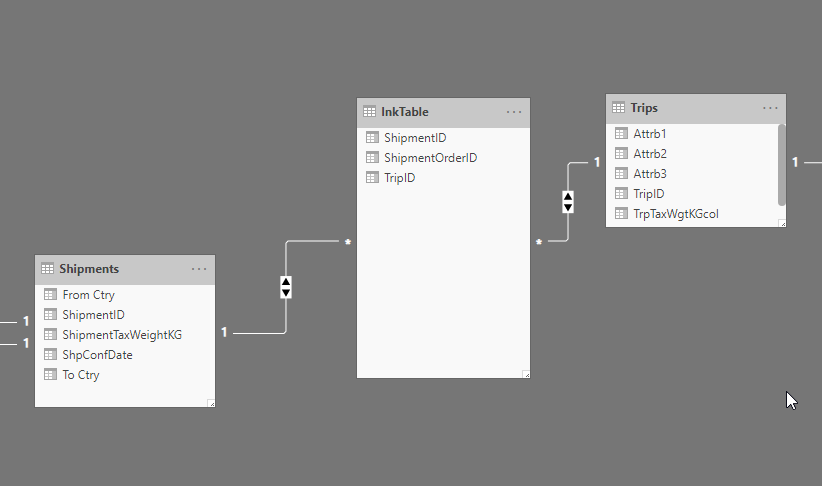
Basically, I’d like to get one entity totals, but calculated for another (but still related/associated!) entity.  Relation type between these entities is many-to-many.

Just to be less abstract, let’s take Trips and Shipments as mentioned entities and Shipments’ weight as a total to be calculated.

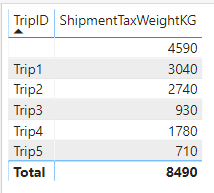
Calculating weight totals just per each trip is pretty easy task. Here is a table of Shipments weights:


We place them into some trucks/trips and get following weight totals per trip:
pic2.png


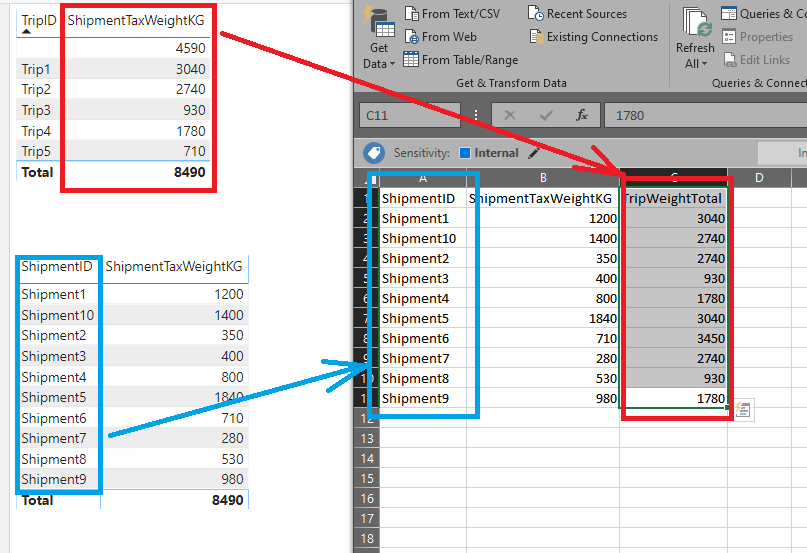
But when I try to show SUM of Trip weight totals (figures from 2nd table) per each related Shipment (Column from 1st table), it becomes much harder than I expect.

It should look like:
pic3.png

And I can’t get such a table within Power BI.


Data model for your reference:
pic4.png


Seems like SUMMARIZE function is almost fit, but it doesn’t allow me to use a column from another table than initialized in the function:

pic5.png


Additional restrictions:

Selections should not affect calculation anyhow.

The figures should be able to be used in further calculations, using them as a basis.


Can someone advise a solution? Or at least proper DAX references to consider? I thought I could find a quick answer in DAX reference guide on my own but failed.

1 ACCEPTED SOLUTION
Anonymous
Not applicable

Hi @v-joesh-msft ,

Basically I already found another, much more suitable solution for my case - just to add new calculated column to Trips table with a simple expression:

SUMX(RELATEDTABLE(Shipments); Shipments[ShipmentTaxWeightKG])

This solution allows me to keep many-to-many relationship between shipments and trips as well as to follow mentioned restrictions. It is important to keep it.


Solution found with Stackoverflow community help.

Here is a link to the same topic there:

https://stackoverflow.com/questions/59324512/power-bi-totals-per-related-entity

You may also find attached example there.

View solution in original post

2 REPLIES 2
v-joesh-msft
Solution Sage
Solution Sage

Hi @Anonymous ,

I think your model structure needs to be adjusted. The table "Trips" and "Shipments" should be a one-to-many relationship to achieve the results you want, then you just need to create a calculated table similar to the following:

addc = 
ADDCOLUMNS (
    Shipments,
    "a",
    VAR a =
        RELATED ( Trips[Tripid] )
    VAR k =
        ADDCOLUMNS ( Shipments, "a", RELATED ( Trips[Tripid] ) )
    RETURN
        CALCULATE ( SUM ( Shipments[ShipmentTaxWeightKG] ), FILTER ( k, [a] = a ) ) 
)

Here is a demo, please try it:

https://qiuyunus-my.sharepoint.com/:u:/g/personal/pbipro_qiuyunus_onmicrosoft_com/EX5sYyIg_LBIoRcMXBm_7yMBy2-5HDy3j92Aehjm_a-a0Q?e=OzwYhg

If not your case, kindly share your sample data if you don't have any Confidential Information.

Best Regards,
Community Support Team _ Joey
If this post helps, then please consider Accept it as the solution to help the other members find it more quickly.


Anonymous
Not applicable

Hi @v-joesh-msft ,

Basically I already found another, much more suitable solution for my case - just to add new calculated column to Trips table with a simple expression:

SUMX(RELATEDTABLE(Shipments); Shipments[ShipmentTaxWeightKG])

This solution allows me to keep many-to-many relationship between shipments and trips as well as to follow mentioned restrictions. It is important to keep it.


Solution found with Stackoverflow community help.

Here is a link to the same topic there:

https://stackoverflow.com/questions/59324512/power-bi-totals-per-related-entity

You may also find attached example there.

Helpful resources

Announcements
Power BI DataViz World Championships

Power BI Dataviz World Championships

The Power BI Data Visualization World Championships is back! Get ahead of the game and start preparing now!

December 2025 Power BI Update Carousel

Power BI Monthly Update - December 2025

Check out the December 2025 Power BI Holiday Recap!

FabCon Atlanta 2026 carousel

FabCon Atlanta 2026

Join us at FabCon Atlanta, March 16-20, for the ultimate Fabric, Power BI, AI and SQL community-led event. Save $200 with code FABCOMM.