Join us at FabCon Atlanta from March 16 - 20, 2026, for the ultimate Fabric, Power BI, AI and SQL community-led event. Save $200 with code FABCOMM.
Register now!The Power BI Data Visualization World Championships is back! Get ahead of the game and start preparing now! Learn more
Hi Guys,
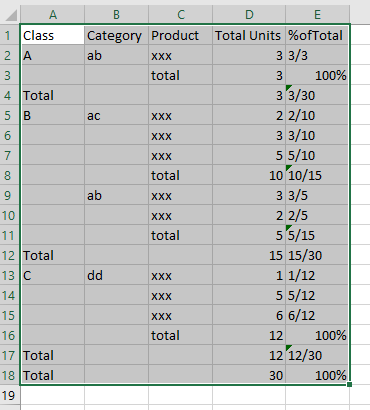
Would like to have a measure shown on Column E:
Just one request, as I am using Live connection Cube, so ISSCOPE function is not avaialble.
I am currently using HASONEFILTER, it does work on a Class which has multiple Categories, but it
Solved! Go to Solution.
Hi @Anonymous ,
If my reply is helpful, please always accept the replies making sense as solution to your question so that people who may have the same question can get the solution directly.
Best Regards,
Cherry
Hi @Anonymous ,
If my reply is helpful, please always accept the replies making sense as solution to your question so that people who may have the same question can get the solution directly.
Best Regards,
Cherry
Hi @Anonymous ,
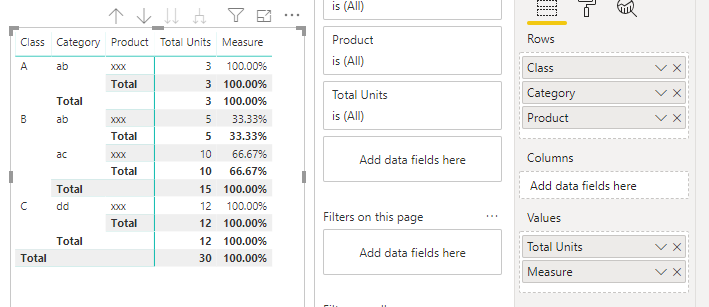
By my tests and research, I'm afraid that we cannot achieve the same output in power bi.
We only could achieve the output like below.
If you want to achieve the measure above, you could refer to the formula below.
Measure =
VAR sum_p =
CALCULATE (
SUM ( 'Table'[Total Units] ),
ALLEXCEPT ( 'Table', 'Table'[Class] )
)
VAR a =
CALCULATE ( SUM ( 'Table'[Total Units] ) )
RETURN
a / sum_p
Best Regards,
Cherry
Check out the November 2025 Power BI update to learn about new features.
Advance your Data & AI career with 50 days of live learning, contests, hands-on challenges, study groups & certifications and more!
| User | Count |
|---|---|
| 57 | |
| 45 | |
| 42 | |
| 20 | |
| 18 |