Join us at FabCon Atlanta from March 16 - 20, 2026, for the ultimate Fabric, Power BI, AI and SQL community-led event. Save $200 with code FABCOMM.
Register now!The Power BI Data Visualization World Championships is back! Get ahead of the game and start preparing now! Learn more
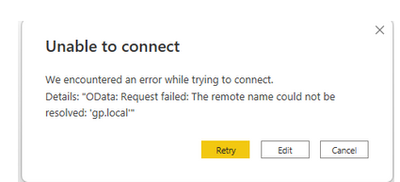
Getting the error below after adding the oData URL from Great Planes into Power BI (oData connection)
Not sure the circumstances with this, I do have full admin access to GP and the connection between Power BI device and Servers looks good. Any suggestions welcome.
Solved! Go to Solution.
Hi @dskeane
Thanks for reaching out to us.
This error message generally indicates a failure to resolve a hostname to an IP address. The reasons may be:
The solution may be:
Best Regards,
Community Support Team _Tang
If this post helps, please consider Accept it as the solution to help the other members find it more quickly.
Update on my issues.....
Details: "OData: Request failed: The underlying connection was closed: Could not establish trust relationship for the SSL/TLS secure channel."
Hi @dskeane
Thanks for reaching out to us.
This error message generally indicates a failure to resolve a hostname to an IP address. The reasons may be:
The solution may be:
Best Regards,
Community Support Team _Tang
If this post helps, please consider Accept it as the solution to help the other members find it more quickly.
I can confirm the three suggestions however still having an issue connecting using oData.
Question are there any other ways from client to host to test URL connection string that was create in Greate Planes?
The Power BI Data Visualization World Championships is back! Get ahead of the game and start preparing now!
Check out the November 2025 Power BI update to learn about new features.
| User | Count |
|---|---|
| 59 | |
| 43 | |
| 42 | |
| 23 | |
| 17 |
| User | Count |
|---|---|
| 190 | |
| 122 | |
| 96 | |
| 66 | |
| 47 |