cancel
Showing results for 
Search instead for 
Did you mean: 

The Power BI Data Visualization World Championships is back! Get ahead of the game and start preparing now! Learn more

Reply
ChaitanyaK
New Member

not supported in DirectQuery mode

Hello Experts,


Currently I am facing an issue in Power BI Desktop version 2.61.5192.601 were in after formating the data and clicking on Apply and close button in Query Editor I receive below error message:-


This step results in a query that is not supported in DirectQuery mode   Switch all tables to import mode


After clicking on  Switch all tables to import mode a new window pop-ups.


I have went through the page but I can not sure what should be the steps that I can follow.


Using Excel file as my data source and not adding any other data apart from that file.


Any suggestions are greatly appericated.


Best Regards,

Chaitanya

1 REPLY 1
v-lili6-msft
Community Support
Community Support

hi,@ChaitanyaK

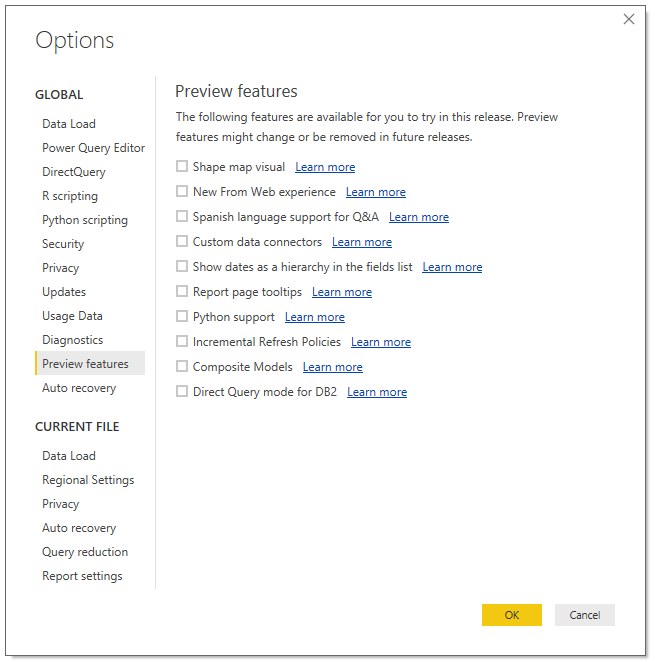
   This is likely happening because the composite models preview feature is turned on.you may try to disable the

preview feature and try it again.

9.PNG


and the same issue has been reported internally before: CRI 79697545.


Reference:https://community.powerbi.com/t5/Issues/Power-Query-reports-about-noncompatible-DirectQuery-mode-for...


Best Regards,

Lin

Community Support Team _ Lin
If this post helps, then please consider Accept it as the solution to help the other members find it more quickly.

Helpful resources

Announcements
Power BI DataViz World Championships

Power BI Dataviz World Championships

The Power BI Data Visualization World Championships is back! Get ahead of the game and start preparing now!

December 2025 Power BI Update Carousel

Power BI Monthly Update - December 2025

Check out the December 2025 Power BI Holiday Recap!

FabCon Atlanta 2026 carousel

FabCon Atlanta 2026

Join us at FabCon Atlanta, March 16-20, for the ultimate Fabric, Power BI, AI and SQL community-led event. Save $200 with code FABCOMM.