cancel
Showing results for 
Search instead for 
Did you mean: 

The FabCon + SQLCon recap series starts April 14th at 8am Pacific. If you’re tracking where AI is going inside Fabric, this first session is a can't miss. Register now

Reply
SuraMan
Advocate II
Advocate II

nested oData, XML, JSON data in Power BI model?

This question applies to consuming XML or JSON data in Power BI.


oData services can provide nested data as

Lists,

Records, and

Tables.


An example is that a Product is associated with two Categories, therefore, has references to two Categories that are nested in Product.


Below is a working example showing the above scenario:

oData source: https://services.odata.org/V3/OData/OData.svc/


Product(1) references two Categories; Category(0) and Category(1). See the screenshot below from PowerBI.

Product with two CategoriesProduct with two Categories


How are this type of data be ‘absorbed’ into Power BI and modelled?


In a relational world, Product-and-Category is a many-to-many relationship which needs an additional link table to contain matching ProductIDs and CategoryIDs. However, when data is exposed via oData, such link tables do not exist. Instead, the relationships are represented via nesting ie references to relevant Categories are nested in Products. Power BI does not create a link table using the oData nested references. Unless we choose to expand (denormalise) columns from Category into Product table within Power BI, Product-->Category relationships are lost.


What is the correct way to handle this type of situation?


1 ACCEPTED SOLUTION

Hi @SuraMan 

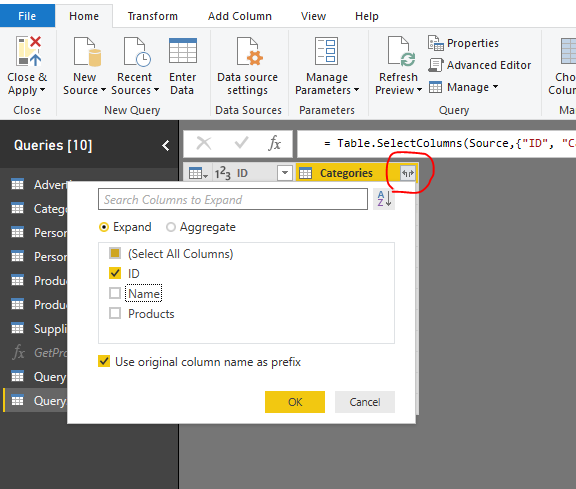
Transform these to UI,

let
    Source = Products,
    #"Removed Other Columns" = Table.SelectColumns(Source,{"ID", "Categories"}),
    #"Expanded Categories" = Table.ExpandTableColumn(#"Removed Other Columns", "Categories", {"ID", "Name", "Products"}, {"Categories.ID", "Categories.Name", "Categories.Products"}),
    #"Removed Other Columns1" = Table.SelectColumns(#"Expanded Categories",{"ID", "Categories.ID"})
in
    #"Removed Other Columns"

 In Edit queries, i create a blank query,

5.png


#"Removed Other Columns"

4.png

3.png


Best Regards

Maggie


Community Support Team _ Maggie Li
If this post helps, then please consider Accept it as the solution to help the other members find it more quickly.

View solution in original post

4 REPLIES 4
v-juanli-msft
Community Support
Community Support

Hi @SuraMan 

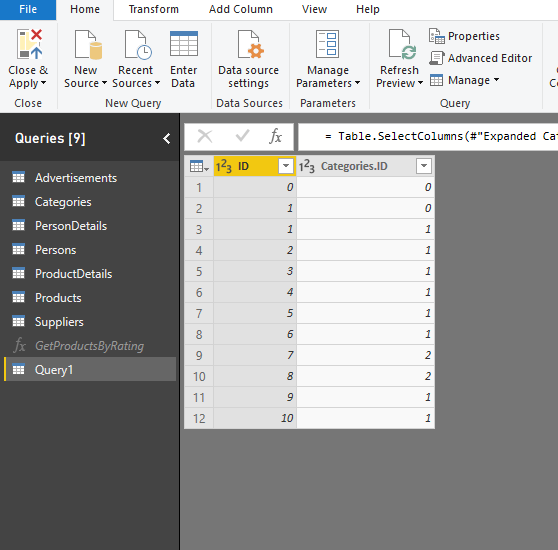
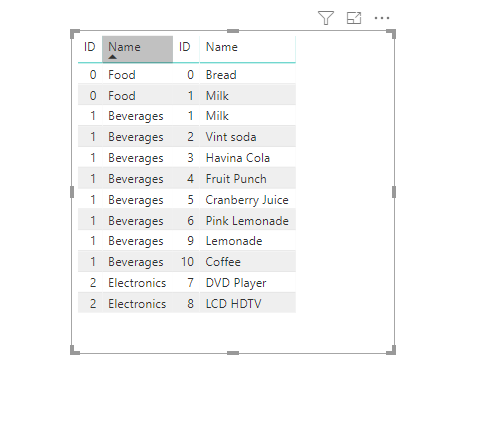
You could create a link table to connect each category with these products, then create correct relationships for "category" and "product" tables.

In Edit queries, i create a blank query, paste the code below in Advanced editor,

let
    Source = Products,
    #"Removed Other Columns" = Table.SelectColumns(Source,{"ID", "Categories"}),
    #"Expanded Categories" = Table.ExpandTableColumn(#"Removed Other Columns", "Categories", {"ID", "Name", "Products"}, {"Categories.ID", "Categories.Name", "Categories.Products"}),
    #"Removed Other Columns1" = Table.SelectColumns(#"Expanded Categories",{"ID", "Categories.ID"})
in
    #"Removed Other Columns1"

2.png

Close&&apply,

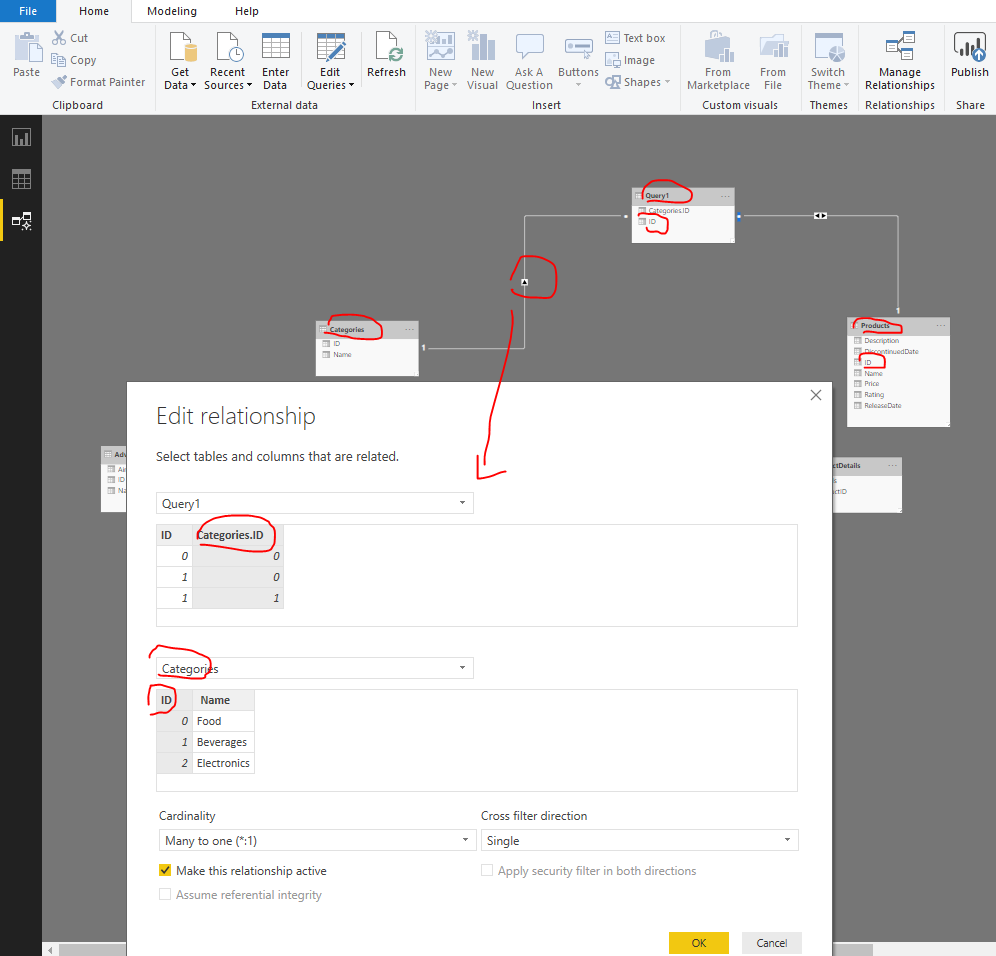
Create relationships

3.png

4.png

Please doanload my pbix to see more details.


Best Regards
Maggie


Community Support Team _ Maggie Li
If this post helps, then please consider Accept it as the solution to help the other members find it more quickly.

thanks @v-juanli-msft for your detailed response.


I can see that you wrote an M query to fetch data from Products and the transform it to a link table. Can this be done via Power BI UI?


Hi @SuraMan 

Transform these to UI,

let
    Source = Products,
    #"Removed Other Columns" = Table.SelectColumns(Source,{"ID", "Categories"}),
    #"Expanded Categories" = Table.ExpandTableColumn(#"Removed Other Columns", "Categories", {"ID", "Name", "Products"}, {"Categories.ID", "Categories.Name", "Categories.Products"}),
    #"Removed Other Columns1" = Table.SelectColumns(#"Expanded Categories",{"ID", "Categories.ID"})
in
    #"Removed Other Columns"

 In Edit queries, i create a blank query,

5.png


#"Removed Other Columns"

4.png

3.png


Best Regards

Maggie


Community Support Team _ Maggie Li
If this post helps, then please consider Accept it as the solution to help the other members find it more quickly.

Thank you Maggie for your detailed assistance.

Helpful resources

Announcements
New to Fabric survey Carousel

New to Fabric Survey

If you have recently started exploring Fabric, we'd love to hear how it's going. Your feedback can help with product improvements.

Power BI DataViz World Championships carousel

Power BI DataViz World Championships - June 2026

A new Power BI DataViz World Championship is coming this June! Don't miss out on submitting your entry.

Join our Fabric User Panel

Join our Fabric User Panel

Share feedback directly with Fabric product managers, participate in targeted research studies and influence the Fabric roadmap.

March Power BI Update Carousel

Power BI Community Update - March 2026

Check out the March 2026 Power BI update to learn about new features.