We've captured the moments from FabCon & SQLCon that everyone is talking about, and we are bringing them to the community, live and on-demand. Starts on April 14th. Register now
Good Morning everyone,
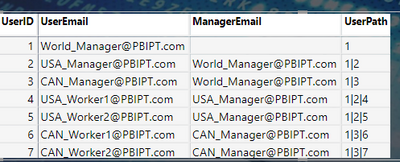
I facing a problem on RLS, present I am getting the entire path of the employee when the manager logs in into file,
but I need only one level down Hierarchy when the manager logs in into file.
Thanks to @Greg_Deckler .
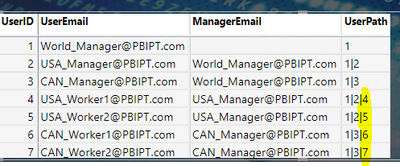
present I am getting value but I need only one level of hierarchy.
example: I don't need this highlighted line.
@Anonymous Maybe:
NewUserPath = PATHITEM([UserPath],1) & "|" & PATHITEM([UserPath],2)
it's not working sir.it must show in dynamic according to Manager login.
@Anonymous That would be PATHITEM([Hierarchy],1). Or maybe this helps: Dynamic Hierarchical Row Level Security - Microsoft Power BI Community. Otherwise, Sorry, having trouble following, can you post sample data as text and expected output?
Not really enough information to go on, please first check if your issue is a common issue listed here: https://community.powerbi.com/t5/Community-Blog/Before-You-Post-Read-This/ba-p/1116882
Also, please see this post regarding How to Get Your Question Answered Quickly: https://community.powerbi.com/t5/Community-Blog/How-to-Get-Your-Question-Answered-Quickly/ba-p/38490
The most important parts are:
1. Sample data as text, use the table tool in the editing bar
2. Expected output from sample data
3. Explanation in words of how to get from 1. to 2.
If you have recently started exploring Fabric, we'd love to hear how it's going. Your feedback can help with product improvements.
A new Power BI DataViz World Championship is coming this June! Don't miss out on submitting your entry.
Share feedback directly with Fabric product managers, participate in targeted research studies and influence the Fabric roadmap.
| User | Count |
|---|---|
| 54 | |
| 37 | |
| 32 | |
| 17 | |
| 15 |
| User | Count |
|---|---|
| 64 | |
| 63 | |
| 37 | |
| 34 | |
| 22 |