Join us at FabCon Atlanta from March 16 - 20, 2026, for the ultimate Fabric, Power BI, AI and SQL community-led event. Save $200 with code FABCOMM.
Register now!The Power BI Data Visualization World Championships is back! Get ahead of the game and start preparing now! Learn more
Hi,
please I have the following example:
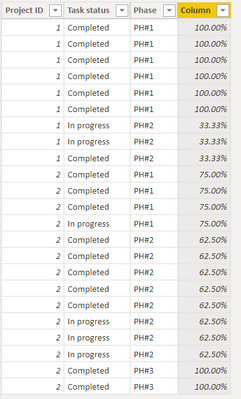
what i need is the following as output, is a tabl that shows for me per project ID and per Phase if all task status = Completed , I will get under task status 100% if it includes both completed and in progress, he will calculate the % of completed tasks over total tasks for that project ID & same Phase.
| Project ID | Task status | Phase |
| 1 | Completed | PH#1 |
| 1 | Completed | PH#1 |
| 1 | Completed | PH#1 |
| 1 | Completed | PH#1 |
| 1 | Completed | PH#1 |
| 1 | Completed | PH#1 |
| 1 | In progress | PH#2 |
| 1 | In progress | PH#2 |
| 1 | Completed | PH#2 |
| 2 | Completed | PH#1 |
| 2 | Completed | PH#1 |
| 2 | Completed | PH#1 |
| 2 | In progress | PH#1 |
| 2 | Completed | PH#2 |
| 2 | Completed | PH#2 |
| 2 | Completed | PH#2 |
| 2 | Completed | PH#2 |
| 2 | Completed | PH#2 |
| 2 | In progress | PH#2 |
| 2 | In progress | PH#2 |
| 2 | In progress | PH#2 |
| 2 | Completed | PH#3 |
| 2 | Completed | PH#3 |
Solved! Go to Solution.
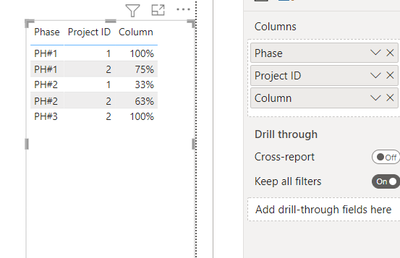
Okay, for that you just need to drag these 3 column on the table visual.
Best Regards,
Samarth
If this post helps, please consider accepting it as the solution to help the other members find it more quickly.
Appreciate your Kudos!!
Connect on Linkedin
Hi @Zakaria_1980 ,
You could create a column as below:-
Column =
VAR completed_task =
COUNTROWS (
FILTER (
'Table',
'Table'[Project ID] = EARLIER ( 'Table'[Project ID] )
&& 'Table'[Phase] = EARLIER ( 'Table'[Phase] )
&& 'Table'[Task status] = "Completed"
)
)
VAR total_task =
COUNTROWS (
FILTER (
'Table',
'Table'[Project ID] = EARLIER ( 'Table'[Project ID] )
&& 'Table'[Phase] = EARLIER ( 'Table'[Phase] )
)
)
RETURN
IF ( total_task = completed_task, 1, DIVIDE ( completed_task, total_task ) )
Refer a attached file.
Output:-
BR,
Samarth
Best Regards,
Samarth
If this post helps, please consider accepting it as the solution to help the other members find it more quickly.
Appreciate your Kudos!!
Connect on Linkedin
Thanks for this output, but can we have sth simple like this:
| Project ID | Phase | Status Completion |
| 1 | PH#1 | 100% |
| 1 | PH#2 | 33% |
| 2 | PH#1 | 75% |
| 2 | PH#2 | 63% |
| 2 | PH#3 | 100% |
@Zakaria_1980 You can adjust your decimals from here.
Best Regards,
Samarth
If this post helps, please consider accepting it as the solution to help the other members find it more quickly.
Appreciate your Kudos!!
Connect on Linkedin
The problem is not the format of the decimal but the output itself, i've shared with you the output i need, what i did is that i regrouped by project id and phase to get the status completion %.
Okay, for that you just need to drag these 3 column on the table visual.
Best Regards,
Samarth
If this post helps, please consider accepting it as the solution to help the other members find it more quickly.
Appreciate your Kudos!!
Connect on Linkedin
The Power BI Data Visualization World Championships is back! Get ahead of the game and start preparing now!
| User | Count |
|---|---|
| 39 | |
| 35 | |
| 33 | |
| 32 | |
| 27 |
| User | Count |
|---|---|
| 136 | |
| 96 | |
| 77 | |
| 67 | |
| 65 |