
Learn from the best! Meet the four finalists headed to the FINALS of the Power BI Dataviz World Championships! Register now
Hi All,
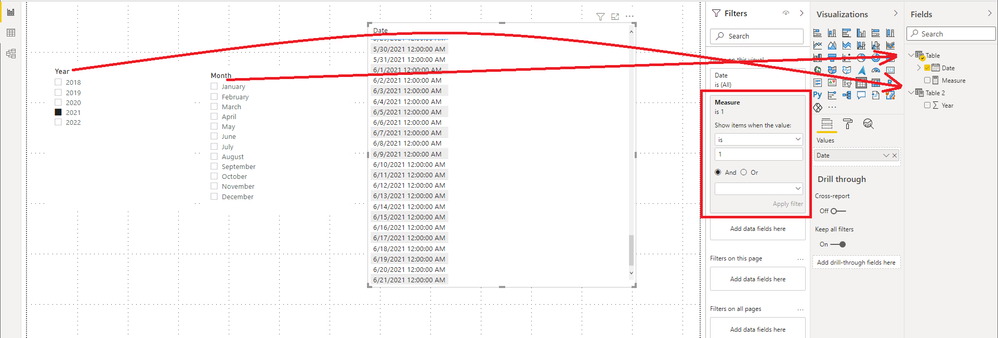
Need your help i have 2 slicers one for year and one for month as shown in the below screenshot.
when i select year 2021 the month slicer has to show only till June and for other years selections it has to show all months.Could someone please let me know how to get this.
Regards
Anitha.
Solved! Go to Solution.
Hi @anithaMallam ,
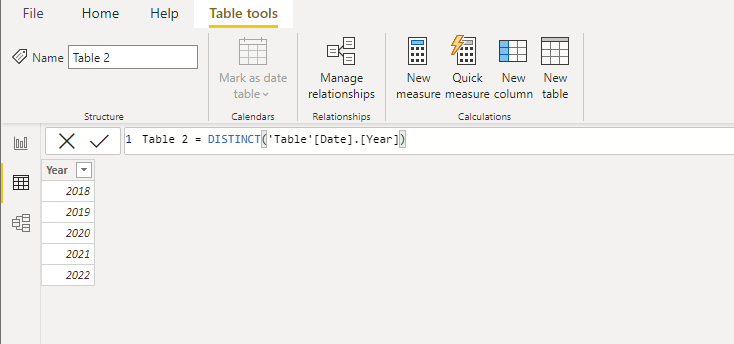
You need to create a seperate year table. In the example I used DAX to create a chronology.
Table 2 = DISTINCT('Table'[Date].[Year])
Then create the following measure
Measure = var _year=SELECTEDVALUE('Table 2'[Year])
return IF(YEAR(MAX('Table'[Date]))=_year,IF(_year=YEAR(TODAY())&&MAX('Table'[Date])>TODAY(),0,1),0)
Best Regards,
Stephen Tao
If this post helps, then please consider Accept it as the solution to help the other members find it more quickly.
Hi @anithaMallam ,
You need to create a seperate year table. In the example I used DAX to create a chronology.
Table 2 = DISTINCT('Table'[Date].[Year])
Then create the following measure
Measure = var _year=SELECTEDVALUE('Table 2'[Year])
return IF(YEAR(MAX('Table'[Date]))=_year,IF(_year=YEAR(TODAY())&&MAX('Table'[Date])>TODAY(),0,1),0)
Best Regards,
Stephen Tao
If this post helps, then please consider Accept it as the solution to help the other members find it more quickly.
@anithaMallam , Create a flag in your date table and use this as visual level filter in the month slicer
new column
flag = if([Date] <=today(),1,0)
filter flag =1
Hi Amit,
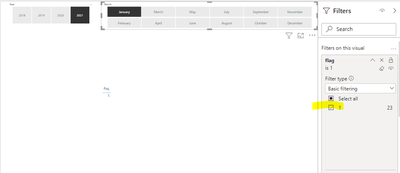
Thanks you for helping me.as per your suggestion i created a new column with flag and applied month slicer visual level filter on the flag as shown
Still when i select 2021 it is not filtering to june,its showing all the months.
Regards
Anitha
A new Power BI DataViz World Championship is coming this June! Don't miss out on submitting your entry.
Share feedback directly with Fabric product managers, participate in targeted research studies and influence the Fabric roadmap.
| User | Count |
|---|---|
| 47 | |
| 32 | |
| 29 | |
| 16 | |
| 15 |
| User | Count |
|---|---|
| 60 | |
| 58 | |
| 39 | |
| 24 | |
| 23 |