Join us at FabCon Atlanta from March 16 - 20, 2026, for the ultimate Fabric, Power BI, AI and SQL community-led event. Save $200 with code FABCOMM.
Register now!Get Fabric Certified for FREE during Fabric Data Days. Don't miss your chance! Request now
Hi community. I'm working in a project of Price Mix Analysis. I have a table with several columns of products and sub-products. I also have two columns with amounts (Sales and Budget). I need to compare the list of products between Sales and Budget and sum the values of Sales only if the budget column has a value for the product; the sub-product is not to be taken into consideration. So, I created a measure to compare the 2 columns. The output is 1 if the 2 columns have a value, if a value is missing in either column, the end value is 0.
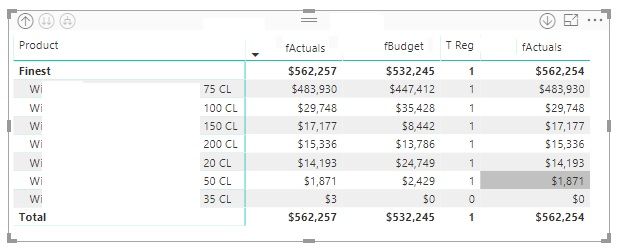
the formula for the column TReg is
Solved! Go to Solution.
Hi Maggie,
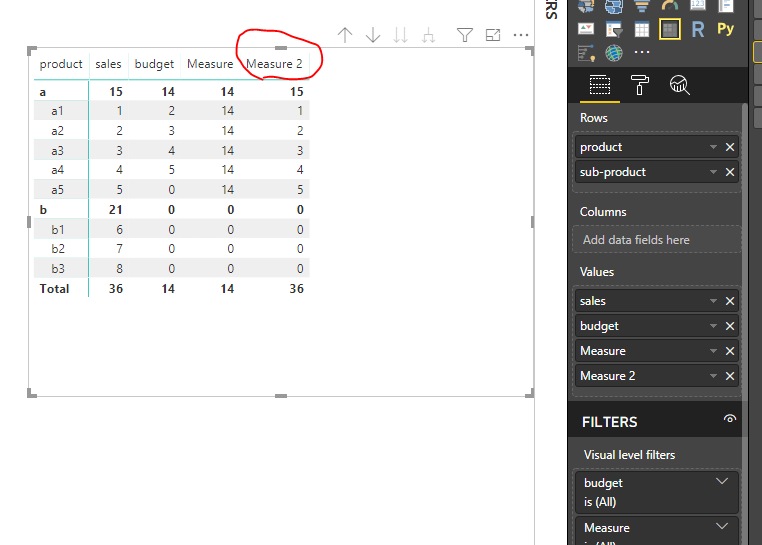
This is great! Thanks, however, this resolves part of it. How do I ensure that the Overall Total sums up only the 15 of Product a since Product b is Zero?
I appreciate your help, really!!!
Albin
@v-juanli-msft wrote:Hi @Anonymous
Create a measure
Measure 2 = IF(OR(CALCULATE(SUM(Sheet7[sales]),ALLEXCEPT(Sheet7,Sheet7[product]))=0,CALCULATE(SUM(Sheet7[budget]),ALLEXCEPT(Sheet7,Sheet7[product]))=0),0,SUM(Sheet7[sales]))
Best Regards
Maggie
Community Support Team _ Maggie Li
If this post helps, then please consider Accept it as the solution to help the other members find it more quickly.
Hi @Anonymous
Create a measure
Measure 2 = IF(OR(CALCULATE(SUM(Sheet7[sales]),ALLEXCEPT(Sheet7,Sheet7[product]))=0,CALCULATE(SUM(Sheet7[budget]),ALLEXCEPT(Sheet7,Sheet7[product]))=0),0,SUM(Sheet7[sales]))
Best Regards
Maggie
Community Support Team _ Maggie Li
If this post helps, then please consider Accept it as the solution to help the other members find it more quickly.
Hi Maggie,
This is great! Thanks, however, this resolves part of it. How do I ensure that the Overall Total sums up only the 15 of Product a since Product b is Zero?
I appreciate your help, really!!!
Albin
@v-juanli-msft wrote:Hi @Anonymous
Create a measure
Measure 2 = IF(OR(CALCULATE(SUM(Sheet7[sales]),ALLEXCEPT(Sheet7,Sheet7[product]))=0,CALCULATE(SUM(Sheet7[budget]),ALLEXCEPT(Sheet7,Sheet7[product]))=0),0,SUM(Sheet7[sales]))
Best Regards
Maggie
Community Support Team _ Maggie Li
If this post helps, then please consider Accept it as the solution to help the other members find it more quickly.
Check out the November 2025 Power BI update to learn about new features.
Advance your Data & AI career with 50 days of live learning, contests, hands-on challenges, study groups & certifications and more!