cancel
Showing results for 
Search instead for 
Did you mean: 

The Power BI Data Visualization World Championships is back! Get ahead of the game and start preparing now! Learn more

Reply
FatBlackCat30
Microsoft Employee
Microsoft Employee

multiple if statement

Hello all,


I have two columns: load and count.

I would like to create a new calculated column called "Class" with formula logic like this:

-if count > 1 then "Both" , load 

or if load = "Both" then "Both 


I am getting lost on how to use two differnet logical outcomes.


thanks for the help


1 ACCEPTED SOLUTION

@FatBlackCat30 


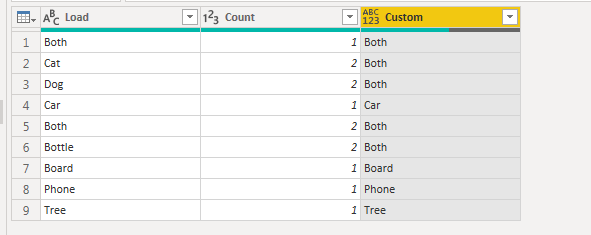
Create a custom column in query editor and use the below formula.


if [Count]>1 or [Load] = "Both" then "Both" else if  [Load] <> "Both" and [Count]<=1 then [Load] else null


image.png

Your 3rd point states "and the count is < 1" but the example show "count <= 1". So modify the above code as per your need.


If this helps, mark it as a solution

Kudos are nice too


Connect on LinkedIn

View solution in original post

5 REPLIES 5
amitchandak
Super User
Super User

Can explain with some data and example

Share with Power BI Enthusiasts: Full Power BI Video (20 Hours) YouTube
Microsoft Fabric Series 60+ Videos YouTube
Microsoft Fabric Hindi End to End YouTube
VasTg
Memorable Member
Memorable Member

@FatBlackCat30 


I couldn't follow the if statement.


Could you provide a sample input and expected output?


Connect on LinkedIn

@VasTg 

1. if load says "Many" the outcome should be "Many"

2. but if the count is > 1 the outcome should be "both"

3. but if the load does not = "both" and the count is <1 then the outcome should be the load column


LoadCount LoadCountOutcome
Both1 Many1Many
Cat2 Cat2Both
Dog2 Dog2Both
Car1 Car1Car
Both2 Many2Many
Bottle2 Bottle2Both
Board1 Board1Board
Phone1 Phone1Phone
Tree1 Tree1Tree

@FatBlackCat30 


Create a custom column in query editor and use the below formula.


if [Count]>1 or [Load] = "Both" then "Both" else if  [Load] <> "Both" and [Count]<=1 then [Load] else null


image.png

Your 3rd point states "and the count is < 1" but the example show "count <= 1". So modify the above code as per your need.


If this helps, mark it as a solution

Kudos are nice too


Connect on LinkedIn
Anonymous
Not applicable

Here you go. Try this and let me know

Outcome = IF(OR('Table'[Load] = "Both", 'Table'[Count] > 1), "Both", 'Table'[Load])

Helpful resources

Announcements
Power BI DataViz World Championships

Power BI Dataviz World Championships

The Power BI Data Visualization World Championships is back! Get ahead of the game and start preparing now!

December 2025 Power BI Update Carousel

Power BI Monthly Update - December 2025

Check out the December 2025 Power BI Holiday Recap!

FabCon Atlanta 2026 carousel

FabCon Atlanta 2026

Join us at FabCon Atlanta, March 16-20, for the ultimate Fabric, Power BI, AI and SQL community-led event. Save $200 with code FABCOMM.