Learn from the best! Meet the four finalists headed to the FINALS of the Power BI Dataviz World Championships! Register now
Hello all,
I have two columns: load and count.
I would like to create a new calculated column called "Class" with formula logic like this:
-if count > 1 then "Both" , load
or if load = "Both" then "Both
I am getting lost on how to use two differnet logical outcomes.
thanks for the help
Solved! Go to Solution.
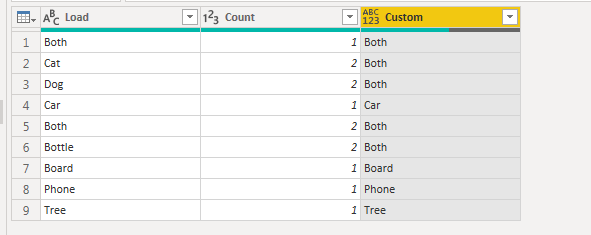
Create a custom column in query editor and use the below formula.
if [Count]>1 or [Load] = "Both" then "Both" else if [Load] <> "Both" and [Count]<=1 then [Load] else null
Your 3rd point states "and the count is < 1" but the example show "count <= 1". So modify the above code as per your need.
If this helps, mark it as a solution
Kudos are nice too
I couldn't follow the if statement.
Could you provide a sample input and expected output?
1. if load says "Many" the outcome should be "Many"
2. but if the count is > 1 the outcome should be "both"
3. but if the load does not = "both" and the count is <1 then the outcome should be the load column
| Load | Count | Load | Count | Outcome | |
| Both | 1 | Many | 1 | Many | |
| Cat | 2 | Cat | 2 | Both | |
| Dog | 2 | Dog | 2 | Both | |
| Car | 1 | Car | 1 | Car | |
| Both | 2 | Many | 2 | Many | |
| Bottle | 2 | Bottle | 2 | Both | |
| Board | 1 | Board | 1 | Board | |
| Phone | 1 | Phone | 1 | Phone | |
| Tree | 1 | Tree | 1 | Tree |
Create a custom column in query editor and use the below formula.
if [Count]>1 or [Load] = "Both" then "Both" else if [Load] <> "Both" and [Count]<=1 then [Load] else null
Your 3rd point states "and the count is < 1" but the example show "count <= 1". So modify the above code as per your need.
If this helps, mark it as a solution
Kudos are nice too
Here you go. Try this and let me know
If you have recently started exploring Fabric, we'd love to hear how it's going. Your feedback can help with product improvements.
A new Power BI DataViz World Championship is coming this June! Don't miss out on submitting your entry.
Share feedback directly with Fabric product managers, participate in targeted research studies and influence the Fabric roadmap.
| User | Count |
|---|---|
| 57 | |
| 34 | |
| 33 | |
| 18 | |
| 16 |
| User | Count |
|---|---|
| 65 | |
| 65 | |
| 44 | |
| 30 | |
| 29 |