cancel
Showing results for 
Search instead for 
Did you mean: 

We've captured the moments from FabCon & SQLCon that everyone is talking about, and we are bringing them to the community, live and on-demand. Starts on April 14th. Register now

Reply
Fekri_bi_66
Frequent Visitor

multi column filter

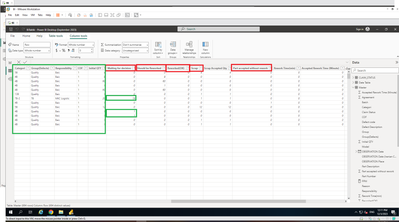
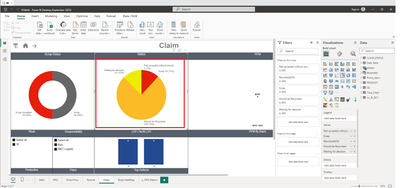
I want to put multi columns in a visual (pie chart or slicer) so that the rest of the visuals are filtered by selecting each column, but no action happens when each option is selected. I tried every method(like  unpivot and field parameter) but it didn't work. please guide me.


2.png

1.png

1 ACCEPTED SOLUTION
amitchandak
Super User
Super User

@Fekri_bi_66 , if you use measures ( Value column with Aggregation) It will not filter


But I think you can do that using the calculation group


Please check the attached file after signature

Model explorer public preview with calculation group authoring| Measure Slicer: https://youtu.be/VfxfJJ0RzvU

Share with Power BI Enthusiasts: Full Power BI Video (20 Hours) YouTube
Microsoft Fabric Series 60+ Videos YouTube
Microsoft Fabric Hindi End to End YouTube

View solution in original post

1 REPLY 1
amitchandak
Super User
Super User

@Fekri_bi_66 , if you use measures ( Value column with Aggregation) It will not filter


But I think you can do that using the calculation group


Please check the attached file after signature

Model explorer public preview with calculation group authoring| Measure Slicer: https://youtu.be/VfxfJJ0RzvU

Share with Power BI Enthusiasts: Full Power BI Video (20 Hours) YouTube
Microsoft Fabric Series 60+ Videos YouTube
Microsoft Fabric Hindi End to End YouTube

Helpful resources

Announcements
New to Fabric survey Carousel

New to Fabric Survey

If you have recently started exploring Fabric, we'd love to hear how it's going. Your feedback can help with product improvements.

Power BI DataViz World Championships carousel

Power BI DataViz World Championships - June 2026

A new Power BI DataViz World Championship is coming this June! Don't miss out on submitting your entry.

Join our Fabric User Panel

Join our Fabric User Panel

Share feedback directly with Fabric product managers, participate in targeted research studies and influence the Fabric roadmap.

March Power BI Update Carousel

Power BI Community Update - March 2026

Check out the March 2026 Power BI update to learn about new features.