cancel
Showing results for 
Search instead for 
Did you mean: 

The Power BI Data Visualization World Championships is back! Get ahead of the game and start preparing now! Learn more

Reply
ShawnPrice
Helper I
Helper I

most current version of name

I have a database that has Item number and Item name among other fields, I'm creating a report that shows the qty of the item number by year. We have changed the item names a few times each year to reflect a more updated named but when I insert the Item name I get all the different name types, and I just want the most current name. Any help or suggstions would be great. Thanks


Capture.PNG

7 REPLIES 7
ShawnPrice
Helper I
Helper I

No time stamp only the date. I will try all those options, thanks very much for the help and I'll get back to you guys to let know if it solved my issue or not.

v-haibl-msft
Microsoft Employee
Microsoft Employee

@ShawnPrice


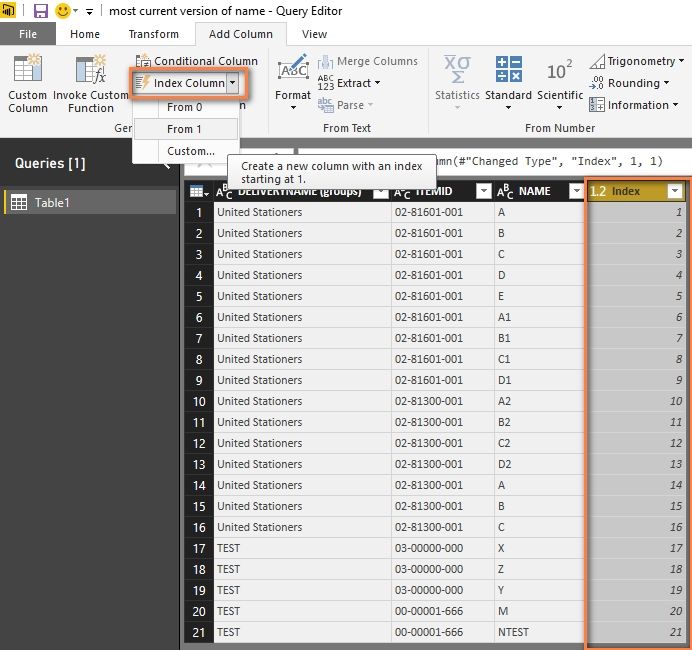
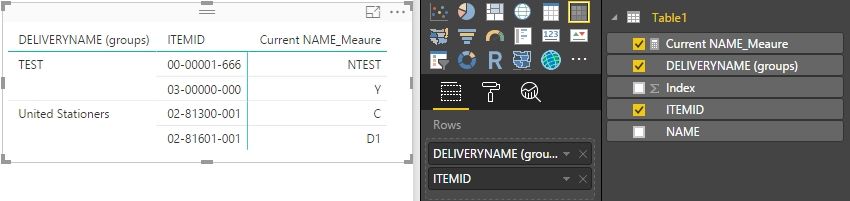
You can add an index column in your table then create a measure to get the latest name.


most current version of name_1.jpg


Current NAME_Meaure = 
    VAR TempIndex =
        CALCULATE (
            MAX ( Table1[Index] ),
            ALLEXCEPT ( Table1, Table1[DELIVERYNAME (groups)], Table1[ITEMID] )
        )
    RETURN
        LOOKUPVALUE ( Table1[NAME], Table1[Index], TempIndex )

most current version of name_2.jpg


Best Regards,

Herbert


Herbert this looks like its working from the limited tests I've run. I'll let you know. Thanks.

Anonymous
Not applicable

I'm sure there's a simpler method, but the following as a new column should give you the current name for each Item:

Current NAME =
    LOOKUPVALUE (
        'DataTable'[NAME],
        'DataTable'[Date], CALCULATE (
            MAX ( 'DataTable'[Date] ),
            FILTER (
                ALL ( 'DataTable' ),
                'DataTable'[ITEMID] = EARLIER ( 'DataTable'[ITEMID] )
            )
        )
    )

Steve I get a "A table of multiple values was supplied when a single value was expected." Any clue what the might be. Thanks

Anonymous
Not applicable

Yeah, this is where it starts to get messy.  You probably have two "latest" records for an ITEMID with the same last date, so the LOOKUPVALUE freaks out as it doesn't have a single row from wihich to choose the NAME.  There's discussion on this "Last Non Empty" problem in several places - e.g. https://blog.crossjoin.co.uk/2013/01/15/a-different-approach-to-last-ever-non-empty-in-dax/


Do your records have a (unique) DateTime stamp rather than Date that can be used to select the latest matching ITEMID record?


Otherwise, do you have an Index column that can be used to select the last matching ITEMID record?

Anonymous
Not applicable

Try this, for the last NAME listed for each ITEMID:

Current NAME =
    CALCULATE (
        LASTNONBLANK ( 'DataTable'[NAME], 1 ),
        FILTER (
            ALL ( 'DataTable' ),
            'DataTable'[ITEMID] = EARLIER ( 'DataTable'[ITEMID] )
        )
    )

Helpful resources

Announcements
Power BI DataViz World Championships

Power BI Dataviz World Championships

The Power BI Data Visualization World Championships is back! Get ahead of the game and start preparing now!

December 2025 Power BI Update Carousel

Power BI Monthly Update - December 2025

Check out the December 2025 Power BI Holiday Recap!

FabCon Atlanta 2026 carousel

FabCon Atlanta 2026

Join us at FabCon Atlanta, March 16-20, for the ultimate Fabric, Power BI, AI and SQL community-led event. Save $200 with code FABCOMM.