Join us at FabCon Atlanta from March 16 - 20, 2026, for the ultimate Fabric, Power BI, AI and SQL community-led event. Save $200 with code FABCOMM.
Register now!The Power BI Data Visualization World Championships is back! Get ahead of the game and start preparing now! Learn more
I am using the same field in my slicer as in my table (Group Name). The slicer is showing only the Group Names that have data associated with them in the fact table. The table is showing ALL Group Names. Both of these are using the same dimension table - it seems as soon as I add any data from the fact table, the list of Group Names changes. I can see why this would happen (seems like it is the opposite of what one might expect) - but I need my slicer to match my table (either with all Group Names or just the subset). Any ideas?
Solved! Go to Solution.
Hi @faerewatson,
but I need my slicer to match my table (either with all Group Names or just the subset).
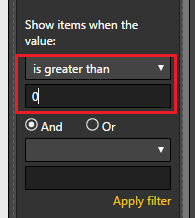
In this scenario, I would suggest you add a visual level filter([Count] is greater than 0) on Table visual to filter out the Group Names whose [Count] is 0. ![]()
Regards
Hi @faerewatson,
but I need my slicer to match my table (either with all Group Names or just the subset).
In this scenario, I would suggest you add a visual level filter([Count] is greater than 0) on Table visual to filter out the Group Names whose [Count] is 0. ![]()
Regards
Hi @faerewatson,
Great to help! Could you accept my reply above as solution to close this thread? ![]()
Regards
Check out the November 2025 Power BI update to learn about new features.
Advance your Data & AI career with 50 days of live learning, contests, hands-on challenges, study groups & certifications and more!
| User | Count |
|---|---|
| 58 | |
| 45 | |
| 40 | |
| 21 | |
| 18 |