Get Fabric or SQL Certified for Free.
Get certified for free when you join Fabric Data Days 2026 and dive into Fabric, Power BI, SQL, AI, and other essential data skills.
Join now- Power BI forums
- Get Help with Power BI
- Desktop
- Service
- Report Server
- Power Query
- Mobile Apps
- Developer
- DAX Commands and Tips
- Custom Visuals Development Discussion
- Health and Life Sciences
- Power BI Spanish forums
- Translated Spanish Desktop
- Training and Consulting
- Instructor Led Training
- Dashboard in a Day for Women, by Women
- Galleries
- Data Stories Gallery
- Themes Gallery
- Contests Gallery
- QuickViz Gallery
- Quick Measures Gallery
- Visual Calculations Gallery
- Fabric Apps Gallery
- Notebook Gallery
- Translytical Task Flow Gallery
- TMDL Gallery
- R Script Showcase
- Webinars and Video Gallery
- Ideas
- Custom Visuals Ideas (read-only)
- Issues
- Issues
- Events
- Upcoming Events
July 7 - July 17 | Round 2 of the Power BI Dataviz World Championships. Don't miss your chance! Learn more
- Power BI forums
- Forums
- Get Help with Power BI
- Desktop
- Re: mitRe: missing value
- Subscribe to RSS Feed
- Mark Topic as New
- Mark Topic as Read
- Float this Topic for Current User
- Bookmark
- Subscribe
- Printer Friendly Page


- Mark as New
- Bookmark
- Subscribe
- Mute
- Subscribe to RSS Feed
- Permalink
- Report Inappropriate Content
missing value
Hello Experts, Have a list that shows partners enrolled in courses, how to make a report that shows missed courses by each partner.
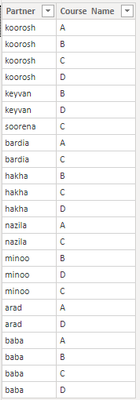
Solved! Go to Solution.


- Mark as New
- Bookmark
- Subscribe
- Mute
- Subscribe to RSS Feed
- Permalink
- Report Inappropriate Content
@koorosh , Create new table like
New table =except(crossjoin(all(Table[partner]),all(Table[Course Name])), selectcolumns(Table,"partner", Table[partner], "Course Name",Table[Course Name]))
https://docs.microsoft.com/en-us/dax/except-function-dax


- Mark as New
- Bookmark
- Subscribe
- Mute
- Subscribe to RSS Feed
- Permalink
- Report Inappropriate Content
cross join expect 2 inputs ,,,, you are including both columns in ALL statement... separate both columns
CrossJoin( all(Sheet1[Partner]), all(Sheet1[Course Name]))
Did I answer your question? Mark my post as a solution! Appreciate your Kudos!!
Proud to be a Super User!

- Mark as New
- Bookmark
- Subscribe
- Mute
- Subscribe to RSS Feed
- Permalink
- Report Inappropriate Content
HI @koorosh ,
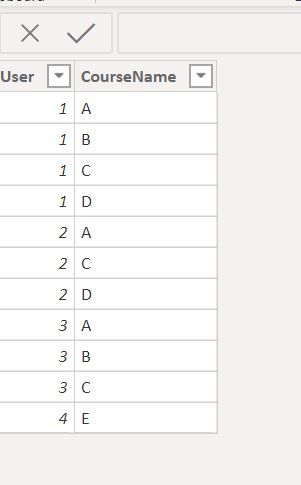
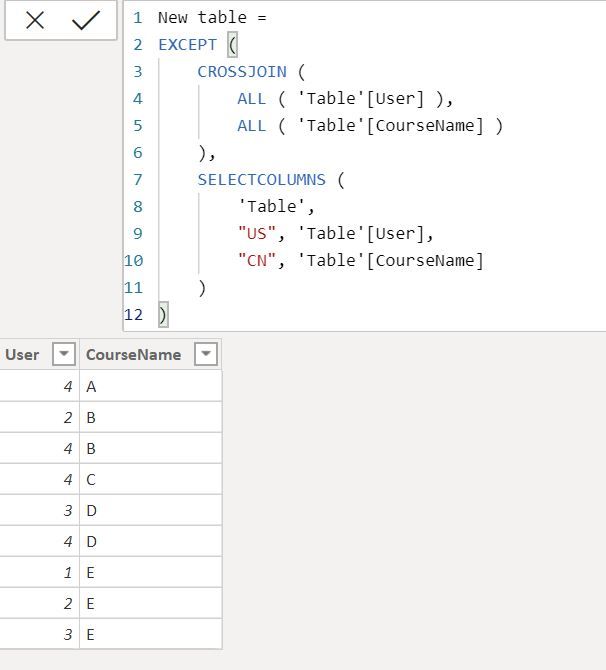
Regards,
Harsh Nathani
Did I answer your question? Mark my post as a solution! Appreciate with a Kudos!! (Click the Thumbs Up Button)
- Mark as New
- Bookmark
- Subscribe
- Mute
- Subscribe to RSS Feed
- Permalink
- Report Inappropriate Content
1- you need to separate Course from Orignal table, i.e. a table that contains all courses. From this table you can create course table like this.
Course = SUMMARIZE(Partner,Partner[Course])
2- Then join this table with your main table.
3- Create a matrix visual
4- Put Partner from partner table in Rows
5- Put Course from course table(new summarized table) in columns
6- create a measure for missed count
Missed Course = IF(COUNT(Partner[Course])>0,BLANK(),1)7- Drop this measure in Values and see the results
Did I answer your question? Mark my post as a solution! Appreciate your Kudos!!
Proud to be a Super User!
- Mark as New
- Bookmark
- Subscribe
- Mute
- Subscribe to RSS Feed
- Permalink
- Report Inappropriate Content
@koorosh , Create new table like
New table =except(crossjoin(all(Table[partner]),all(Table[Course Name])), selectcolumns(Table,"partner", Table[partner], "Course Name",Table[Course Name]))
- Mark as New
- Bookmark
- Subscribe
- Mute
- Subscribe to RSS Feed
- Permalink
- Report Inappropriate Content
Why get error Amit?

- Mark as New
- Bookmark
- Subscribe
- Mute
- Subscribe to RSS Feed
- Permalink
- Report Inappropriate Content
Hi @koorosh ,
You need to add a ) after Sheet1[CourseName]
Create a Table
T2 = except(crossjoin(all('Table'[User]),all('Table'[CourseName])),selectcolumns('Table',"partner", 'Table'[User], "Course Name",'Table'[CourseName]))
Regards,
Harsh Nathani
Did I answer your question? Mark my post as a solution! Appreciate with a Kudos!! (Click the Thumbs Up Button)
- Mark as New
- Bookmark
- Subscribe
- Mute
- Subscribe to RSS Feed
- Permalink
- Report Inappropriate Content
cross join expect 2 inputs ,,,, you are including both columns in ALL statement... separate both columns
CrossJoin( all(Sheet1[Partner]), all(Sheet1[Course Name]))
Did I answer your question? Mark my post as a solution! Appreciate your Kudos!!
Proud to be a Super User!
- Mark as New
- Bookmark
- Subscribe
- Mute
- Subscribe to RSS Feed
- Permalink
- Report Inappropriate Content
The result is wrong,
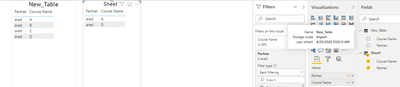
In the new table "arad" should be shown with "B" and "C" course.
- Mark as New
- Bookmark
- Subscribe
- Mute
- Subscribe to RSS Feed
- Permalink
- Report Inappropriate Content
Hi @koorosh ,
Your Sheet1 Table in the Visualization Pane should have values from New Table.
Here in the screenshot the values are selectd from the sheet1 table.
Regards,
Harsh Nathani
Did I answer your question? Mark my post as a solution! Appreciate with a Kudos!! (Click the Thumbs Up Button)
- Mark as New
- Bookmark
- Subscribe
- Mute
- Subscribe to RSS Feed
- Permalink
- Report Inappropriate Content
Thanks to all gentlemen, Amit, Farhan, Harsh.
- Mark as New
- Bookmark
- Subscribe
- Mute
- Subscribe to RSS Feed
- Permalink
- Report Inappropriate Content
Hi, Again Experts, why partner name slicer does not work for both tables?

- Mark as New
- Bookmark
- Subscribe
- Mute
- Subscribe to RSS Feed
- Permalink
- Report Inappropriate Content
In the main table (sheet1) arad enrolled in "A" and "D" course. In the new table, we are looking for missed courses for arad!
- Mark as New
- Bookmark
- Subscribe
- Mute
- Subscribe to RSS Feed
- Permalink
- Report Inappropriate Content
HI @koorosh ,
Regards,
Harsh Nathani
Did I answer your question? Mark my post as a solution! Appreciate with a Kudos!! (Click the Thumbs Up Button)
- Mark as New
- Bookmark
- Subscribe
- Mute
- Subscribe to RSS Feed
- Permalink
- Report Inappropriate Content

Helpful resources

FabCon & SQLCon – Barcelona 2026
Join us in Barcelona for FabCon and SQLCon, the Fabric, Power BI, SQL, and AI community event. Save €200 with code FABCMTY200.

Power BI Monthly Update - July 2026
Check out the July 2026 Power BI update to learn about new features.

Data Days 2026
Join Data Days 2026: 60 days of free live/on-demand sessions, challenges, study groups, and certification opportunities.

Power BI DataViz World Championships - June 2026
A new Power BI DataViz World Championship is coming this June! Don't miss out on submitting your entry.

| User | Count |
|---|---|
| 30 | |
| 25 | |
| 23 | |
| 22 | |
| 13 |


| User | Count |
|---|---|
| 50 | |
| 32 | |
| 19 | |
| 19 | |
| 17 |


