Join us at FabCon Atlanta from March 16 - 20, 2026, for the ultimate Fabric, Power BI, AI and SQL community-led event. Save $200 with code FABCOMM.
Register now!Learn from the best! Meet the four finalists headed to the FINALS of the Power BI Dataviz World Championships! Register now
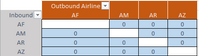
Hello - I'm trying to understand how the top left most cell is populated on a matrix visual when you have both column and row values. It seems to display the name of the rows field, but formats itself to match the columns which is confusing to the report user. See example below.
I am looking for either a way to have it display the field name that is in the columns value location or a way to format it to match the row header formatting. Kind of like this:
Thanks for any insight you can provide.
Hi @Anonymous
There is no such option in power bi currently, you could distinguish the "row" and "column" with a workaround as below.
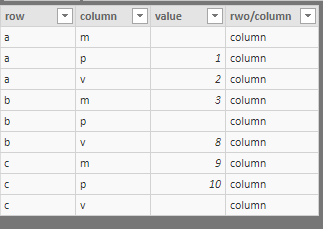
create a column in the table
rwo/column = "column"
then add "row/column" in the "Column" field, and click on the "expand" icon on the top-right of the matrix.
Best Regards
Maggie
Share feedback directly with Fabric product managers, participate in targeted research studies and influence the Fabric roadmap.
Check out the February 2026 Power BI update to learn about new features.
| User | Count |
|---|---|
| 62 | |
| 55 | |
| 39 | |
| 16 | |
| 15 |
| User | Count |
|---|---|
| 93 | |
| 85 | |
| 33 | |
| 31 | |
| 25 |