We've captured the moments from FabCon & SQLCon that everyone is talking about, and we are bringing them to the community, live and on-demand. Starts on April 14th. Register now
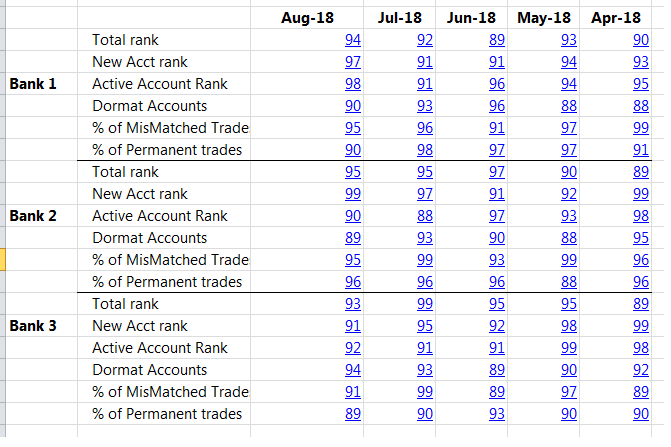
hello, i am trying to create this matrix in this format, a Dimension in column 1 that is distinct, and in Column 2, a set of repeating measures for each distinct Dimension in Column 1. If possible... i would like each value cell to link to another report page...
i am enclosing a screenshot, i tried to do this in the standard matrix but had trouble... please give me advice . thanks
Solved! Go to Solution.
question Lydia
do you think i will be able to drop a Dimension in 1st column like my original screenshot shows? (if you have used this before)
i just dont want to go thru the process and I cant format it this way... any guidance on this issue?
@ilcaa72,
I am afraid that it is not possible as if you add the dimension to the Measure table, how will you establish relationship between the measures based on the dimension?
Regards,
Lydia
thanks Lydia. The link to report is the least of the concerns, its a "nice to have".
the ideal would be to create this type of structured table. ill check out the links
It's not an exact representation (it's pivoted) but you can make something similar using a table viz and a slicer:
If you have recently started exploring Fabric, we'd love to hear how it's going. Your feedback can help with product improvements.
A new Power BI DataViz World Championship is coming this June! Don't miss out on submitting your entry.
Share feedback directly with Fabric product managers, participate in targeted research studies and influence the Fabric roadmap.
| User | Count |
|---|---|
| 54 | |
| 39 | |
| 32 | |
| 17 | |
| 15 |
| User | Count |
|---|---|
| 64 | |
| 63 | |
| 37 | |
| 36 | |
| 22 |