FabCon is coming to Atlanta
Join us at FabCon Atlanta from March 16 - 20, 2026, for the ultimate Fabric, Power BI, AI and SQL community-led event. Save $200 with code FABCOMM.
Register now!- Power BI forums
- Get Help with Power BI
- Desktop
- Service
- Report Server
- Power Query
- Mobile Apps
- Developer
- DAX Commands and Tips
- Custom Visuals Development Discussion
- Health and Life Sciences
- Power BI Spanish forums
- Translated Spanish Desktop
- Training and Consulting
- Instructor Led Training
- Dashboard in a Day for Women, by Women
- Galleries
- Data Stories Gallery
- Themes Gallery
- Contests Gallery
- QuickViz Gallery
- Quick Measures Gallery
- Visual Calculations Gallery
- Notebook Gallery
- Translytical Task Flow Gallery
- TMDL Gallery
- R Script Showcase
- Webinars and Video Gallery
- Ideas
- Custom Visuals Ideas (read-only)
- Issues
- Issues
- Events
- Upcoming Events
The Power BI Data Visualization World Championships is back! Get ahead of the game and start preparing now! Learn more
- Power BI forums
- Forums
- Get Help with Power BI
- Desktop
- Re: matrix percentage from another total
- Subscribe to RSS Feed
- Mark Topic as New
- Mark Topic as Read
- Float this Topic for Current User
- Bookmark
- Subscribe
- Printer Friendly Page

- Mark as New
- Bookmark
- Subscribe
- Mute
- Subscribe to RSS Feed
- Permalink
- Report Inappropriate Content
matrix percentage from another total
I want to create a matrix that shows the percentage of paid invoices from total amount of invoices.
i have invoice-date, paymnt-date, invoice-amount, payment-amount
I have to show how much has been paid in Jan., Feb., Mar...etc from total Jan. invoice amount and so on for each month.
Solved! Go to Solution.
- Mark as New
- Bookmark
- Subscribe
- Mute
- Subscribe to RSS Feed
- Permalink
- Report Inappropriate Content
Hi @Anonymous ,
I created some data:
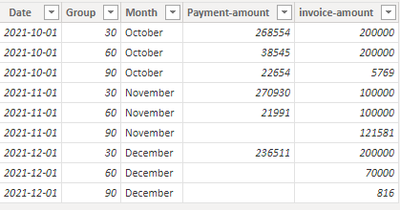
Here are the steps you can follow:
1. Create measure.
30 =
var _30=CALCULATE(SUM('Table'[Payment-amount]),FILTER(ALL('Table'),'Table'[Month]=MAX('Table'[Month])&&'Table'[Group]=30))
var _all=CALCULATE(SUM('Table'[invoice-amount]),FILTER(ALL('Table'),'Table'[Month]=MAX('Table'[Month])))
return
DIVIDE(_30,_all)
60 =
var _60=CALCULATE(SUM('Table'[Payment-amount]),FILTER(ALL('Table'),'Table'[Month]=MAX('Table'[Month])&&'Table'[Group]=60))
var _all=CALCULATE(SUM('Table'[invoice-amount]),FILTER(ALL('Table'),'Table'[Month]=MAX('Table'[Month])))
return
DIVIDE(_60,_all)90 =
var _90=CALCULATE(SUM('Table'[Payment-amount]),FILTER(ALL('Table'),'Table'[Month]=MAX('Table'[Month])&&'Table'[Group]=90))
var _all=CALCULATE(SUM('Table'[invoice-amount]),FILTER(ALL('Table'),'Table'[Month]=MAX('Table'[Month])))
return
DIVIDE(_90,_all)30_group =
var _30=CALCULATE(SUM('Table'[Payment-amount]),FILTER(ALL('Table'),'Table'[Month]=MAX('Table'[Month])&&'Table'[Group]=30))
var _all=CALCULATE(SUM('Table'[Payment-amount]),FILTER(ALL('Table'),'Table'[Month]=MAX('Table'[Month])))
return
DIVIDE(_30,_all)60_group =
var _60=CALCULATE(SUM('Table'[Payment-amount]),FILTER(ALL('Table'),'Table'[Month]=MAX('Table'[Month])&&'Table'[Group]=60))
var _all=CALCULATE(SUM('Table'[Payment-amount]),FILTER(ALL('Table'),'Table'[Month]=MAX('Table'[Month])))
return
DIVIDE(_60,_all)90_group =
var _90=CALCULATE(SUM('Table'[Payment-amount]),FILTER(ALL('Table'),'Table'[Month]=MAX('Table'[Month])&&'Table'[Group]=90))
var _all=CALCULATE(SUM('Table'[Payment-amount]),FILTER(ALL('Table'),'Table'[Month]=MAX('Table'[Month])))
return
DIVIDE(_90,_all)Result:

2. Use Enter data to create a slice table.

3. Create the measure again and change the values in the matrix by selecting the slicer.
30_select =
var _select=SELECTEDVALUE(Slice_Table[select])
return
IF(
    _select="Value",[30],[30_group])
60_select =
var _select=SELECTEDVALUE(Slice_Table[select])
return
IF(
_select="Value",[60],[60_group])90_select =
var _select=SELECTEDVALUE(Slice_Table[select])
return
IF(
_select="Value",[90],[90_group])4. Result:
Use [select] of Slice_Table as a slicer, and form a matrix with [Month], [30_select], [60_select], [90_select] of Table.
When the slicer is selected as Value, the matrix displays:
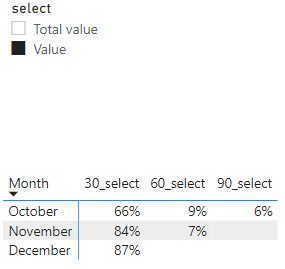
When the slicer is selected as Total value, the matrix displays:
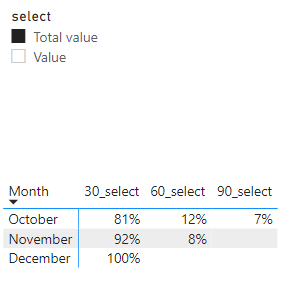
Best Regards,
Liu Yang
If this post helps, then please consider Accept it as the solution to help the other members find it more quickly
- Mark as New
- Bookmark
- Subscribe
- Mute
- Subscribe to RSS Feed
- Permalink
- Report Inappropriate Content
Thank you @Anonymous it worked bu there is a small problem. total column gives wrong total

- Mark as New
- Bookmark
- Subscribe
- Mute
- Subscribe to RSS Feed
- Permalink
- Report Inappropriate Content
Hi @Anonymous ,
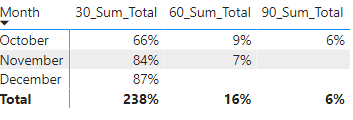
This is an error in the Total of the measure, you can use the HASONEVALUE() function to solve it:
Create measure:
30_Sum_Total =
VAR _table =
    SUMMARIZE ( 'Table', 'Table'[Month], "_value",[30] )
RETURN
    IF ( HASONEVALUE ( 'Table'[Month] ),[30], SUMX ( _table, [_value] )
)
60_Sum_Total =
VAR _table =
    SUMMARIZE ( 'Table', 'Table'[Month], "_value", [60] )
RETURN
    IF ( HASONEVALUE ( 'Table'[Month] ),[60], SUMX ( _table, [_value] )
)
90_Sum_Total =
VAR _table =
SUMMARIZE ( 'Table', 'Table'[Month], "_value", [90] )
RETURN
IF ( HASONEVALUE ( 'Table'[Month] ),[90], SUMX ( _table, [_value] )
)Notice:
Don't forget to format each measure as a percentage
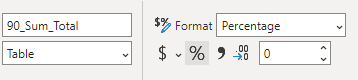
Result:
Best Regards,
Liu Yang
If this post helps, then please consider Accept it as the solution to help the other members find it more quickly.
- Mark as New
- Bookmark
- Subscribe
- Mute
- Subscribe to RSS Feed
- Permalink
- Report Inappropriate Content
Hi @Anonymous ,
Whether your measure format is Whole number, you can select [60] measure, click % in Measure tools - to convert it to percentage format

Best Regards,
Liu Yang
If this post helps, then please consider Accept it as the solution to help the other members find it more quickly.
- Mark as New
- Bookmark
- Subscribe
- Mute
- Subscribe to RSS Feed
- Permalink
- Report Inappropriate Content
Hello @Anonymous
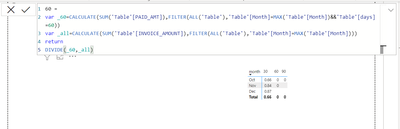
Got wrong results in 60 & 90 categories. What is wrong?
- Mark as New
- Bookmark
- Subscribe
- Mute
- Subscribe to RSS Feed
- Permalink
- Report Inappropriate Content
Hi @Anonymous ,
I created some data:
Here are the steps you can follow:
1. Create measure.
30 =
var _30=CALCULATE(SUM('Table'[Payment-amount]),FILTER(ALL('Table'),'Table'[Month]=MAX('Table'[Month])&&'Table'[Group]=30))
var _all=CALCULATE(SUM('Table'[invoice-amount]),FILTER(ALL('Table'),'Table'[Month]=MAX('Table'[Month])))
return
DIVIDE(_30,_all)
60 =
var _60=CALCULATE(SUM('Table'[Payment-amount]),FILTER(ALL('Table'),'Table'[Month]=MAX('Table'[Month])&&'Table'[Group]=60))
var _all=CALCULATE(SUM('Table'[invoice-amount]),FILTER(ALL('Table'),'Table'[Month]=MAX('Table'[Month])))
return
DIVIDE(_60,_all)90 =
var _90=CALCULATE(SUM('Table'[Payment-amount]),FILTER(ALL('Table'),'Table'[Month]=MAX('Table'[Month])&&'Table'[Group]=90))
var _all=CALCULATE(SUM('Table'[invoice-amount]),FILTER(ALL('Table'),'Table'[Month]=MAX('Table'[Month])))
return
DIVIDE(_90,_all)30_group =
var _30=CALCULATE(SUM('Table'[Payment-amount]),FILTER(ALL('Table'),'Table'[Month]=MAX('Table'[Month])&&'Table'[Group]=30))
var _all=CALCULATE(SUM('Table'[Payment-amount]),FILTER(ALL('Table'),'Table'[Month]=MAX('Table'[Month])))
return
DIVIDE(_30,_all)60_group =
var _60=CALCULATE(SUM('Table'[Payment-amount]),FILTER(ALL('Table'),'Table'[Month]=MAX('Table'[Month])&&'Table'[Group]=60))
var _all=CALCULATE(SUM('Table'[Payment-amount]),FILTER(ALL('Table'),'Table'[Month]=MAX('Table'[Month])))
return
DIVIDE(_60,_all)90_group =
var _90=CALCULATE(SUM('Table'[Payment-amount]),FILTER(ALL('Table'),'Table'[Month]=MAX('Table'[Month])&&'Table'[Group]=90))
var _all=CALCULATE(SUM('Table'[Payment-amount]),FILTER(ALL('Table'),'Table'[Month]=MAX('Table'[Month])))
return
DIVIDE(_90,_all)Result:
2. Use Enter data to create a slice table.
3. Create the measure again and change the values in the matrix by selecting the slicer.
30_select =
var _select=SELECTEDVALUE(Slice_Table[select])
return
IF(
    _select="Value",[30],[30_group])
60_select =
var _select=SELECTEDVALUE(Slice_Table[select])
return
IF(
_select="Value",[60],[60_group])90_select =
var _select=SELECTEDVALUE(Slice_Table[select])
return
IF(
_select="Value",[90],[90_group])4. Result:
Use [select] of Slice_Table as a slicer, and form a matrix with [Month], [30_select], [60_select], [90_select] of Table.
When the slicer is selected as Value, the matrix displays:
When the slicer is selected as Total value, the matrix displays:
Best Regards,
Liu Yang
If this post helps, then please consider Accept it as the solution to help the other members find it more quickly
- Mark as New
- Bookmark
- Subscribe
- Mute
- Subscribe to RSS Feed
- Permalink
- Report Inappropriate Content
TThank you @Anonymous It was so beneficial, however, the matrix doesn't show the results.
What can I do in this case?


- Mark as New
- Bookmark
- Subscribe
- Mute
- Subscribe to RSS Feed
- Permalink
- Report Inappropriate Content
Hi @Anonymous
Use the Matrix visual. Drag "Invoice Number" on to the values. Convert it to Distinct Count using the little down arrow. Add Months to the Columns of the Matrix Table. Go back to the "Invoice Number" count and then click on the down arrow again, go to "Show Value As" and then select Percent of Grand Total.
Hopefully that helps 🙂
Theo
If I have posted a response that resolves your question, please accept it as a solution to formally close the post.
Also, if you are as passionate about Power BI, DAX and data as I am, please feel free to reach out if you have any questions, queries, or if you simply want to connect and talk to another data geek!
Want to connect?www.linkedin.com/in/theoconias
- Mark as New
- Bookmark
- Subscribe
- Mute
- Subscribe to RSS Feed
- Permalink
- Report Inappropriate Content
Thank you @TheoC but I'm looking for a matrix that contains invoice date as columns, payment date as rows, and the paid amount as a value but I need to present it as a percentage of invoice amount. if i chose show value as a percentage from grand total it will give paid amount per month from total paid amount. I need to check how many has been paid from the total invoice every single month. for example, I have to present that 60% of invoices has been issued in oct and paid in oct, while 9% of invoices has been issued in oct and paid in nov.. etc. Again I want the percentage to be paid amount/ invoice amount.
- Mark as New
- Bookmark
- Subscribe
- Mute
- Subscribe to RSS Feed
- Permalink
- Report Inappropriate Content

I need to show 66% (268554/405769) instead of 268554. If I chose show value as percentage from grand total it gives the result of (268554/329753)
Helpful resources

Power BI Dataviz World Championships
The Power BI Data Visualization World Championships is back! Get ahead of the game and start preparing now!

Power BI Monthly Update - December 2025
Check out the December 2025 Power BI Holiday Recap!

FabCon Atlanta 2026
Join us at FabCon Atlanta, March 16-20, for the ultimate Fabric, Power BI, AI and SQL community-led event. Save $200 with code FABCOMM.

| User | Count |
|---|---|
| 38 | |
| 36 | |
| 33 | |
| 31 | |
| 28 |


| User | Count |
|---|---|
| 129 | |
| 88 | |
| 79 | |
| 68 | |
| 63 |


