Join us at FabCon Atlanta from March 16 - 20, 2026, for the ultimate Fabric, Power BI, AI and SQL community-led event. Save $200 with code FABCOMM.
Register now!Learn from the best! Meet the four finalists headed to the FINALS of the Power BI Dataviz World Championships! Register now
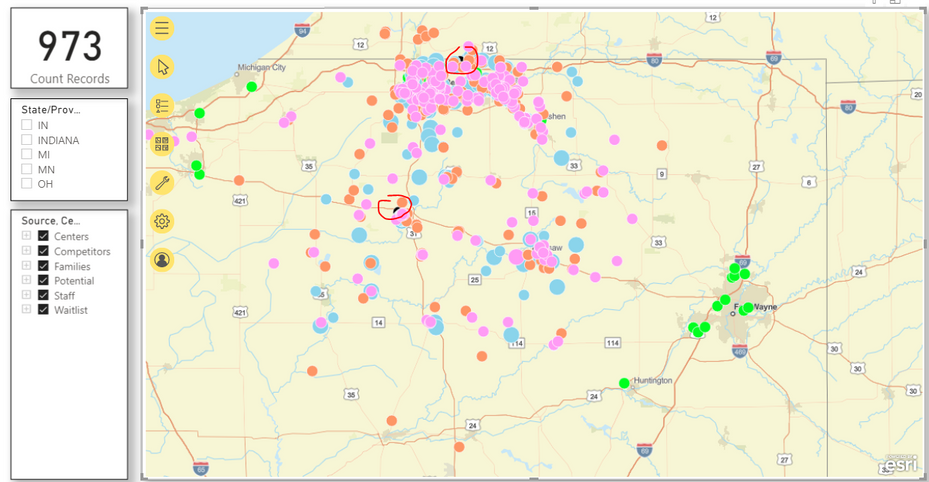
I have a simple map visual where each color represents different source.
I am trying to do following:
I spent quite some time trying to accomplish both requirements and was not successful yet. Did anybody else has similar requirements and figured out how to accomplish it.
Hi @bogomda ,
You could use the custom visual: Icon Map to have a try.
https://powerbi.jamesdales.com/how-to-use-icon-map/
https://blog.pragmaticworks.com/power-bi-custom-visuals-icon-map
Hi @bogomda ,
What is the visualization you are I'm not abble to get a similar look and feel with the one you have. Some visualizations don't allow the customization of all the different options.
Regards
Miguel Félix
Proud to be a Super User!
Check out my blog: Power BI em PortuguêsShare feedback directly with Fabric product managers, participate in targeted research studies and influence the Fabric roadmap.
Check out the February 2026 Power BI update to learn about new features.
| User | Count |
|---|---|
| 61 | |
| 54 | |
| 41 | |
| 17 | |
| 13 |
| User | Count |
|---|---|
| 106 | |
| 99 | |
| 38 | |
| 29 | |
| 28 |