cancel
Showing results for 
Search instead for 
Did you mean: 

The Power BI Data Visualization World Championships is back! Get ahead of the game and start preparing now! Learn more

Reply
kesham
Frequent Visitor

lookup valu of a previous row and calculate

Hi,

I'm new in power BI and i'm searching a solution to my issue

I'm seaching to calculate a empty kilometers between 2 travels of a driver making with a simple substraction.

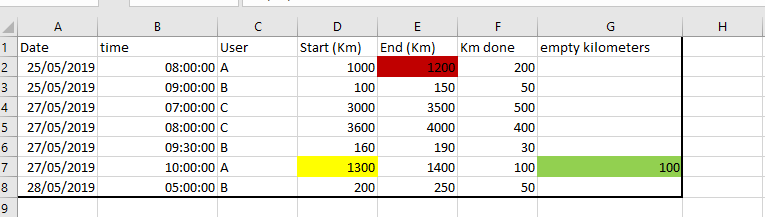
I have the mileage counters of trucks (start and end when they are charging) and I want to calculate the distance between the "start" of the current travel and the "end" of the previous travel. See example in the picture

image.png

so for the user A, G7=D7-E2


a previous travel is depending the date and the time


thank you inadvance for your help


1 ACCEPTED SOLUTION
v-xicai
Community Support
Community Support

Hi @kesham ,


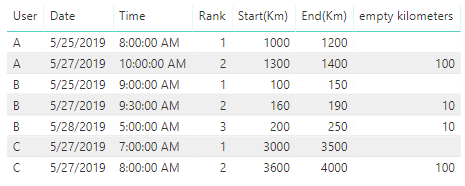
You can create column Rank , then create measure empty kilometers to meet your demand.


Rank = RANKX(FILTER(Table1,Table1[User]=EARLIER(Table1[User])),Table1[Date]&Table1[Time],,ASC,Dense)


empty kilometers = IF(MAX(Table1[Rank])=1,BLANK(),MAX(Table1[Start(Km)])-CALCULATE(MAX(Table1[End(Km)]),FILTER(ALL(Table1),Table1[User]=MAX(Table1[User])&&Table1[Rank]=MAX(Table1[Rank])-1)))


1.png


Here is my test pbix: https://qiuyunus-my.sharepoint.com/:u:/g/personal/pbipro_qiuyunus_onmicrosoft_com/Ee4k5IBgXY5GvqVg4U...


Best Regards,

Amy


If this post helps, then please consider Accept it as the solution to help the other members find it more quickly.

View solution in original post

3 REPLIES 3
kesham
Frequent Visitor

in short, what I need is:

"start kilometer" - select the max("end kilometer") of  the table (all "end kilometer" where "end kilometer" are < of "start kilometer")

v-xicai
Community Support
Community Support

Hi @kesham ,


You can create column Rank , then create measure empty kilometers to meet your demand.


Rank = RANKX(FILTER(Table1,Table1[User]=EARLIER(Table1[User])),Table1[Date]&Table1[Time],,ASC,Dense)


empty kilometers = IF(MAX(Table1[Rank])=1,BLANK(),MAX(Table1[Start(Km)])-CALCULATE(MAX(Table1[End(Km)]),FILTER(ALL(Table1),Table1[User]=MAX(Table1[User])&&Table1[Rank]=MAX(Table1[Rank])-1)))


1.png


Here is my test pbix: https://qiuyunus-my.sharepoint.com/:u:/g/personal/pbipro_qiuyunus_onmicrosoft_com/Ee4k5IBgXY5GvqVg4U...


Best Regards,

Amy


If this post helps, then please consider Accept it as the solution to help the other members find it more quickly.

kesham
Frequent Visitor

Could someone help me please?

Helpful resources

Announcements
Power BI DataViz World Championships

Power BI Dataviz World Championships

The Power BI Data Visualization World Championships is back! Get ahead of the game and start preparing now!

November Power BI Update Carousel

Power BI Monthly Update - November 2025

Check out the November 2025 Power BI update to learn about new features.

FabCon Atlanta 2026 carousel

FabCon Atlanta 2026

Join us at FabCon Atlanta, March 16-20, for the ultimate Fabric, Power BI, AI and SQL community-led event. Save $200 with code FABCOMM.