Get Fabric or SQL Certified for Free.
Get certified for free when you join Fabric Data Days 2026 and dive into Fabric, Power BI, SQL, AI, and other essential data skills.
Join now- Power BI forums
- Get Help with Power BI
- Desktop
- Service
- Report Server
- Power Query
- Mobile Apps
- Developer
- DAX Commands and Tips
- Custom Visuals Development Discussion
- Health and Life Sciences
- Power BI Spanish forums
- Translated Spanish Desktop
- Training and Consulting
- Instructor Led Training
- Dashboard in a Day for Women, by Women
- Galleries
- Data Stories Gallery
- Themes Gallery
- Contests Gallery
- QuickViz Gallery
- Quick Measures Gallery
- Visual Calculations Gallery
- Fabric Apps Gallery
- Notebook Gallery
- Translytical Task Flow Gallery
- TMDL Gallery
- R Script Showcase
- Webinars and Video Gallery
- Ideas
- Custom Visuals Ideas (read-only)
- Issues
- Issues
- Events
- Upcoming Events
July 7 - July 17 | Round 2 of the Power BI Dataviz World Championships. Don't miss your chance! Learn more
- Power BI forums
- Forums
- Get Help with Power BI
- Desktop
- Re: link path to SQL Server
- Subscribe to RSS Feed
- Mark Topic as New
- Mark Topic as Read
- Float this Topic for Current User
- Bookmark
- Subscribe
- Printer Friendly Page


- Mark as New
- Bookmark
- Subscribe
- Mute
- Subscribe to RSS Feed
- Permalink
- Report Inappropriate Content
link path to SQL Server
in the basic on premise Get Data scenario - if one chooses Excel - you're presented the standard file explorer method to go and find the excel file you wish to use.... just a little background....
but if you select SQL Server - one gets prompted for the server name and database name (optional); not file explorer
so is the server name suppose to be a full path string name? ... assuming the SQL server is elsewhere on the LAN and not the same machine as where PBI is installed.....
Solved! Go to Solution.


- Mark as New
- Bookmark
- Subscribe
- Mute
- Subscribe to RSS Feed
- Permalink
- Report Inappropriate Content
Ideally you should use the fully qualified domain name to avoid any issues downstream when you setup refreshing via one of the Gateways.
But you can always update that later. In the meantime you can use the netbios name of the machine.

- Mark as New
- Bookmark
- Subscribe
- Mute
- Subscribe to RSS Feed
- Permalink
- Report Inappropriate Content
hI @CahabaData
If the SQL Server is in the same domain and has no instances, the path looks like "SCPBISQL01" or similar.
If the SQL Server is in the same domain and has instances, the path looks like "SCPBISQL01\Instance" or similar.
If the SQL is not in the same domain, then you need the fully qualified domain name as @Phil_Seamark wrote.
The name of the Database is optional, but if you know the name of the DB, is better to provide it.
- Mark as New
- Bookmark
- Subscribe
- Mute
- Subscribe to RSS Feed
- Permalink
- Report Inappropriate Content
hI @CahabaData
If the SQL Server is in the same domain and has no instances, the path looks like "SCPBISQL01" or similar.
If the SQL Server is in the same domain and has instances, the path looks like "SCPBISQL01\Instance" or similar.
If the SQL is not in the same domain, then you need the fully qualified domain name as @Phil_Seamark wrote.
The name of the Database is optional, but if you know the name of the DB, is better to provide it.
- Mark as New
- Bookmark
- Subscribe
- Mute
- Subscribe to RSS Feed
- Permalink
- Report Inappropriate Content
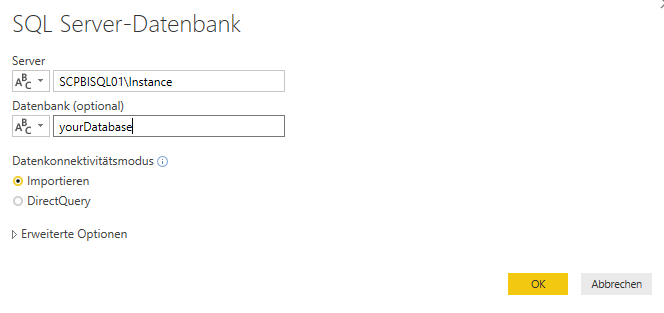
then does: SCPBISQL01\Instance
go into the Server Name field in PBI?
- Mark as New
- Bookmark
- Subscribe
- Mute
- Subscribe to RSS Feed
- Permalink
- Report Inappropriate Content
yes 😉
- Mark as New
- Bookmark
- Subscribe
- Mute
- Subscribe to RSS Feed
- Permalink
- Report Inappropriate Content
Schönen Dank
not sure I saw the instance info in any of the documentation I was researching on this before......
- Mark as New
- Bookmark
- Subscribe
- Mute
- Subscribe to RSS Feed
- Permalink
- Report Inappropriate Content
Ideally you should use the fully qualified domain name to avoid any issues downstream when you setup refreshing via one of the Gateways.
But you can always update that later. In the meantime you can use the netbios name of the machine.
- Mark as New
- Bookmark
- Subscribe
- Mute
- Subscribe to RSS Feed
- Permalink
- Report Inappropriate Content
thanks - though must admit I don't get it - but then it isn't my field so much.... with Netbios or 'fully qualified domain name' as the server name I guess that will include or define the path as far as Power BI is concerned.....
Helpful resources

FabCon & SQLCon – Barcelona 2026
Join us in Barcelona for FabCon and SQLCon, the Fabric, Power BI, SQL, and AI community event. Save €200 with code FABCMTY200.

Fabric Community Sticker Challenge - Barcelona 2026
If you love stickers, then you will definitely want to check out our community sticker challenge, Barcelona edition!

Power BI Monthly Update - July 2026
Check out the July 2026 Power BI update to learn about new features.

Power BI DataViz World Championships - June 2026
A new Power BI DataViz World Championship is coming this June! Don't miss out on submitting your entry.

| User | Count |
|---|---|
| 30 | |
| 23 | |
| 23 | |
| 23 | |
| 14 |


| User | Count |
|---|---|
| 48 | |
| 33 | |
| 20 | |
| 18 | |
| 16 |


