Join us at FabCon Atlanta from March 16 - 20, 2026, for the ultimate Fabric, Power BI, AI and SQL community-led event. Save $200 with code FABCOMM.
Register now!Vote for your favorite vizzies from the Power BI Dataviz World Championship submissions. Vote now!
hi
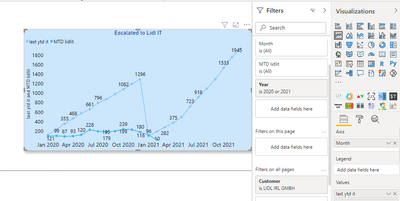
i was trying to compare last year nd current year calls
but im not getting the correct month count
i was using the below dax
Solved! Go to Solution.
@Anonymous , At least one measure seems correct. Make sure the Calendar table is marked as the Date table.
In case you do not need YTD only month data
MTD Sales = CALCULATE(SUM(Sales[Sales Amount]),DATESMTD('Date'[Date]))
last year MTD Sales = CALCULATE(SUM(Sales[Sales Amount]),DATESMTD(dateadd('Date'[Date],-12,MONTH)))
Hi @Anonymous ,
Please try this:
YTD =
CALCULATE (
COUNT ( 'Table'[Escalated to Lidl IT] ),
DATESYTD ( 'Table'[Date] )
)Last YTD = VAR DataMaxDate =
CALCULATE ( MAX ( 'Table'[Date] ), ALL ('Table' ) )
RETURN
CALCULATE (
[YTD],
SAMEPERIODLASTYEAR (
INTERSECT (
VALUES ( 'Table'[Date] ),
DATESBETWEEN ( 'Table'[Date], BLANK (), DataMaxDate )
)
)
)
Best Regards,
Eyelyn Qin
If this post helps, then please consider Accept it as the solution to help the other members find it more quickly.
@Anonymous , At least one measure seems correct. Make sure the Calendar table is marked as the Date table.
In case you do not need YTD only month data
MTD Sales = CALCULATE(SUM(Sales[Sales Amount]),DATESMTD('Date'[Date]))
last year MTD Sales = CALCULATE(SUM(Sales[Sales Amount]),DATESMTD(dateadd('Date'[Date],-12,MONTH)))
Vote for your favorite vizzies from the Power BI World Championship submissions!
If you love stickers, then you will definitely want to check out our Community Sticker Challenge!
Check out the January 2026 Power BI update to learn about new features.
| User | Count |
|---|---|
| 58 | |
| 53 | |
| 43 | |
| 17 | |
| 16 |
| User | Count |
|---|---|
| 123 | |
| 108 | |
| 44 | |
| 32 | |
| 24 |