Hi @byronkelly,
Can you share some more insight on what you are making?
- Are you using measures or values from a column?
- Are all the values from the same table?
- Do you have an X-axis that is common?
Based on your explanation I'm assuming that you are using information for X-Axis from the same table for line 1 and the other 2 lines are from another table or tables without a relationship to the 1st one.
If this is what is happening the result you are getting is the line 1 correct since it's related with the values on X-Axis, and the other two lines are calculated based on it's total number of data points (count or a sum) for the full table where they.
You are getting a constant since the line chart can't determine the context for line 2 and 3 so it return the full sum of those values.
To overcome this you need to have a relationship between the tables you are using in that way when you use a column on the X-Axis all of the value place in the chart will be related and summarized accordingly.
I know this is a little bit theorical but without any additional information is difficult to give you a better answer.
In attach is a PBIX file with 5 tables:
- 2 table with no relation and place on the same chart, as you can see you have 1 line that is a constant
- 2 tables related by a Dimension table (category) that is used for the 2nd chart and giving the correct values.
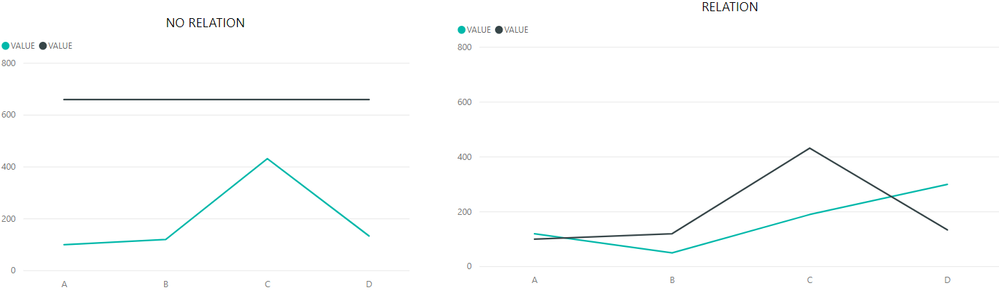
Believe this is your issue, but if not please tell me more specifications on your data model so I can help you.
Regards,
MFelix
Regards
Miguel Félix
Did I answer your question? Mark my post as a solution! Proud to be a Super User!
Check out my blog: Power BI em Português 


