cancel
Showing results for 
Search instead for 
Did you mean: 

The Power BI Data Visualization World Championships is back! Get ahead of the game and start preparing now! Learn more

Reply
Bokchoy
Helper II
Helper II

indexing trading days

Hi all,


I have a measure that helps me index trading days shown below

var calc = CALCULATE(COUNTROWS(vw_calendar_BI), FILTER(ALL('vw_calendar_BI'), vw_calendar_BI[SingleDate] <= SELECTEDVALUE(vw_calendar_BI[SingleDate]) && vw_calendar_BI[Is_trading_day] = SELECTEDVALUE(vw_calendar_BI[Is_trading_day])),vw_calendar_BI[FinancialYear] = "2021-2022")

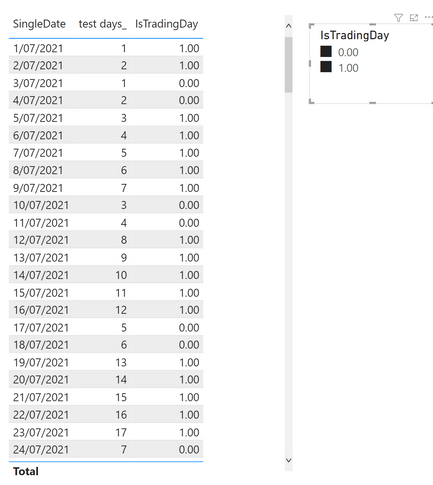
The measure works fine when a single slicer option is selected, but it doesn’t work as intended when both or no option is selected. (see below). Rather than combining the dates together and produce 1 index, it seems to simultaneously produce 2 separate index calculations.


Bokchoy_0-1639623613099.png

My desired solution is to have the measure produce the correct index value when a filter is applied, and if no filter is applied, produce the index value for the entire range ( in 1 sequence)


1 ACCEPTED SOLUTION
amitchandak
Super User
Super User

@Bokchoy , Try like


var calc = CALCULATE(COUNTROWS(vw_calendar_BI), FILTER(ALL('vw_calendar_BI'), vw_calendar_BI[SingleDate] <= SELECTEDVALUE(vw_calendar_BI[SingleDate]) && vw_calendar_BI[Is_trading_day] in allselected(vw_calendar_BI[Is_trading_day])),vw_calendar_BI[FinancialYear] = "2021-2022")

Share with Power BI Enthusiasts: Full Power BI Video (20 Hours) YouTube
Microsoft Fabric Series 60+ Videos YouTube
Microsoft Fabric Hindi End to End YouTube

View solution in original post

3 REPLIES 3
amitchandak
Super User
Super User

@Bokchoy , Try like


var calc = CALCULATE(COUNTROWS(vw_calendar_BI), FILTER(ALL('vw_calendar_BI'), vw_calendar_BI[SingleDate] <= SELECTEDVALUE(vw_calendar_BI[SingleDate]) && vw_calendar_BI[Is_trading_day] in allselected(vw_calendar_BI[Is_trading_day])),vw_calendar_BI[FinancialYear] = "2021-2022")

Share with Power BI Enthusiasts: Full Power BI Video (20 Hours) YouTube
Microsoft Fabric Series 60+ Videos YouTube
Microsoft Fabric Hindi End to End YouTube

hi @amitchandak ,


thanks for looking into my query, i was able to achieve what i want with the ISFILTERED() function in of my measure


Hi @amitchandak 
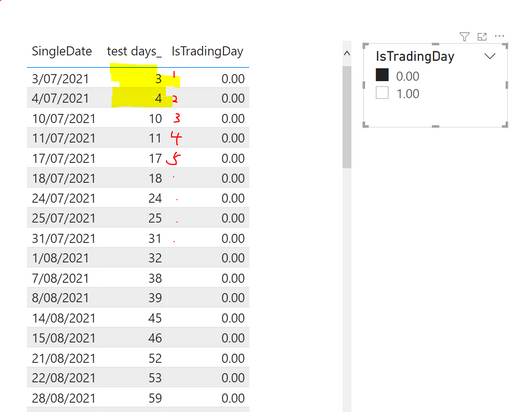
your measure did work when both options are selected but it no longer works when a single filter is applied.

Bokchoy_0-1639632235244.png


Helpful resources

Announcements
Power BI DataViz World Championships

Power BI Dataviz World Championships

The Power BI Data Visualization World Championships is back! Get ahead of the game and start preparing now!

November Power BI Update Carousel

Power BI Monthly Update - November 2025

Check out the November 2025 Power BI update to learn about new features.

FabCon Atlanta 2026 carousel

FabCon Atlanta 2026

Join us at FabCon Atlanta, March 16-20, for the ultimate Fabric, Power BI, AI and SQL community-led event. Save $200 with code FABCOMM.