cancel
Showing results for 
Search instead for 
Did you mean: 

The Power BI Data Visualization World Championships is back! Get ahead of the game and start preparing now! Learn more

Reply
AndrewPF
Helper V
Helper V

increase length of x-axis labels

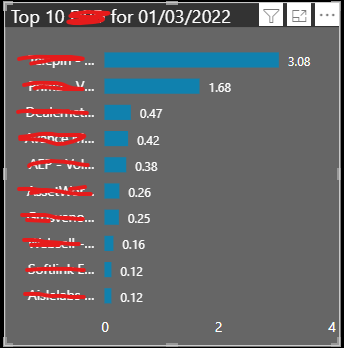
On the following chart: 

AndrewPF_1-1648200173903.png

the x-axis labels have been truncated. 

I need to increase the length so that I can see the whole word. 

Any ideas on how to do this? 

1 ACCEPTED SOLUTION
lkalawski
Super User
Super User

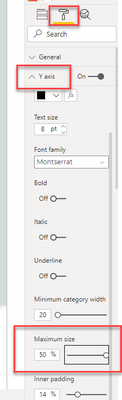
Hi  @AndrewPF , 

In the visual settings, go to the Y-axis and change Maximum size. It should help.

lkalawski_3-1648200405669.png

@AndrewPF

View solution in original post

4 REPLIES 4
ColinG
Frequent Visitor

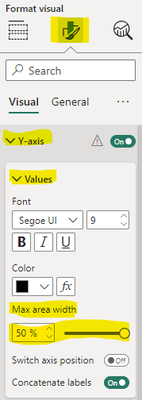
Does anyone know of a way to do this will current version of Power BI desktop? The screenshots above no longer apply.

It's here now: 

AndrewPF_0-1698136381731.png


lkalawski
Super User
Super User

Hi  @AndrewPF , 

In the visual settings, go to the Y-axis and change Maximum size. It should help.

lkalawski_3-1648200405669.png

@AndrewPF

I always wondered what that was for! Thank you. 

Helpful resources

Announcements
Power BI DataViz World Championships

Power BI Dataviz World Championships

The Power BI Data Visualization World Championships is back! Get ahead of the game and start preparing now!

December 2025 Power BI Update Carousel

Power BI Monthly Update - December 2025

Check out the December 2025 Power BI Holiday Recap!

FabCon Atlanta 2026 carousel

FabCon Atlanta 2026

Join us at FabCon Atlanta, March 16-20, for the ultimate Fabric, Power BI, AI and SQL community-led event. Save $200 with code FABCOMM.