Join us at FabCon Atlanta from March 16 - 20, 2026, for the ultimate Fabric, Power BI, AI and SQL community-led event. Save $200 with code FABCOMM.
Register now!The Power BI Data Visualization World Championships is back! Get ahead of the game and start preparing now! Learn more
Hi everybody!
I have the next issue.
I have 2 tables, LEAD table and SCORE table. each Lead can have more than one score. i have a measure on LEAD table which ranks the records depending on some page filters. This measure works well for the LEAD table.
Now, on another tile of the dashboard i have to add 5 different tiles that will have the scores of those leads who were ranked as 1st, 2nd, 3rd, etc. For achieving that i was traying to use as a "related column" the ranking measure of the LEADs table, but when i do this the end value is not dynamic or it counts all the ranks that are on the LEADs table.
Does anyone knows how to see the measure value of table 1 reflected on another measure in table 2?
Hi @amitchandak, Thanks for responding my request.
I prepare here some images to explain what I need.
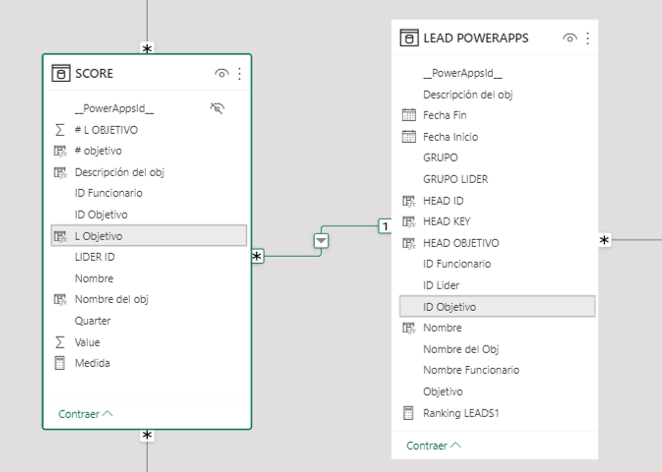
This is the relationship between the two tables (many to one).
I created a measure on the LEADs table:
Thanks for your help
@OCORZO_ABI , For them, to dynamic you need a measure
example
Sumx(Score, related(LEAD [Value]) *score[Value])
The information you have provided is not making the problem clear to me. Can you please explain with an example.
Can you share sample data and sample output in table format? Or a sample pbix after removing sensitive data.
Appreciate your Kudos.
The Power BI Data Visualization World Championships is back! Get ahead of the game and start preparing now!
Check out the November 2025 Power BI update to learn about new features.
| User | Count |
|---|---|
| 59 | |
| 43 | |
| 42 | |
| 23 | |
| 17 |
| User | Count |
|---|---|
| 190 | |
| 122 | |
| 96 | |
| 66 | |
| 47 |