Join us at FabCon Atlanta from March 16 - 20, 2026, for the ultimate Fabric, Power BI, AI and SQL community-led event. Save $200 with code FABCOMM.
Register now!Vote for your favorite vizzies from the Power BI Dataviz World Championship submissions. Vote now!
Hello,
I'm connecting to PBI trouth Tabular Model connect live. I have a field that displays a URL, but when I view in in PBI it doesn't function as a hyper link - meaning, it is not clickable.
How do I make it Clickable?
Thank you
Hello,
I'm connecting to PBI trouth Tabular Model connect live. I have a field that displays a URL, but when I view in in PBI it doesn't function as a hyper link - meaning, it is not clickable.
How do I make it Clickable?
Thank you
When open live connection to SSAS Tabular in Power BI Desktop, we can't do any modeling on source data fields (attributes, measures, etc), which means your URL fields will be resolved as text.
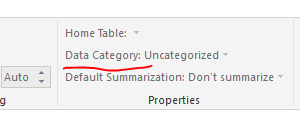
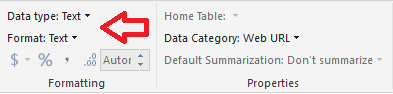
We are unable to transform the data category into "Web URL." It's even greyed out.
Regards,
Thank you @v-sihou-msft.
Is there a way to change the type of the field to URL in Tabular model (and not in PBI)?
Vote for your favorite vizzies from the Power BI World Championship submissions!
If you love stickers, then you will definitely want to check out our Community Sticker Challenge!
Check out the January 2026 Power BI update to learn about new features.
| User | Count |
|---|---|
| 64 | |
| 51 | |
| 46 | |
| 23 | |
| 19 |
| User | Count |
|---|---|
| 136 | |
| 110 | |
| 50 | |
| 32 | |
| 29 |