Join us at FabCon Atlanta from March 16 - 20, 2026, for the ultimate Fabric, Power BI, AI and SQL community-led event. Save $200 with code FABCOMM.
Register now!Get Fabric Certified for FREE during Fabric Data Days. Don't miss your chance! Request now
I am trying to emulate some steps done in PowerQuery...
I can reproduce most of them (specially the ones with the gear button, which shows the exact code), but the ones like 'filtering', in the properties it's blank...
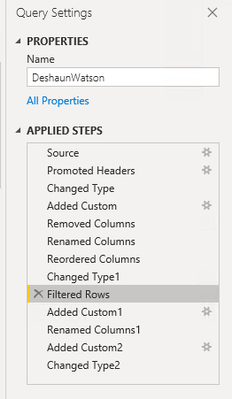
For example I am trying to reproduce the 'Filtered rows' from here:
But I do not know how to reproduce it since there is no specification
Solved! Go to Solution.
You can click on Advanced Editor, it shows all the steps and you can code based on it.
Also you can enable the formular bar... Click on View -> check the item Formula Bar.
You can click on Advanced Editor, it shows all the steps and you can code based on it.
Also you can enable the formular bar... Click on View -> check the item Formula Bar.
Check out the November 2025 Power BI update to learn about new features.
Advance your Data & AI career with 50 days of live learning, contests, hands-on challenges, study groups & certifications and more!