cancel
Showing results for 
Search instead for 
Did you mean: 

Get Fabric Certified for FREE during Fabric Data Days. Don't miss your chance! Request now

Reply
paw1
Helper I
Helper I

how to hide subtotals for particular measure

Hi,

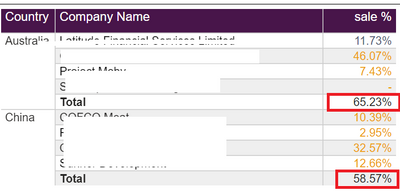
I have a pivot table with 5 measures. I have to hide subtotal values for only sale %. is there any way to convert sale % sub total value to 0 or completly hide the value.

Sale % = if(FORMAT(SUM(Input[Sales]),"#,##0.00%")="0.00%","-",
FORMAT(SUM(Input[Sales]),"##,###0.00%;(##,###0.00%); -"))

paw1_0-1680003409781.png

Thanks


1 ACCEPTED SOLUTION

You can use this pattern to do that.


Sale % No subtotals =
IF (
HASONEVALUE ( Table[Company Name] ) || NOT ( ISFILTERED ( Table[Country] ) ),
[Sale %]
)
 
Pat
Microsoft Employee

View solution in original post

3 REPLIES 3
ppm1
Solution Sage
Solution Sage

Yes. You can make a new measure like this that references your existing measure and use it instead.


Sale % No subtotals = IF (HASONEVALUE(Table[Company Name]), [Sale %])


Pat

Microsoft Employee

Hi @ppm1 Thanks for your help. It's working fine for subtotals but totals also showing blank along with sub totals. Is there any way to hide only subtotal and show total.

You can use this pattern to do that.


Sale % No subtotals =
IF (
HASONEVALUE ( Table[Company Name] ) || NOT ( ISFILTERED ( Table[Country] ) ),
[Sale %]
)
 
Pat
Microsoft Employee

Helpful resources

Announcements
November Power BI Update Carousel

Power BI Monthly Update - November 2025

Check out the November 2025 Power BI update to learn about new features.

Fabric Data Days Carousel

Fabric Data Days

Advance your Data & AI career with 50 days of live learning, contests, hands-on challenges, study groups & certifications and more!

FabCon Atlanta 2026 carousel

FabCon Atlanta 2026

Join us at FabCon Atlanta, March 16-20, for the ultimate Fabric, Power BI, AI and SQL community-led event. Save $200 with code FABCOMM.

Top Solution Authors
Top Kudoed Authors