cancel
Showing results for 
Search instead for 
Did you mean: 

Get Fabric Certified for FREE during Fabric Data Days. Don't miss your chance! Request now

Reply
summer18
Helper III
Helper III

how to get Average grand row total

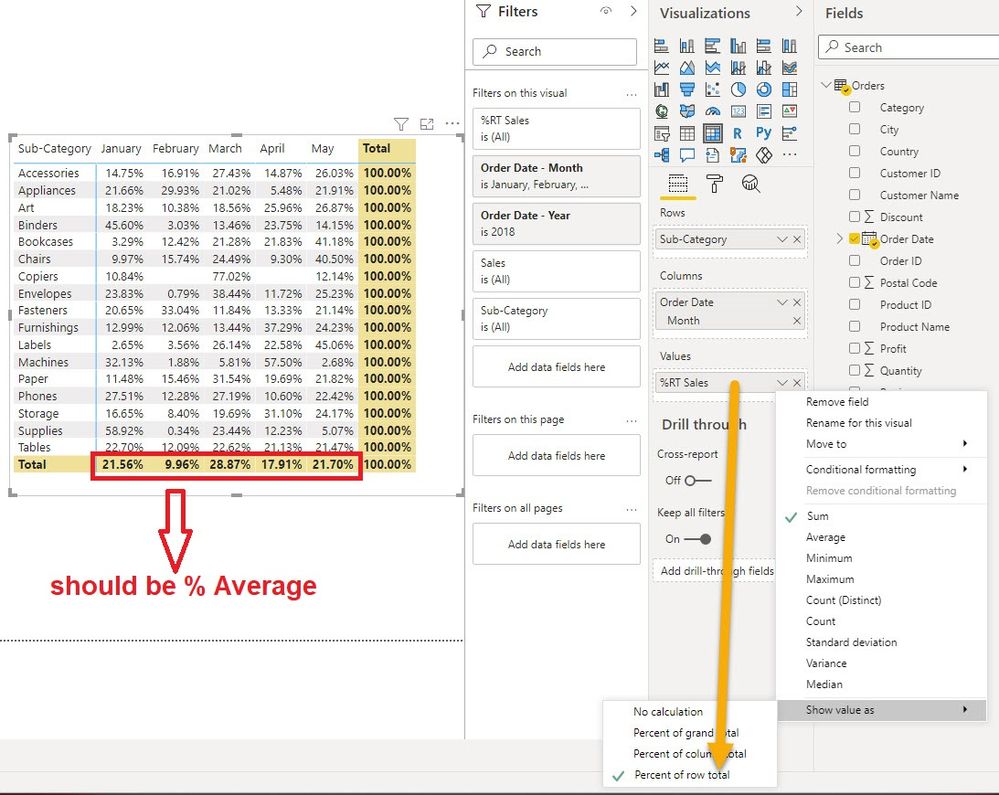
I have matrix chart which shows % of row total.  I just dragged "Sales" field in value and used "Percent of row total".  But I want my grand ROW total to display % Average instead of Sum.  What formula should I use?


% of row total.jpg


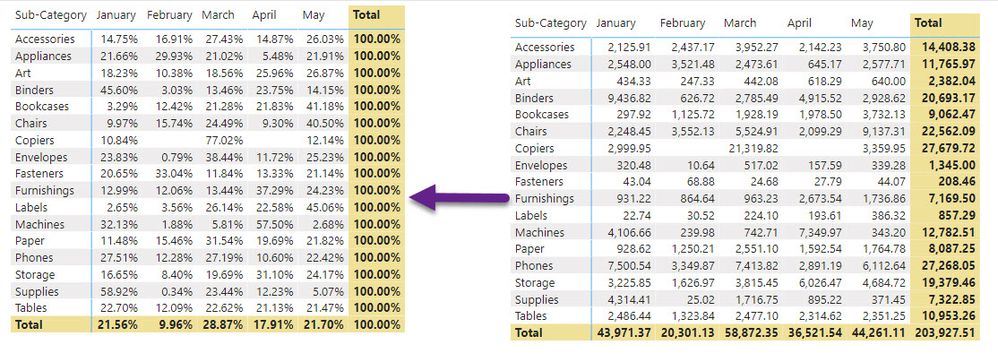
What formula can I use to get the % of row total and at the same time the grand row total will be average of % row total?  Attached below is the % and actual values.


img003.jpg

1 ACCEPTED SOLUTION
MFelix
Super User
Super User

Hi @summer18 ,


Try the following measure:

AverageValue =
VAR Percent_value =
    DIVIDE (
        SUM ( 'Table'[Value] ),
        CALCULATE (
            SUM ( 'Table'[Value] ),
            ALLEXCEPT ( 'Table', 'Table'[Sub-Category] )
        )
    )
RETURN
    IF (
        HASONEVALUE ( 'Table'[Sub-Category] ),
        Percent_value,
        AVERAGEX (
            SUMMARIZE (
                'Table',
                'Table'[Sub-Category],
                "Average_total",
                    VAR Percent_value_2 =
                        DIVIDE (
                            SUM ( 'Table'[Value] ),
                            CALCULATE (
                                SUM ( 'Table'[Value] ),
                                ALLEXCEPT ( 'Table', 'Table'[Sub-Category] )
                            )
                        )
                    RETURN
                        Percent_value_2
            ),
            [Average_total]
        )
    )

Regards

Miguel Félix


Did I answer your question? Mark my post as a solution!

Proud to be a Super User!

Check out my blog: Power BI em Português


View solution in original post

2 REPLIES 2
MFelix
Super User
Super User

Hi @summer18 ,


Try the following measure:

AverageValue =
VAR Percent_value =
    DIVIDE (
        SUM ( 'Table'[Value] ),
        CALCULATE (
            SUM ( 'Table'[Value] ),
            ALLEXCEPT ( 'Table', 'Table'[Sub-Category] )
        )
    )
RETURN
    IF (
        HASONEVALUE ( 'Table'[Sub-Category] ),
        Percent_value,
        AVERAGEX (
            SUMMARIZE (
                'Table',
                'Table'[Sub-Category],
                "Average_total",
                    VAR Percent_value_2 =
                        DIVIDE (
                            SUM ( 'Table'[Value] ),
                            CALCULATE (
                                SUM ( 'Table'[Value] ),
                                ALLEXCEPT ( 'Table', 'Table'[Sub-Category] )
                            )
                        )
                    RETURN
                        Percent_value_2
            ),
            [Average_total]
        )
    )

Regards

Miguel Félix


Did I answer your question? Mark my post as a solution!

Proud to be a Super User!

Check out my blog: Power BI em Português


Thank you very much @MFelix .  It works!

Helpful resources

Announcements
November Power BI Update Carousel

Power BI Monthly Update - November 2025

Check out the November 2025 Power BI update to learn about new features.

Fabric Data Days Carousel

Fabric Data Days

Advance your Data & AI career with 50 days of live learning, contests, hands-on challenges, study groups & certifications and more!

FabCon Atlanta 2026 carousel

FabCon Atlanta 2026

Join us at FabCon Atlanta, March 16-20, for the ultimate Fabric, Power BI, AI and SQL community-led event. Save $200 with code FABCOMM.

Top Solution Authors
Top Kudoed Authors