cancel
Showing results for 
Search instead for 
Did you mean: 

Get Fabric Certified for FREE during Fabric Data Days. Don't miss your chance! Request now

Reply
Anonymous
Not applicable

how to do a calculation with parent and child hirerachy

better i move directly to an example to be clear with my query. here Result  is a measure column which i have created which is nothing but division of (Arrear/Target) column

Input table to Power Bi:

Zone     District      School        Subject       Arrear    Target      Result

1                A            Noon        Science             20           10               2

1                A            Noon        Commerce        30             5               6

1                A            Noon         Arts                  20             4               5

1                B           Evening      Maths                40            5               8

1                B           Evening      PhysicsA            20            4               5   

1                B            Noon          Chem A            30            3              10

1                B            Noon          BIO A                40            8               5

1                B            Evening       Social               30           10               3

2                C            Evening      Moral                20            4                5   

2                C           Noon          GK                     30            3               10

2                C           Noon          EVS                    40             8                5

2                D           Evening      History               30            10               3

2                D            Evening      Geo                    30            10              3


Now my output should be like if I want to cumalate on Zone, District and School.  It Should Be  LIke When I have only Zone

Zone   Arrear    Target        Result

1           230         49             2.58

2           150         26             5.76


If I want District wise

Zone  District    Arrear  Target   result
1            A            70        19         3.68

1            B            160       30        5,33

2            c              90        11        6.36

2            D             60        20         3


So In short If I select Zone, Then I should get a cumalative of Arrear and Target column for each zone and  their divison
and if I select District, I should get a cumalative of Arrear and Target column for each district in each zone and then their divison.

So please let me know If any thing is not clear from my end and I can elaborate more and how should I acheive it.

Thanks!!!


2 ACCEPTED SOLUTIONS
v-qiuyu-msft
Community Support
Community Support

Hi @Anonymous,


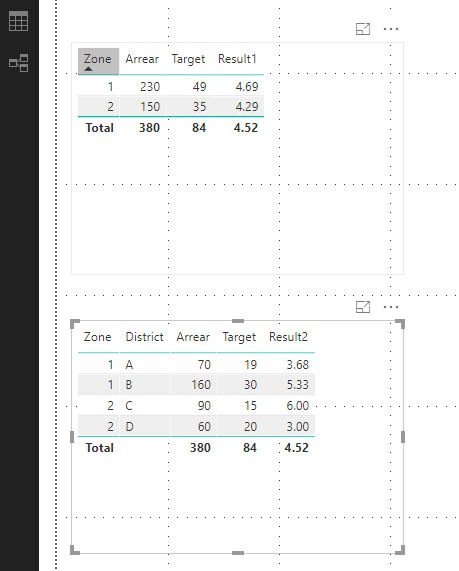
You can create two measures: 


Result1 = DIVIDE(CALCULATE(SUM(Table1[Arrear]),ALLEXCEPT(Table1,'Table1'[Zone])),CALCULATE(SUM(Table1[Target]),ALLEXCEPT(Table1,Table1[Zone])))


Result2 = DIVIDE(CALCULATE(SUM(Table1[Arrear]),ALLEXCEPT(Table1,'Table1'[Zone],Table1[District])),CALCULATE(SUM(Table1[Target]),ALLEXCEPT(Table1,Table1[Zone],Table1[District])))


q2.PNG


You can see attached pbix file. 


Best Regards,
Qiuyun Yu 

Community Support Team _ Qiuyun Yu
If this post helps, then please consider Accept it as the solution to help the other members find it more quickly.

View solution in original post

Ashish_Mathur
Super User
Super User

Hi,


Try this.  Delete the Result column from your source data.  Write the following measures:


Total arrears=SUM(Data[Arrear])

Total target=SUM(Data[Target])

Result=[Total arrears]/[Total target]


Create a simple Table visual and drag any/all of Zone/District/School.


Hope this helps.


Regards,
Ashish Mathur
http://www.ashishmathur.com
https://www.linkedin.com/in/excelenthusiasts/

View solution in original post

2 REPLIES 2
Ashish_Mathur
Super User
Super User

Hi,


Try this.  Delete the Result column from your source data.  Write the following measures:


Total arrears=SUM(Data[Arrear])

Total target=SUM(Data[Target])

Result=[Total arrears]/[Total target]


Create a simple Table visual and drag any/all of Zone/District/School.


Hope this helps.


Regards,
Ashish Mathur
http://www.ashishmathur.com
https://www.linkedin.com/in/excelenthusiasts/
v-qiuyu-msft
Community Support
Community Support

Hi @Anonymous,


You can create two measures: 


Result1 = DIVIDE(CALCULATE(SUM(Table1[Arrear]),ALLEXCEPT(Table1,'Table1'[Zone])),CALCULATE(SUM(Table1[Target]),ALLEXCEPT(Table1,Table1[Zone])))


Result2 = DIVIDE(CALCULATE(SUM(Table1[Arrear]),ALLEXCEPT(Table1,'Table1'[Zone],Table1[District])),CALCULATE(SUM(Table1[Target]),ALLEXCEPT(Table1,Table1[Zone],Table1[District])))


q2.PNG


You can see attached pbix file. 


Best Regards,
Qiuyun Yu 

Community Support Team _ Qiuyun Yu
If this post helps, then please consider Accept it as the solution to help the other members find it more quickly.

Helpful resources

Announcements
November Power BI Update Carousel

Power BI Monthly Update - November 2025

Check out the November 2025 Power BI update to learn about new features.

Fabric Data Days Carousel

Fabric Data Days

Advance your Data & AI career with 50 days of live learning, contests, hands-on challenges, study groups & certifications and more!

FabCon Atlanta 2026 carousel

FabCon Atlanta 2026

Join us at FabCon Atlanta, March 16-20, for the ultimate Fabric, Power BI, AI and SQL community-led event. Save $200 with code FABCOMM.

Top Solution Authors
Top Kudoed Authors