

cancel
Showing results for 
Search instead for 
Did you mean: 

The Power BI Data Visualization World Championships is back! Get ahead of the game and start preparing now! Learn more

Reply
Anonymous
Not applicable

how to display in a Matrix measure name in Y axis and results on X asis

Hello, I would like to display a set of measures that I have already calculate in a matrix in the following way:

     image.png

The problem is that I haven't got a column with the measure names so I don't have any field and if I add many measures, I display the information in the following way:


image.png


Any idea? Thanks in advance

1 ACCEPTED SOLUTION

Actually, there is a simple solution.

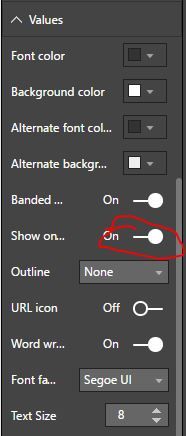
Under Format tab, choose Values and select On for Show on rows. And that's it.

Capture3.JPG 

View solution in original post

3 REPLIES 3
Greg_Deckler
Community Champion
Community Champion

Generally, the solution to something like this is to use the disconnected table trick:


https://community.powerbi.com/t5/Community-Blog/Solving-Attendance-with-the-Disconnected-Table-Trick...


Follow on LinkedIn
@ me in replies or I'll lose your thread!!!
Instead of a Kudo, please vote for this idea
Become an expert!: Enterprise DNA
External Tools: MSHGQM
YouTube Channel!: Microsoft Hates Greg
Latest book!:
DAX For Humans

DAX is easy, CALCULATE makes DAX hard...

Actually, there is a simple solution.

Under Format tab, choose Values and select On for Show on rows. And that's it.

Capture3.JPG 

Thank you so much. This is so simple and effective

Helpful resources

Announcements
November Power BI Update Carousel

Power BI Monthly Update - November 2025

Check out the November 2025 Power BI update to learn about new features.

Fabric Data Days Carousel

Fabric Data Days

Advance your Data & AI career with 50 days of live learning, contests, hands-on challenges, study groups & certifications and more!

FabCon Atlanta 2026 carousel

FabCon Atlanta 2026

Join us at FabCon Atlanta, March 16-20, for the ultimate Fabric, Power BI, AI and SQL community-led event. Save $200 with code FABCOMM.

Top Solution Authors
Top Kudoed Authors