Join us at FabCon Atlanta from March 16 - 20, 2026, for the ultimate Fabric, Power BI, AI and SQL community-led event. Save $200 with code FABCOMM.
Register now!The Power BI Data Visualization World Championships is back! Get ahead of the game and start preparing now! Learn more
Hi - Please can someone help me. I want to create a clustered table showing the Top 6 Root cause from my file, group based on date selected per month and also i wanted to see which root cause has the highest dollar paid as well. Please see attached graph i wanted to re-create in power bi. I have Root cause field, Audit date field which containes mm/dd/yy, dollar paid amount field.
Solved! Go to Solution.
Hi @joegie ,
Create a measure as below:
Measure =
VAR _rank=RANKX(FILTER(ALLSELECTED('Table'),'Table'[Month]=MAX('Table'[Month])),CALCULATE(SUM('Table'[dollar paid])),,DESC,Skip)
Return
IF(_rank<=5,MAX('Table'[dollar paid]),BLANK())
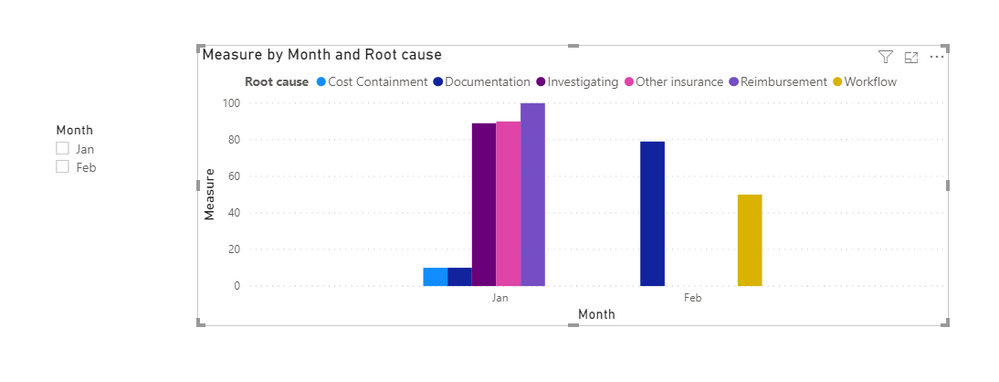
And you will see:
For the related .pbix file,pls see attached.
Best Regards,
Kelly
Did I answer your question? Mark my post as a solution!
Hi @joegie ,
Create a measure as below:
Measure =
VAR _rank=RANKX(FILTER(ALLSELECTED('Table'),'Table'[Month]=MAX('Table'[Month])),CALCULATE(SUM('Table'[dollar paid])),,DESC,Skip)
Return
IF(_rank<=5,MAX('Table'[dollar paid]),BLANK())
And you will see:
For the related .pbix file,pls see attached.
Best Regards,
Kelly
Did I answer your question? Mark my post as a solution!
Hi,
Share some data to work with. Also on the data that you share, show the expected result in a Table format. Thereafter we can always show any visual that you want.
Hi - here is the sample table I'm working with. I don' t know how to inser the excel file so adding here as body of the message:
| Root cause | audit date | dollar paid |
Reimbursement | 1/1/2020 | 100 |
| Duplicate payment | 1/1/2020 | 0 |
| Other insurance | 1/1/2020 | 90 |
| Cost Containment | 1/2/2020 | 10 |
| Investigating | 1/2/2020 | 89 |
| Documentation | 1/2/2020 | 10 |
| Documentation | 2/2/2020 | 20 |
| Workflow | 2/2/2020 | 50 |
| Documentation | 2/2/2020 | 79 |
Hi,
I still cannot relate your source data with your expected result. Share a slightly larger dataset and on that dataset show your expected result in a Table format. You may upload your file to Google Drive or a similar hosting service and share a download link here.
Check out the November 2025 Power BI update to learn about new features.
Advance your Data & AI career with 50 days of live learning, contests, hands-on challenges, study groups & certifications and more!