Join us at FabCon Atlanta from March 16 - 20, 2026, for the ultimate Fabric, Power BI, AI and SQL community-led event. Save $200 with code FABCOMM.
Register now!The Power BI Data Visualization World Championships is back! It's time to submit your entry. Live now!
Hello ,
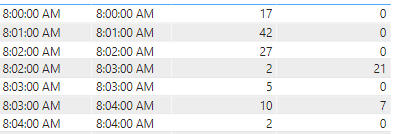
I would like to group my table like that :
8:00:00 -> 17
8:01:00 ->42
8:02:00 -> 29(27+2)
8:03:00 -> 36 (21+5+10)
8:04:00 -> 9 ( 7 + 2)
I tested different way but no succes ..
Hi,
is there any reason the data needs to stay in this format, could you not split it into 2 tables in power query and append them together so that the time is in one column and count in another. Then use a simple calculate(sum?
If I answered your question, please mark my post as solution, Appreciate your Kudos 👍
Hi @dfs29
Please paste sample data in chat box
Thanks
Pijush
Proud to be a Super User! | |
| User | Count |
|---|---|
| 56 | |
| 41 | |
| 38 | |
| 21 | |
| 21 |
| User | Count |
|---|---|
| 140 | |
| 102 | |
| 64 | |
| 36 | |
| 35 |