Don't miss your chance to take the Fabric Data Engineer (DP-600) exam for FREE! Find out how by watching the DP-600 session on-demand now through April 28th.
Learn moreJoin the FabCon + SQLCon recap series. Up next: Power BI, Real-Time Intelligence, IQ and AI, and Data Factory take center stage. All sessions are available on-demand after the live show. Register now
What I am expecting:
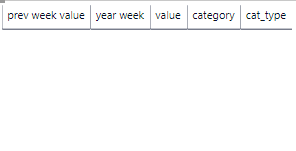
| prev week value | yearweek | value | category | cat_type |
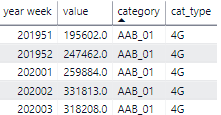
| 30 | 202001 | 10 | a | 4g |
| 10 | 202002 | 20 | a | 4g |
| 40 | 201952 | 30 | a | 4g |
| ... | 201951 | 40 | a | 4g |
I get a blank table (I have no filters or agregation on) and if I'm taking the measure out of the table they start to pop up.
I think this one doesn't work because the "cat_type" and "category" will change, and if I want to show it for certain category types for example will give me the wrong value. I managed to do it with a column:
lastweekvalue = CALCULATE(SUM('table'[value]),FILTER('table',EARLIER('table'[category])='table'[category] && EARLIER('table'[KPI_type])='table'[KPI_type] && EARLIER('node'[cat_type])='table'[cat_type] && EARLIER('table'[year week])='table'[year week]+if(MOD('table'[year week],100)=52,49,1)))But I would still like to know if this is possible with a measure
Hi @VladMatao ,
Can you show me your .pbix file if there's no confidential information inside?
Hi @VladMatao ,
You have to modify your measure as below:
Measure =
VAR previousweek =
IF (
MOD ( SELECTEDVALUE ( 'table'[yearweek] ), 100 ) = 1,
SELECTEDVALUE ( 'Table'[yearweek] ) - 49,
SELECTEDVALUE ( 'Table'[yearweek] ) - 1
)
VAR prevweekvalue =
CALCULATE (
SUM ( 'table'[value] ),
FILTER ( ALL ( 'Table' ), 'table'[yearweek] = previousweek )
)
RETURN
prevweekvalue
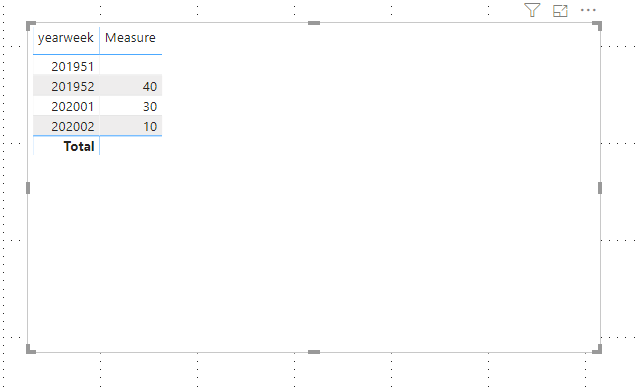
Finally you will see:
For the related .pbix file,pls click here.
You have to use all
var prev week value =
CALCULATE(
SUM('table'[value]),
FILTER(all('table'),'table'[yearweek]=previousweek)
)
return prev week value
It is better to take week to a different table or preferably to date table. Create a rank.
Week rank = Rank(Week,Week[yearweek],,asc,dense)
var prev week value =
Var previousweekRank= maxx(Week,Week[Rank])-1
CALCULATE(
SUM('table'[value]),
FILTER(all('Week'),'Week'[Rank]=previousweekRank)
)
return prev week value
Appreciate your Kudos. In case, this is the solution you are looking for, mark it as the Solution.
In case it does not help, please provide additional information and mark me with @
Thanks. My Recent Blogs -Decoding Direct Query - Time Intelligence, Winner Coloring on MAP, HR Analytics, Power BI Working with Non-Standard TimeAnd Comparing Data Across Date Ranges
Proud to be a Datanaut Connect on Linkedin
Check out the April 2026 Power BI update to learn about new features.
If you have recently started exploring Fabric, we'd love to hear how it's going. Your feedback can help with product improvements.
A new Power BI DataViz World Championship is coming this June! Don't miss out on submitting your entry.
| User | Count |
|---|---|
| 43 | |
| 35 | |
| 35 | |
| 21 | |
| 15 |
| User | Count |
|---|---|
| 63 | |
| 58 | |
| 28 | |
| 27 | |
| 25 |